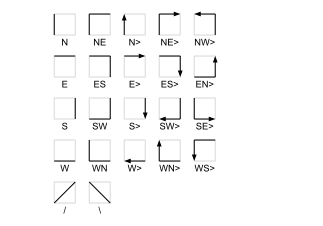
The ArrowElement draws a horizontal and/or a vertical line and optionally an arrowhead. The line's color is selectable, also may follow a parameter value. Strictly spoken the ArrowElement is a rectangle with only one or two sides drawn. The parameter arrowCode defines which sides of the rectangle shall be drawn and if an arrow shall be placed at the end of the line. The figure below shows all arrow codes defined:
Data Model (extends ScreenElement)
| Key | Type | Value |
|---|---|---|
| type | String | Always "ArrowElement". |
| xpos | Number | see ScreenElement |
| ypos | Number | see ScreenElement |
| width | Number | see ScreenElement |
| height | Number | see ScreenElement |
| id | String | The message ID this element listens to. Is only relevant if variableLineColor reads true. |
| arrowCode | String | A 1..3 character code defining the line/arrow outline. See the figure above which arrow codes are possible. |
| color | String | The color used for the line / arrow. |
| variableLineColor | Boolean | true = set the line color from the value received from the parameter addressed by id. |
| useColorTranslation | Boolean | use the colors[] translation |
| colors | Array | of ColorDefinition objects. Defines how to translate values of the id parameter to color values if useColorTranslation reads true. |
Variable Line Color
With variableLineColor=true the ArrowElement will change its line color depending on the value of the parameter addressed by id. This way the line can be used as a status indicator, e.g. in a block diagram signalling "the signal goes actually this way". The way the ArrowElement interprets the parameter value depends on the value of useColorTranslation.
If useColorTranslation=false, the ArrowElement tries to decode the line color directly from the parameter value. First it does the following tests on the parameter value (not case sensitive):
| Parameter Value | Line Color And Thickness |
|---|---|
| ends with BOLD | The line is drawn thicker than normal |
| starts with BLACK | The line is drawn with this color |
| starts with WHITE | The line is drawn with this color |
| starts with RED | The line is drawn with this color |
| starts with BLUE | The line is drawn with this color |
| starts with GREEN | The line is drawn with this color |
| starts with YELLOW | The line is drawn with this color |
| starts with GRAY | The line is drawn with this color |
| contains TRUE | If the message ID identifies the parameter as an alarm flag (the ID contains 'fault'), the line is drawn RED-BOLD, for other parameters it is drawn GREEN-BOLD |
| contains FAULT | The line is drawn RED-BOLD |
| starts with ON | The line is drawn GREEN-BOLD |
If none of the above conditions apply, the ArrowElement tries to interpret the parameter value as a hex coded color (#RRGGBB). If this also fails, the standard line color defined in color is used.
If useColorTranslation=true, the ArrowElement uses the ColorDefinition table in colors[] to decode the line's color and thickness.