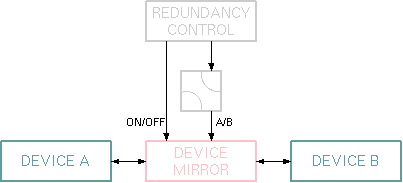
The Device-Mirror logical device ties two 1:1 redundant devices together. Any time a setting is changed at the primary device, the Device-Mirror copies this setting to the spare device. Both devices must be of the same type. The Device-Mirror itself provides no redundancy control or switching, it is intended to be used as an extension of an existing redundancy switching unit.
The Device-Mirror works symmetrically, there is no fixed definition of a primary and a spare device. To determine it's working direction, the Device-Mirror monitors a switch position. This switch position may be an arbitrary M&C parameter, hence a hardware switch may be monitored as well as the output state of a software based redundancy control. Accordingly, the redundancy controller may be both, a sat-nms logical device or an external hardware unit.
Mirroring the device settings usually only is desired while the redundancy / protection switch is activated. The Device-Mirror monitors a second parameter, which enables mirroring. This usually is the ON/OFF setting of the redundancy controller. While the Device-Mirror is disabled by this parameter, no mirroring of settings takes place. However, the Device-Mirror monitors all settings of both devices and remembers them in an internal memory. Once the redundancy switch is enabled, the Device-Mirror controls the spare device to match the settings read from the active one.
The Device-Mirror controls most of the operative parameters of the spare device. The list of parameters which are mirrored is the same set which is stored into device presets of this device type. Configuration parameters usually are excluded as well as "event trigger" parameters.
Device window pages
The following table shows which device window pages are available with this individual device type. Tool-bar functions not mentioned here are described at the general description of device windows .
 --- The device info page.
 --- The maintenance page. The configuration parameters from this page are described below.
Configuration parameters
At the maintenance page of the device window there are a couple of configuration parameter which must be set to interconnect the Device-Mirror device with the devices it shall mirror.
| parameter | description |
|---|---|
| enableId | Enter the message identifier here of the parameter the Device-Mirror shall monitor in order to enable / disable the mirroring function. (e.g. "PROTECT.enable") |
| enableVal | This is the message contents, the Device-Mirror expects to enable the mirroring. (e.g. "ON") |
| directionId | Enter the message identifier here of the switch position which determines the direction of the mirroring function. (e.g. "S2.position") |
| direction1To2Val | This is the message contents, the Device-Mirror expects to mirror from device 1 to device 2. (e.g. "A") |
| device1Name | The name of device 1 to mirror. |
| device2Name | The name of device 2 to mirror. |
Variables defined by this device driver
| name | type | flags | range |
|---|---|---|---|
| info.driver | TEXT | R/O | StringRange R/O |
| info.type | TEXT | R/O | StringRange R/O |
| info.frame | TEXT | R/O | StringRange R/O |
| config.enableId | TEXT | SAVE SETUP | StringRange |
| config.enableVal | TEXT | SAVE SETUP | StringRange |
| config.directionId | TEXT | SAVE SETUP | StringRange |
| config.direction1To2Val | TEXT | SAVE SETUP | StringRange |
| config.device1Name | TEXT | SAVE SETUP | StringRange |
| config.device2Name | TEXT | SAVE SETUP | StringRange |