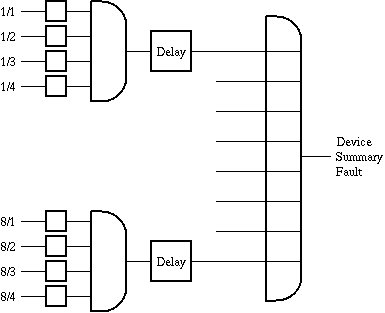
The Fault-Array logical device combines fault messages or other state parameters of arbitrary devices in a flexible way to one common fault state. Comparable to a programmable gate array, it combines the input information on a user configurable basis.
The Fault-Array contains so called elements in 8 rows and 4 columns. Each element can be configured via parameter messages to listen to a certain parameter value. The element owns a FAULT state, which becomes true if the parameter value matches a target value. This fault state is generated by comparing the parameter value to a user defined target. Thus the Fault-Array is capable to process arbitrary parameters like switch positions or "TX-ON" settings beside the fault state of other devices.
The fault states of the elements in one row are ANDed together (i.e. the row summary fault becomes true if all elements are faulty at a time). The row summary fault is passed though some sort of "glitch filter" which suppresses faults shorter than a certain time. All filtered row fault states are ORed to the device summary fault flag.
Device window pages
The following table shows which device window pages are available with this individual device type. Tool-bar functions not mentioned here are described at the general description of device windows .
 ...
...  --- The device window provides eight pages, each containing the parameters of one table row. The meaning of each particular parameter is explained below.
 --- The device info page.
 --- The maintenance page.
Setting up a Fault-Array logical device
The most common use of a Fault-Array logical device will be to combine several fault flags to the switch condition of a redundancy switch or a site diversity switch.
The first eight pages of the device window show the parameters of one row (AND gate) of the Fault-Array. The table below explains these parameters:
| parameter | description |
|---|---|
| message id | You specify the source of data you want to route to the gate input with this field. A message identifier is made of the name of the device followed by a dot and the name of the parameter which shall be fed into this input. The fault flag "faults.05" of the device "REC-1" e.g. uses the message id "REC-1.faults.05". A complete list of parameter names for all device types is found later in this document. Leave this field empty if the input shall not be connected. |
| actual value | This read only field shows the actual value of the parameter connected to this gate input. |
| target value | The actual parameter value gets compared to this target value in order to set the gate input. Be aware that this is a textual comparison, FLOAT parameters may fail to match the target value due to rounding errors. |
| comparison | If "==" is selected here, the gate input becomes true ("FAULT") if the parameter value matches the target. The selection of "!=" reverses this. |
| momentary | This read only field shows the momentary output state of the row/gate before it gets processed by the delay. |
| delay | A delay time may specified here to filter out short-time events which must not appear in the overall output state. The momentary output of the gate must be in "FAULT" state for at least this delay time before the device summary fault is raised. |
| filtered | This read only field shows the filtered output state of the row/gate after it has been processed by the delay. |
Remarks
The filter/delay function is implemented by the background polling procedure which is called on a regular basis for all logical devices. With the factory preset settings, this procedure runs once a second. The resolution of the delay time is limited to this value.
If your application needs a finer resolution, you may configure the polling procedures of all logical device to be called more frequently. This is done by configuring the IDLE parameter of the PORT null in the vlc.setup file. Be aware, that the workload of the M&C computer may rise dramatically if you set this parameter to very small values.
As of version 1.01 (2014-04-08), the device sets an alarm flag faults.01 in parallel to the device summary fault. The faults.01 flag duplicates the the summary fault, neither the priority nor the delay time of this flag may be configured by the operator.
Variables defined by this device driver
| name | type | flags | range |
|---|---|---|---|
| info.driver | TEXT | R/O | StringRange R/O |
| info.type | TEXT | R/O | StringRange R/O |
| info.frame | TEXT | R/O | StringRange R/O |
| faults.01 | ALARM | R/O | AlarmFlagRange R/O (Overall output) |