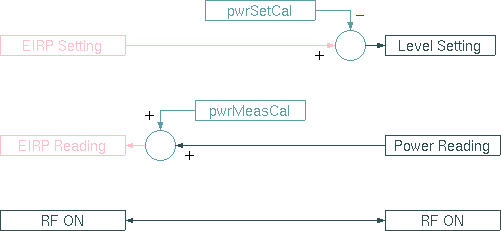
The Level-Set logical device provides a simple mechanism to set (and monitor) transmit power values in EIRP. It is intended to be used with small VSAT stations using a SSPA at a fixed frequency. The Level-Set device uses fixed calibrations offsets or optionally calibration tables.
The diagram above illustrates the function of the Level-Set device. The device provides two calibrations offsets. One is used to translate an EIRP setting into a gain / output power setting to be applied at a device. The other offset translates a power reading into an EIRP value which is reported to the user. The RF-ON switch simply is routed through the device.
Device window pages
The following table shows which device window pages are available with this individual device type. Tool-bar functions not mentioned here are described at the general description of device windows .
 --- This page shows the operational parameters.
 --- The device info page.
 --- The maintenance page. The configuration parameters described below are set at this page.
Configuration parameters
At the maintenance page of the device window there are a couple of configuration parameters which must be set to interconnect the Level-Set device to the devices it monitors and controls.
| parameter | description |
|---|---|
| rfOnId | The message ID controlling the RF ON state, e.g. KSTAR.tx.on |
| pwrSetId | The message ID for the drive setting. |
| pwrMeasId | The message ID for the output power reading. |
| pwrSetCal | The calibration offset to be applied at the drive setting. The offset is defined in a way that the drive setting is calculated as: |
| drive-setting = EIRP(dBW) - pwrSetCal . | |
| The Level-Set device optionally may use calibration tables (see below), the pwrSetCal value then gets recalculated with each change of the transmit frequency or the signal path. | |
| pwrMeasCal | The calibration offset to be applied at the power reading. The offset is defined that the displayed EIRP is calculated as: |
| EIRP(dBW) = power-reading + pwrMeasCal . | |
| The Level-Set device optionally may use calibration tables (see below), the pwrSetCal value then gets recalculated with each change of the transmit frequency or the signal path. | |
| txFrequencyId | The message ID of the transmit frequency, usually the upconverter tx.frequency setting. The Level-Set device listens to this parameter to perform the amplifier output power vs. EIRP calculations based on the actual frequency. |
| txSwitch1Id | The message ID of the first of two switches in the transmit signal path which affect the EIRP calibration. Usually here the ID of the polarization switch is entered. |
| txSwitch2Id | The message ID of a second switch in the transmit signal path. |
| fileName | The base name of the files containing the calibration tables (see below). The name is without suffix. |
| maxDisplay | The EIRP value to be displayed at the right edge of a GaugeElement which uses the 'gauge' status variable provided by this device. Set maxDisplay and minDisplay both to 0.0 in order to set the gauge's display range to the complete valid range of the eirp setting. |
| minDisplay | The EIRP value to be displayed at the left edge of a GaugeElement which uses the 'gauge' status variable provided by this device. Set maxDisplay and minDisplay both to 0.0 in order to set the gauge's display range to the complete valid range of the eirp setting. |
EIRP Calibration Tables
The Level-Set device may use fixed calibration values to convert the measures amplifier power to EIRP and to convert the desired EIRP to a gain or output power setting of an arbitrary device. For applications which require a more precise power setting/display, the Level-Set device alternatively may use calibration tables. With these tables, the calibration offsets are calculated frequency dependent for up to four signal paths.
The calibration tables are plain text files, called "XXXX.eirpCal" and "XXXX.driveCal" where XXXX is the 'fileName' configuration setting. The files must reside in the M&C software's home directory. If the files exist and the Level-Set device receives a valid frequency setting, the calibration values calculated from the tables replace the pwrSetCal and pwrMeasCal values in the configuration setup.
Below an example for such a file is shown:
    #
    # /home/mnc/EIRP-1.eirpCal
    #
    #           TRANSMIT 1    TRANSMIT-2
    #           X      Y      X      Y
       14000.0  20.2   20.2   20.2   20.2
       14100.0  20.27  20.27  20.27  20.27
       14200.0  20.31  20.31  20.31  20.31
       14300.0  20.44  20.44  20.44  20.44
       14400.0  20.5   20.5   20.5   20.5
       14500.0  20.5   20.5   20.5   20.5
The file is formatted as a table of 5 columns and an arbitrary number of lines. Empty lines and lines starting with a "#" are ignored. Columns are separated by spaces.
| column | description |
|---|---|
| 1 | The frequency value in MHz. The frequency values must be sorted in the order low values first. |
| 2 | The calibration value for the signal path indicated by SWITCH1=A (OFF), SWITCH2=A (OFF). |
| 3 | The calibration value for the signal path indicated by SWITCH1=B (ON), SWITCH2=A(OFF). |
| 4 | The calibration value for the signal path indicated by SWITCH1=A (OFF), SWITCH2=B (ON). |
| 5 | The calibration value for the signal path indicated by SWITCH1=B (ON), SWITCH2=B (ON). |
The calibration values in the '*.eirpCal' table are defined the same way as the pwrMeasCal setup value, the values in the '*.driveCal' table are defined the same way as the pwrSetCal value.
Dynamic Change Of Calibration Settings
If the transmit frequency or the signal path changes, the Level-Set device keeps the drive setting constant and adjusts the diyplayed EIRP value according to the changed calibarion offsets.
The device provides a variable called 'adjustDrive'. If an arbitrary value gets written to this variable, the device adjusts the drive setting in order to meet the previously set EIRP value.
Limit Checking
At the primary device page, two pairs of min / max threshold values may be defined. These values apply to the measured EIRP, they are checked while the Level-Set device is set RF-ON. If the measured EIRP exceeds the limit values a fault is generated. The fault gets cleared if the EIRP value returns inside the limit window of id the EIRP is switched off. If the Level-Set device shall not do any limit checking, set both threshold values to 0.0.
The minEirp/maxEirp settings are included into the 'gauge' parameter which controls the appearance of a Gauge screen element which follows this parameter. There is a second parameter of the same format called 'gauge2' which includes the minEirp2/maxEirp2 limits instead.
Variables defined by this device driver
| name | type | flags | range |
|---|---|---|---|
| info.driver | TEXT | R/O | StringRange R/O |
| info.type | TEXT | R/O | StringRange R/O |
| info.frame | TEXT | R/O | StringRange R/O |
| info.state | TEXT | R/O | StringRange R/O |
| config.rfOnId | TEXT | SAVE SETUP | StringRange |
| config.pwrSetId | TEXT | SAVE SETUP | StringRange |
| config.pwrMeasId | TEXT | SAVE SETUP | StringRange |
| config.txFrequencyId | TEXT | SAVE SETUP | StringRange |
| config.txSwitch1Id | TEXT | SAVE SETUP | StringRange |
| config.txSwitch2Id | TEXT | SAVE SETUP | StringRange |
| config.pwrSetCal | FLOAT | SAVE SETUP | DoubleRange (0.00 .. 0.00) |
| config.pwrMeasCal | FLOAT | SAVE SETUP | DoubleRange (0.00 .. 0.00) |
| config.fileName | TEXT | SAVE SETUP | StringRange |
| config.maxDisplay | FLOAT | SAVE SETUP | DoubleRange (0.00 .. 0.00) |
| config.minDisplay | FLOAT | SAVE SETUP | DoubleRange (0.00 .. 0.00) |
| eirp | FLOAT | DoubleRange (0.00 .. 0.00) | |
| on | CHOICE | EnumRange (OFF ON) | |
| minEirp | FLOAT | SAVE | DoubleRange (0.00 .. 0.00) |
| maxEirp | FLOAT | SAVE | DoubleRange (0.00 .. 0.00) |
| minEirp2 | FLOAT | SAVE | DoubleRange (0.00 .. 0.00) |
| maxEirp2 | FLOAT | SAVE | DoubleRange (0.00 .. 0.00) |
| adjustDrive | TEXT | NOPRESET | StringRange |
| measuredEirp | FLOAT | R/O | DoubleRange R/O (0.00 .. 0.00) |
| gauge | TEXT | R/O | StringRange R/O |
| gauge2 | TEXT | R/O | StringRange R/O |
| faults.01 | ALARM | R/O | AlarmFlagRange R/O (EIRP low threshold) |
| faults.02 | ALARM | R/O | AlarmFlagRange R/O (EIRP high threshold) |
| faults.03 | ALARM | R/O | AlarmFlagRange R/O (EIRP low threshold 2) |
| faults.04 | ALARM | R/O | AlarmFlagRange R/O (EIRP high threshold 2) |