The Link logical device connects the equipment used in a VLC for one end point of a satellite link to the link management of the NMS software. It controls the timing when links are going up or down and does all equipment settings necessary for the satellite link. Beside this it does some sort of abstraction of the equipment settings, making the NMS capable to handle differently equipped VLCs in the same way.
The Link device is used for link end points which either receive or transmit a signal. Only unidirectional links may end on a 'Link' device. It may be used for static and scheduled links as well. Typical applications for this are the transmit or receive facilities of a video distribution system. There are two more variants of the link device which are adapted to other applications:
The Link-Two-Way device is used for link end points which receive and transmit at the same time. Only bidirectional links may end on a 'Link-Two-Way' device. It may be used for static and scheduled links as well. Typical applications for this link device are data or Internet link stations.
The Link-Static device is a stripped down version of other two link devices. The 'Link-Static' device does not implement any equipment control nor does it contain a local scheduler. It simply collects the fault states of some device with a logical 'or' function and assigns the resulting state to the satellite link using these devices. The 'Link-Static' device is much easier to setup and configure than the other two link devices, it is therefore ideal for large networks where no scheduling is needed. The 'Link-Static' device may be used with static links only.
Link parameters
The link definitions record directly defines the common parameters of the satellite link like frequency, polarization or EIRP. Application specific parameters like data rate, encoding etc. are enveloped in device presets which are sent to up to three devices involved in the satellite link. Using device presets the Link device is capable to handle completely different types of satellite links in the same way.
Link timing
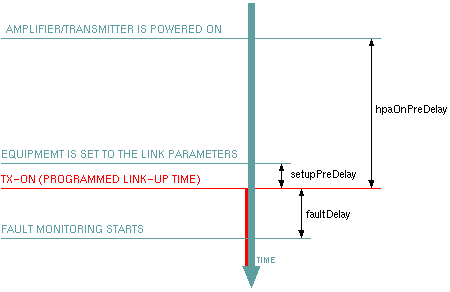
The scheduler in the Link device is a little more sophisticated than the introduction above suggests. When bringing up a satellite link, the scheduler takes care of several points of time beside the effective start of the link.
Some seconds (the "setupPreDelay" configuration parameter defines this value) before the link starts, the scheduler already sets all link parameters as device presets, frequencies, polarization settings to ensure that all equipment is readily set at the programmed link-up time. At the effective start point of the link, only the tx-power is set "ON".
For applications where a station transmits only occasionally, the scheduler is able to maintain a "transmitter-on" switch which powers on the amplifier / transmitter only on demand. The "hpaOnPreDelay" configuration parameter defines how long before the start of the transmission the transmitter shall be powered on to allow a sufficient warming up period of this unit. The scheduler keeps the transmitter switched on after the link goes down, if another link if programmed within the "hpaOnPreDelay" interval.
The link device monitors the fault signals of up to three devices and reports a link OK/FAULT state to the NMS from the summary of these signals. As it is likely that when the link goes up, some devices show a fault until they lock on the signal, fault monitoring starts with some delay after tx-on was set. The "faultDelay" configuration parameter sets this time delay.
Device window pages
The following table shows which device window pages are available with this individual device type. Tool-bar functions not mentioned here are described at the general description of device windows .
 --- Shows the actual link state
 --- The faults page.
 --- The device info page.
 --- The maintenance page. The configuration parameters described below are set at this page.
Configuration parameters
The table below explains the configuration parameters which interconnect the Link device to the devices it monitors / controls. Unused parameters should be left empty.
| parameter | description |
|---|---|
| mode | Selects if this Link device controls the transmit side (TX) or the receive side (RX) of a link. |
| preset1Id | The message ID to send the preset #1 to. This must be in accordance with the link type definition in the NMS. |
| preset2Id | The message ID to send the preset #2 to. |
| preset3Id | The message ID to send the preset #3 to. |
| frequencyId | The message ID to send the transmit/receive frequency to. |
| powerId | The message ID to send the tx power value to. Should be left empty if the Link device controls receive equipment. |
| powerCal | You may define a power calibration factor here to convert the Link EIRP into a output power setting for a modem e.g.. |
| onId | The message ID to send the tx on/off command to. |
| polId | The message ID of the polarization select switch. |
| polXlt | The polarization / switch position translation table. For a wave guide switch selecting horizontal polarization at position "A" the table would be "X=A,Y=B". |
| hpaOnId | The message ID of a switch which separately switches the power amplifier (or transceiver) on. |
| fault1Id | The message ID of a device fault to be monitored by the Link device. |
| fault2Id | The message ID of a device fault to be monitored by the Link device. |
| fault3Id | The message ID of a device fault to be monitored by the Link device. |
| faultDelay | Fault monitoring starts this time after the Link-UP (TX-ON) was commanded. This lets the equipment some time to come in lock. |
| hpaOnPreDelay | The power amplifier (or transceiver) gets switched on this time before the effective start of a link. |
| hpaOnInterval | The Link device checks in this intervals whether to switch on/off the power amplifier. This time is equivalent to the post-carriage of the amplifier after the link goes down. |
| setupPreDelay | The presets (containing the data rate definitions etc.) are sent to their devices this time prior to the link start time. This makes allowance for the devices to carry out the preset settings before the link really goes up. |
Remarks
Variables defined by this device driver
| name | type | flags | range |
|---|---|---|---|
| info.driver | TEXT | R/O | StringRange R/O |
| info.type | TEXT | R/O | StringRange R/O |
| info.frame | TEXT | R/O | StringRange R/O |
| config.mode | CHOICE | SAVE SETUP | EnumRange (RX TX) |
| config.preset1Id | TEXT | SAVE SETUP | StringRange |
| config.preset2Id | TEXT | SAVE SETUP | StringRange |
| config.preset3Id | TEXT | SAVE SETUP | StringRange |
| config.frequencyId | TEXT | SAVE SETUP | StringRange |
| config.powerId | TEXT | SAVE SETUP | StringRange |
| config.powerCal | FLOAT | SAVE SETUP | DoubleRange (0.00 .. 0.00) |
| config.onId | TEXT | SAVE SETUP | StringRange |
| config.polId | TEXT | SAVE SETUP | StringRange |
| config.polXlt | TEXT | SAVE SETUP | StringRange |
| config.hpaOnId | TEXT | SAVE SETUP | StringRange |
| config.fault1Id | TEXT | SAVE SETUP | StringRange |
| config.fault2Id | TEXT | SAVE SETUP | StringRange |
| config.fault3Id | TEXT | SAVE SETUP | StringRange |
| config.faultDelay | INTEGER | SAVE SETUP | IntegerRange (0 .. 0) |
| config.hpaOnPreDelay | INTEGER | SAVE SETUP | IntegerRange (0 .. 0) |
| config.hpaOnInterval | INTEGER | SAVE SETUP | IntegerRange (0 .. 0) |
| config.setupPreDelay | INTEGER | SAVE SETUP | IntegerRange (0 .. 0) |
| reset | CHOICE | EnumRange (CLEAR) | |
| activeLink | TEXT | R/O | StringRange R/O |
| scheduledLinks | TEXT | R/O | StringRange R/O |
| faults.01 | ALARM | R/O | AlarmFlagRange R/O (Device 1) |
| faults.02 | ALARM | R/O | AlarmFlagRange R/O (Device 2) |
| faults.03 | ALARM | R/O | AlarmFlagRange R/O (Device 3) |