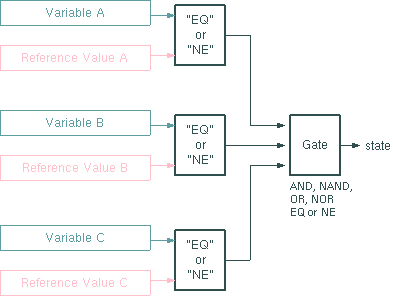
The Logical-Gate-3 device provides a 3-input logical gate which can be used to merge status variables in a user programmed way. The gate may be configured to work as a AND, NAND, OR, NOR, NE (XOR) or EQ gate. It listens to two input variables and compares these to user supplied reference values. the logical result of the comparisons gets fed into the gate. The gate's output state is distributed as a boolean state variable named "state".
Device window pages
The following table shows which device window pages are available with this individual device type. Tool-bar functions not mentioned here are described at the general description of device windows .
 --- The device info page.
 --- The maintenance page. The configuration parameters from this page are described below.
Configuration parameters
At the maintenance page of the device window there are a couple of configuration parameters which must be set to interconnect the Logical-Gate device with the devices that dliver the gate's input signals.
| parameter | description |
|---|---|
| input-A.Id | Enter the message identifier here of the parameter the gate shall listen as input-A, e.g. "SWITCH-1. position". |
| input-A.compare | Select EQ if this gate input shall become "true" if the monitored value matches the reference value defined below. NE reverses this, the input becomes "true" if the monitored value does not match the reference value. |
| input-A.reference | The reference value the monitored parameter shall be compared to. The comparison made is textual, so be careful when comparing numeric parameters. Inaccuracies of the floating point arithmetic or number formatting issues may let the monitored parameter look different than you expect. |
| gateType | Select the type of logical gate. |
| input-B.Id | Enter the message identifier here of the parameter the gate shall listen as input-B, e.g. "SWITCH-2. position". |
| input-B.compare | Select EQ if this gate input shall become "true" if the monitored value matches the reference value defined below. NE reverses this, the input becomes "true" if the monitored value does not match the reference value. |
| input-B.reference | The reference value the monitored parameter shall be compared to. The comparison made is textual, so be careful when comparing numeric parameters. Inaccuracies of the floating point arithmetic or number formatting issues may let the monitored parameter look different than you expect. |
| input-C.Id | Enter the message identifier here of the parameter the gate shall listen as input-C, e.g. "SWITCH-3. position". |
| input-C.compare | Select EQ if this gate input shall become "true" if the monitored value matches the reference value defined below. NE reverses this, the input becomes "true" if the monitored value does not match the reference value. |
| input-C.reference | The reference value the monitored parameter shall be compared to. The comparison made is textual, so be careful when comparing numeric parameters. Inaccuracies of the floating point arithmetic or number formatting issues may let the monitored parameter look different than you expect. |
| setFaultOnTrue | If set to YES, the device sets the device summary fault and a (hidden) fault flag faults.01 if the gate output is true. The faults are set fully event driven without delay, therefore the faults.01 flag cannot be configured in any way. |
| startupDelay | The number of cycles after startup the device waits until it produces the output. Defaults to 0 for backward compatibility. May be used to avoid glitches during the startup phase where not all input parameters are known. |
Variables defined by this device driver
| name | type | flags | range |
|---|---|---|---|
| info.driver | TEXT | R/O | StringRange R/O |
| info.type | TEXT | R/O | StringRange R/O |
| info.frame | TEXT | R/O | StringRange R/O |
| info.state | TEXT | R/O | StringRange R/O |
| info.initialized | TEXT | R/O | StringRange R/O |
| config.gateType | CHOICE | SAVE SETUP | EnumRange (AND NAND OR NOR EQ NE) |
| config.input-A.Id | TEXT | SAVE SETUP | StringRange |
| config.input-A.compare | CHOICE | SAVE SETUP | EnumRange (EQ NE) |
| config.input-A.reference | TEXT | SAVE SETUP | StringRange |
| config.input-B.Id | TEXT | SAVE SETUP | StringRange |
| config.input-B.compare | CHOICE | SAVE SETUP | EnumRange (EQ NE) |
| config.input-B.reference | TEXT | SAVE SETUP | StringRange |
| config.input-C.Id | TEXT | SAVE SETUP | StringRange |
| config.input-C.compare | CHOICE | SAVE SETUP | EnumRange (EQ NE) |
| config.input-C.reference | TEXT | SAVE SETUP | StringRange |
| config.setFaultOnTrue | CHOICE | SAVE SETUP | EnumRange (NO YES) |
| config.startupDelay | INTEGER | SAVE SETUP | IntegerRange (0 .. 30) |
| state | BOOLEAN | R/O | BooleanRange R/O (true false) |
| faults.01 | ALARM | R/O | AlarmFlagRange R/O (Gate output) |