The Pass-Scheduler logical device provides a very specialized version of sat-nms system scheduler. The Pass-Scheduler gets its information from an XML file with times when an overflying satellite rises and sets. For each pass pf the satellite the scheduler generates four events (PRE-PASS, START-PASS, END-PASS and POST-PASS) at times which correlate with the satellite pass times way globally configured for the device in a config file. Each event triggers a macro with a special name, the name is generated from parameters read from the XML schedule definition
The device scans a configurable directory for XML schedule files and uses the first one found as the new schedule. Then the XML schedule file gets moved to an archive directory to prevent the device from reading it again.
The scheduler embedded in this device is always active, neglecting any OUT-OF-SERVICE setting of the device. Setting the device OUT-OF-SERVICE only prevents it from scanning the schedule directory, this does not disable the scheduler itself. The recommended way to disable the scheduler is to use the "Disable" / "Interrupt" buttons in the device window.
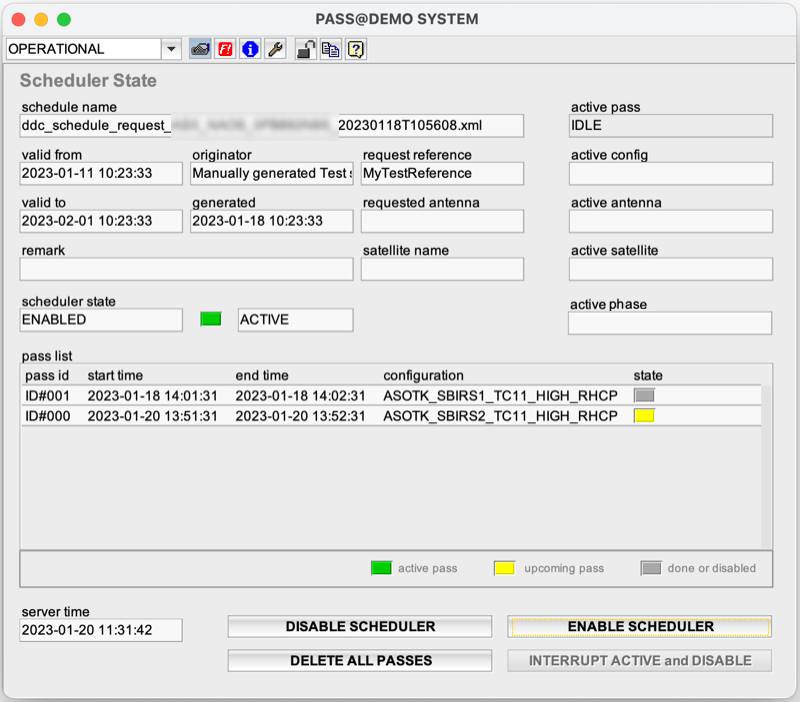
The Pass-Scheduler principally requires no interaction with the operator. Once set up the Pass-Scheduler does its work in background, The device window of the Pass-Scheduler nevertheless provides some state information and controls:
Device window pages
The following table shows which device window pages are available with this individual device type. Tool-bar functions not mentioned here are described at the general description of device windows .
 --- This page shows the actual schedule state and provides buttons to delete / interrupt / disable or enable the actual schedule
 --- The fault state of the device.
 --- The device info page.
 --- The maintenance page. The configuration parameters described below are set at this page.
Configuration parameters
At the maintenance page of the device window there are a couple of configuration parameters which must be set to interconnect the Level-Set device to the devices it monitors and controls.
| parameter | description |
|---|---|
| antennaId | The XML schedule file may contain satellite pass information to be interpreted by multiple Antennas. Hence each schedule request in the file is marked for which antenna the request applies. antennaId must be set to then ID if the antenna this scheduler shall work for. Note, this is not necessarily the sat-nms device name of the antenna, but the antenna ID used by the originator of the XML schedule file. If this parameter is not set, the device will ignore all pass definition in the file |
| scheduleDir | The name of the directory, the device shall scan for new XML schedule files. The name may be an absolute directory path or one relative to the working directory of the satnms software. The directory must exist and must be permanently reachable for the software. |
| archiveDir | The name of a directory the device shall move an XML schedule file to after it has been read. Like scheduleDir, the directory path may be absolute or relative. The archive directory must exist and it must be permanently writable for the software. It must refer to the same physical medium as the scheduleDir. scheduleDir and archiveDir must not be the same or the device will read XML schedule files over and over again. |
Pass Phases
The Pass-Scheduler device manages four phases of a satellite pass: PRE, START, END and POST. each phase starts a defined time relative to the calculated start / end times of the satellite pass in the schedule. With the beginning of each phase a macro is called which executes the actions to be done in this phase
| phase | displayed name | description |
|---|---|---|
| PRE | prepass | prepares the equipment for the upcoming pass |
| START | startpass | starts the pass, e.g. switches RF-ON |
| END | endpass | ends the pass, e.g. switches RF-OFF |
| POST | postpass | cleans up, returns the equipment to idle state |
The state.phase parameter shows the actually running phase while a pass is active with the abbreviations shown in column displayed name in the table above. Please note that the postpass phase often may not be visible as the scheduler returns to idle immediately after it entered postpass.
Configuration file
The device reads a configuration file at startup which defines prefixes for the macro names to be used for the four events of a satellite pass. This file also defines the time offsets of the schedules events to the pas times of the satellite.
The configuration file has the same name as the device with the file extension ".cfg". the example below illustrates the the structure if the file:
# configures the pass scheduler macro name prefixes and relative timings
# there may be comment lines starting with '#' at the top of the file, the
# definitions of the pass phases however must appear without interruption
#
000_SCHD_prepass_, StartTime, -900
000_SCHD_startpass_, StartTime, 0
000_SCHD_endpass_, EndTime, 0
000_SCHD_postpass_, EndTime, +300
The file consists of four lines defining the parameters for the PRE-PASS, START-PASS, END-PASS and POST-PASS events. Each line consists of three definitions separated by comma characters. The first is the name prefix used for the macros related to this event, the second is one of the keywords StartTime or EndTime, denoting the reference from where the time of this event shall be calculated. The last definition in the line is the offset of the time when the event is scheduled, relative to the reference in the second parameter.
The file may have comment lines starting with a '#' character at its top, but this is optional. There mus not be any comments between the four lines defining the event parameters.
Macro names
The names of the macros executed by the scheduler for the four events of each pass are built from the prefix defined for the particular event in the configuration file described above and the actual "configuration" for this pass as shown in the pass list in the column "configuration". This configuration string is built from five parameters read from the XML definition of this pass. Example
000_SCHD_startpass_SX_YES_TC1_HIGH_RHCPis the name of the macro to be executed with the START-PASS event for a pass defined with the parameters bands=SX, uplink=YES, bb-id=TC1, dl-rate=HIGH and polarization=RHCP (assuming the macro name prefix as used in the example above).
Persistent schedule
The device stores its schedule in a JSON formatted file with the name of the device and the file extension ".json". The file is read when the software starts, the schedule persists over stop / start cycles of the software this way.
XML schedule replacement
The device scans a configurable directory for XML schedule files and uses the first one found as the new schedule. Then the XML schedule file gets moved to an archive directory to prevent the device from reading it again.
When a new schedule is read, it replaces the existing schedule. If from the old schedule there is an active pass in progress when the new schedule is read, this pass will be completed. If the new schedule contains a pass which collides in some way with the active pass, the schedule will not be read and a fault will be raised.
XML schedule file name
When the device scans the schedule directory, it looks for files looking like
ddc_schedule_request_<recipient><satellite><request_ref>_<generation_time>.xml
regex: 'ddc_schedule_request_[A-z]+[A-z0-9]+[A-z0-9]+_[0-9] {8} T[0-9] {6} .xml'
Files not matching this pattern are ignored.
Fault flags
The device knows a number of fault flags which are set if some errors occur when reading a schedule file. The list below gives som explanations regarding these fault flags:
Variables defined by this device driver
| name | type | flags | range |
|---|---|---|---|
| info.driver | TEXT | R/O | StringRange R/O |
| info.type | TEXT | R/O | StringRange R/O |
| info.frame | TEXT | R/O | StringRange R/O |
| config.antennaId | TEXT | SAVE SETUP | StringRange |
| config.scheduleDir | TEXT | SAVE SETUP | StringRange |
| config.archiveDir | TEXT | SAVE SETUP | StringRange |
| state.validFrom | TEXT | R/O | StringRange R/O |
| state.validTo | TEXT | R/O | StringRange R/O |
| state.generated | TEXT | R/O | StringRange R/O |
| state.originator | TEXT | R/O | StringRange R/O |
| state.requestReference | TEXT | R/O | StringRange R/O |
| state.scheduleName | TEXT | R/O | StringRange R/O |
| state.satelliteName | TEXT | R/O | StringRange R/O |
| state.requestedAntenna | TEXT | R/O | StringRange R/O |
| state.remark | TEXT | R/O | StringRange R/O |
| state.activeConfig | TEXT | R/O | StringRange R/O |
| state.activePass | TEXT | R/O | StringRange R/O |
| state.activeAntenna | TEXT | R/O | StringRange R/O |
| state.activeSatellite | TEXT | R/O | StringRange R/O |
| state.passList | TEXT | R/O | StringRange R/O |
| state.passList.coldef | TEXT | R/O | StringRange R/O |
| state.state | TEXT | R/O | StringRange R/O |
| state.enabled | TEXT | R/O | StringRange R/O |
| state.time | TEXT | R/O | StringRange R/O |
| state.phase | TEXT | R/O | StringRange R/O |
| running | BOOLEAN | R/O | BooleanRange R/O (true false) |
| withinPass | BOOLEAN | R/O | BooleanRange R/O (true false) |
| disable | TEXT | NOPRESET | StringRange |
| interrupt | TEXT | NOPRESET | StringRange |
| enable | TEXT | NOPRESET | StringRange |
| delete | TEXT | NOPRESET | StringRange |
| reset | TEXT | NOPRESET | StringRange |
| mem.validFrom | INTEGER | SAVE | IntegerRange (0 .. 0) |
| mem.validTo | INTEGER | SAVE | IntegerRange (0 .. 0) |
| mem.generated | INTEGER | SAVE | IntegerRange (0 .. 0) |
| mem.originator | TEXT | SAVE | StringRange |
| mem.requestReference | TEXT | SAVE | StringRange |
| mem.scheduleName | TEXT | SAVE | StringRange |
| mem.satelliteName | TEXT | SAVE | StringRange |
| mem.requestedAntenna | TEXT | SAVE | StringRange |
| mem.remark | TEXT | SAVE | StringRange |
| faults.01 | ALARM | R/O | AlarmFlagRange R/O (Events missed) |
| faults.02 | ALARM | R/O | AlarmFlagRange R/O (Events dropped) |
| faults.03 | ALARM | R/O | AlarmFlagRange R/O (Schedule load) |
| faults.04 | ALARM | R/O | AlarmFlagRange R/O (Pass outside) |
| faults.05 | ALARM | R/O | AlarmFlagRange R/O (Swapped pass times) |
| faults.06 | ALARM | R/O | AlarmFlagRange R/O (Overlapping passes) |
| faults.07 | ALARM | R/O | AlarmFlagRange R/O (Overlaps current time) |
| faults.08 | ALARM | R/O | AlarmFlagRange R/O (Scanning directory) |
| faults.09 | ALARM | R/O | AlarmFlagRange R/O (Archiving schedule) |