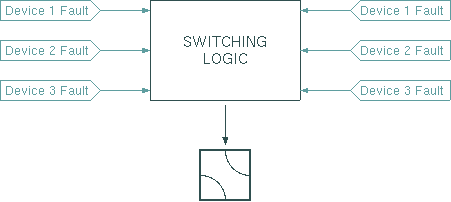
The Protection-Switch-1-To-1 logical device provides a completely software based solution for a 1:1 redundancy switch. It saves the active chain (variable 'location') while the M&C is switched of and restores it at program start. This may cause a switchover at program start. For this reason, the Protection-Switch-1-To-1 logical device should only be used in applications where no position readback from the chain selecting switch is available. The Protection-Switch-NoSave-1-To-1 device provides the same functionality but relies in the switch position rather than saving the value.
The logical device monitors the fault states of a couple of devices, deriving from this the information whether to switch the (usually transmit-) chain.
As illustrated by the figure above, the redundancy switch reads up to four device fault variables for each chain and controls one switch. The latter not necessarily needs to be a waveguide switch as shown here. Any device may be configured to receive a command when the protection switch toggles the chain.
To control the switching behavior, the Protection-Switch-1-To-1 knows two configurable delay constants called 'switchDelay' and 'recovDelay'. Redundancy switch over takes place if these conditions become true at one time:
When specifying the delay times, you should consider that the values become effective in steps of the IDLE time defined for the 'null' interface in the device setup. If the default value of 1000 msecs applies, all delays will be rounded up the next full second.
Redundancy switching is done fully symmetrically. There is no preferential chain. Hence the switch will not return to the initial position if the fault which caused the switch over disappears.
Operation Modes
As of version 2.02 / 080604 the Protection-Switch-1-To-1 device may be configured to act either in SW-ALWAYS or in SW-ONCE (single shot) mode.
SW-ALWAYS ist the default mode also used by earlier versions of the device. Like described above, the device will switch back to the first chain if the fault on this chain disappeared and the second chain shows a fault (eventually delayed by the recovDelay setting).
The SW-ONCE mode disables any further redundancy switching if the "switched" flag is set. This means the protection switch switches to the redundant chain and then inhibits itself. You have to click the "Reset" button at the device window to re-activate the device after a switchover.
Device window pages
The following table shows which device window pages are available with this individual device type. Tool-bar functions not mentioned here are described at the general description of device windows .
 --- This page controls the operational parameters of the device.
 --- The faults page. *
  --- The device info page.
 --- The maintenance page. The configuration parameters described below are set at this page.
Configuration parameters
At the maintenance page of the device window there are a couple of configuration parameter which must be set to interconnect the redundancy switch with the devices it shall monitor and control.
| parameter | description |
|---|---|
| operationMode | may be set to SW-ONCE or SW-ALWAYS to control how the device handles consecutive faults. See the paragraph "Operation Modes" above for an explanation of this setting. |
| fault11Id | The message ID for the first fault flag to be monitored for chain 1. The the switch recognized device summary fault flags ('XXXXX.fault') and individual fault flags ('XXXXX.faults.yy') as well. Be aware that the latter are individually defined for each device driver. |
| fault12Id | The message ID for the second fault flag to be monitored for chain 1. You may leave this field empty if there is no second fault to monitor. |
| fault13Id | The message ID for the third fault flag to be monitored for chain 1. You may leave this field empty if there is no third fault to monitor. |
| fault14Id | The message ID for the fourth fault flag to be monitored for chain 1. You may leave this field empty if there is no fourth fault to monitor. |
| fault21Id | The message ID for the first fault flag to be monitored for chain 2. |
| fault22Id | The message ID for the second fault flag to be monitored for chain 2. |
| fault23Id | The message ID for the third fault flag to be monitored for chain 2. |
| fault24Id | The message ID for the fourth fault flag to be monitored for chain 2. |
| switchFaultId | The message ID of the fault flag indicating a problem with the chain select switch. Usually this is 'ZZZ.fault', if 'ZZZ' is the device name of the switch. |
| switchId | The message ID to send the switch over command to. Usually this is 'ZZZ. position' if 'ZZZ' is the name of the switch device. |
| location1Val | The command to be sent to 'switchId' if the protection switch wants to select chain 1. Usually this is one of 'ON', 'OFF', 'A' or 'B'. |
| location2Val | The command to be sent to 'switchId' if the protection switch wants to select chain 2. Usually this is one of 'ON', 'OFF', 'A' or 'B'. |
| inhibitId | The message ID of a parameter to watch if the protection shall be inhibited. |
| inhibitVal | The value to compare the parameter to which is watched through the 'inhibitId' setting. Protection switching is inhibited if the value of the parameter addressed by 'inhibitId' matches the value of 'inhibitVal'. If you don't want to use this feature, leave both fields empty. |
| suppressFaultIfOff | may set to YES or NO. If set to YES, single fault and double fault are suppressed if protection is set to OFF. If set to NO, these faults are reported even if protection is OFF. |
Fault definitions
The Protection-Switch-1-To-1 device defines a couple of individual faults to report the device's actual state. The fault conditions always are shown as LEDs at the first page if the device window. Depending on the individual fault configuration, these conditions also may be logged and summarized to a device fault for the redundancy switch. The table below describes the fault flags defined for the Protection-Switch-1-To-1 device.
Variables defined by this device driver
| name | type | flags | range |
|---|---|---|---|
| info.driver | TEXT | R/O | StringRange R/O |
| info.type | TEXT | R/O | StringRange R/O |
| info.frame | TEXT | R/O | StringRange R/O |
| config.operationMode | CHOICE | SAVE SETUP | EnumRange (SW-ALWAYS SW-ONCE) |
| config.fault11Id | TEXT | SAVE SETUP | StringRange |
| config.fault12Id | TEXT | SAVE SETUP | StringRange |
| config.fault13Id | TEXT | SAVE SETUP | StringRange |
| config.fault14Id | TEXT | SAVE SETUP | StringRange |
| config.fault15Id | TEXT | SAVE SETUP | StringRange |
| config.fault21Id | TEXT | SAVE SETUP | StringRange |
| config.fault22Id | TEXT | SAVE SETUP | StringRange |
| config.fault23Id | TEXT | SAVE SETUP | StringRange |
| config.fault24Id | TEXT | SAVE SETUP | StringRange |
| config.fault25Id | TEXT | SAVE SETUP | StringRange |
| config.switchFaultId | TEXT | SAVE SETUP | StringRange |
| config.switchId | TEXT | SAVE SETUP | StringRange |
| config.location1Val | TEXT | SAVE SETUP | StringRange |
| config.location2Val | TEXT | SAVE SETUP | StringRange |
| config.inhibitId | TEXT | SAVE SETUP | StringRange |
| config.inhibitVal | TEXT | SAVE SETUP | StringRange |
| config.suppressFaultIfOff | CHOICE | SAVE SETUP | EnumRange (YES NO) |
| location | CHOICE | SAVE | EnumRange (1 2) |
| protection | CHOICE | SAVE | EnumRange (OFF ON) |
| switchDelay | FLOAT | SAVE | DoubleRange (0.0 .. 300.0) |
| recovDelay | FLOAT | SAVE | DoubleRange (0.0 .. 300.0) |
| reset | TEXT | StringRange | |
| chain1Fault | BOOLEAN | R/O | BooleanRange R/O (true false) |
| chain2Fault | BOOLEAN | R/O | BooleanRange R/O (true false) |
| singleFault | BOOLEAN | R/O | BooleanRange R/O (true false) |
| doubleFault | BOOLEAN | R/O | BooleanRange R/O (true false) |
| switchFault | BOOLEAN | R/O | BooleanRange R/O (true false) |
| switched | BOOLEAN | R/O | BooleanRange R/O (true false) |
| faults.01 | ALARM | R/O | AlarmFlagRange R/O (Single fault) |
| faults.02 | ALARM | R/O | AlarmFlagRange R/O (Double fault) |
| faults.03 | ALARM | R/O | AlarmFlagRange R/O (Path select switch) |
| faults.04 | ALARM | R/O | AlarmFlagRange R/O (Protection) |
| faults.05 | ALARM | R/O | AlarmFlagRange R/O (Switched) |