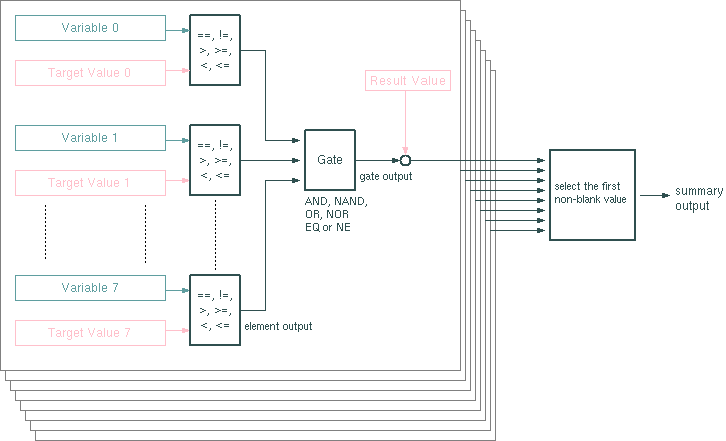
The Gate-Array and Gate-Array-20 devices provide a set of 8 logical gates with 8 inputs each (20 with the Gate-Array-20) which may be used to merge status variables in a user programmed way. Gate-Array and Gate-Array-20 behave exactly the same way, the only difference is the number of inputs of each gate. Each gate may be configured to work as a AND, NAND, OR, NOR, NE (XOR) or EQ gate. The inputs of a gate are so called elements, which compare the contents of a sat-nms parameter to a fixed target value.
Elements
The Gate-Array altogether provides 64 'elements' (160 with the Gate-Array-20) which compare a parameter value to a fixed target value. Each element of a Gate-Array may be used / programmed individually.
The output of an element is a read-only text-type variable which either reads 'true' or 'false'. This output may may be monitored by other devices, the parameter name is ' <device-name>.<gate-no.>.<element-no.>.output '. Counting the gate or element numbers starts at zero, the name of the second element of the first gate e.g. is ' <device-name>.0.1.output '.
The parameter 'message id' defines the full name of the parameter the element shall monitor. The 'target' value is the constant value the parameter is compared against. The comparison operator is selected from a choice box:
Elements which have no or no valid message ID set, are not taken into account in the downstream gate. The same applies to elements which indeed have a valid message ID set, but the message source did not supply a value since system start.
Gates
Every 8/20 elements are connected to one gate (There are 8 gates in total). Each gated can be set to perform one of the logical functions AND, NAND, OR, NOR, EQ and NE. A gate likewise provides an output variable, named ' <device-name>.<gate-no.>.output ' (' <device-name>.0.output ' designates the output of the first gate). A output either reads 'true' or 'false' depending on the result of the logical function it performs. For the logical function only these inputs contribute which really are in use. The outputs of elements which have no message identifier set are not taken into account. The available logical functions for the gate are:
Beside this, each gate provides a parameter called 'result'. This parameter is an arbitrary text value which may become the summary output value of the gate array under certain circumstances.
The Summary Output
The Gate-Array provides a summary output variable named ' <device-name>.output '. This summary output carries the value of the 'result' parameter of the first gate which has a 'true' output. If no gate has a 'true' output, the Gate-Array's master output reads an empty string. Example: If the gates 4 and 6 in the Gate-Array are 'true', the summary output is set to the value of the 'result' variable of gate 4.
Individual Logical Gate Outputs
The Gate-Array provides variables which report the local state of each comparison element, each gate and additionally a summary output which combines the outputs of all gates with a logical OR. For compatibility reasons these variables all are read-only TEXT variables reporting either 'true' or 'false'.
On element level (the result of each individual comparison) the variables are named ' <device-name>.<gate-no.>.<element-no.>.output '. Counting the gate or element numbers starts at zero, the name of the second element of the first gate e.g. is ' <device-name>.0.1.output '.
On gate level (the result of each of the eight gates) the variables are named ' <device-name>.<gate-no.>.output '. Counting the gate numbers starts at zero.
Beside the textual summary output described above, the Gate-Array provides a second summary output called ' <device-name>.ored '. This output reports 'true' if at least one of the gates reports 'true', 'false' otherwise.
Device window pages
The following table shows which device window pages are available with this individual device type. Tool-bar functions not mentioned here are described at the general description of device windows .
 ..
..  --- The configuration and status pages each contain the parameters for one gate and the eight elements which are connected to this gate. The actual state of the element outputs and the gate output is signalled by the color of the arrows which show the logical signal flow. Gray arrows signal a 'false' or inactive state, green arrows signal 'true' state.At the bottom of each page the actual summary (master) output of the Gate-Array and the output states of all eight gates ist shown.
 --- The device info page.
 --- The maintenance page. The configuration parameters from this page are described below.
Configuration parameters
Beside the standard debug settings 'verbose' and 'logParameterChanges' there is one configuration parameter available for the Gate-Array logical device.
| parameter | description |
|---|---|
| outputDefault | If this parameter is set to a non-blanc value, the Gate-Arrays 'output' shows this value instead of an empty string if none of the gates results 'true'. |
Remarks
Variables defined by this device driver
| name | type | flags | range |
|---|---|---|---|
| info.driver | TEXT | R/O | StringRange R/O |
| info.type | TEXT | R/O | StringRange R/O |
| info.frame | TEXT | R/O | StringRange R/O |
| config.outputDefault | TEXT | SAVE SETUP | StringRange |