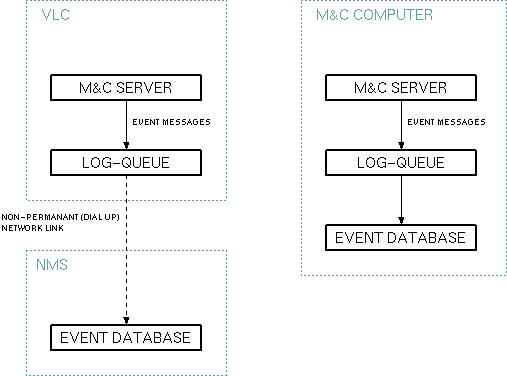
The System device with the name SYSTEM is present on every M&C/VLC server. It does not appear in the "vlc.setup" file, the server creates it automatically as a gateway to some of it's internal services. You mainly use the system device to tell the M&C/VLC server on which way and on which conditions the server shall send event messages to the event log.
To understand the parameters provided by the System device, it is necessary to know that the M&C/VLC server routes all faults and other messages through the so called "log-queue".
With a NMS/VLC network control system, all event messages are stored at a central place at the NMS. As the VLC usually has no permanent data link to the NMS, the log-queue holds the messages until a network link to the NMS is available and the queue gets flushed to the central event database.
The VLC is capable to dial to the NMS by itself. To limit the costs of the dial up connections, time delays may be specified to prevent the VLC from dialing with each message that occurs. If the log-queue gets flushed (which implies a dial-up from the VLC to the NMS) depends on the following. The queue gets flushed if:
With a M&C system, the M&C computer itself provides the event database in most cases. The M&C server still routes the event messages through the log-queue, the timing parameter described above still apply, but they are set in a way that all messages go straight through into the event database.
Clock synchronisation
Another task of the SYSTEM device is to control the synchronization of the VLC's clock to the NMS time. This synchronization is essential for the link management as scheduled links are planned on the base of the NMS' clock but executed following the VLC's clock. The synchronization works as follows:
Each time, the NMS connects to a VLC, it sends the actual time to the VLC. The SYSTEM device compares the local time to the time received from the NMS and -- depending on the difference -- tunes the VLC's clock a little bit faster or slower. With VLCs being accessed at least once a month, this keeps the VLC's clock well in tune with the NMS without producing any leaps in the local time. This clock synchronization is made once when a VLC becomes 'on-line'.
If the clocks of NMS and VLC differ by more than 30 seconds, the SYSTEM device treas this as an error. It states a FAULT (it's icon at the user interface becomes red) and writes a message to the event log with a message text like:
Clock differs by 1523 secs from NMS time. Please reboot.
There may be several reasons for this fault:
When the SYSTEM device has recognized this fault, the VLC already is about to adjust the clock to the right time. It however cannot set the correct time immediately because the time leap could mess up the software's timeout recognition. The VLC smoothly tunes the clock with a maximum rate of 10 minutes per day. Hence, with relative small time differences you might ignore the fault, for larger differences a re-boot of the VLC will speed up this procedure, the correct time is set when the VLC starts (see section 'SYSTEM Device fault' below for details).
Device window pages
The following table shows which device window pages are available with this individual device type. Tool-bar functions not mentioned here are described at the general description of device windows .
 --- The parameters at this page define on which way event messages shall be sent to the event database.
NMSnetworkaddress --- Defines the host name / IP address of the NMS / event database server.
dial command 1 dial command 2 dial command 3 --- For a VLC you can specify up to three dial commands (AT.. command sequences) the VLC shall use to connect to the NMS. The VLC always tries dial command 1 first, if this fails it tries the second one an so on. You must enter the complete modem AT command, not only the phone number. This lets you prepend some additional commands like "X3" or some switches in front of the "D" command.With a M&C system or a VLC which communicates to NMS via Ethernet, let all three dial commands empty. This prevents the machine from doing any dial attempts.
 --- Contains the size and timing parameter of the log queue.
 --- Contains the macro backup function which permits to store all parameter settings known to the M&C/VLC into a macro definition for later retrieval.
 --- The device info page. You see the software revision number/date of the M&C/VLC server at this place
SYSTEM Device Fault
If the SYSTEM device states a fault, this indicates that the clocks of NMS and VLC are not in tune. The VLC will correct the clock difference automatically after some time, but actually any scheduled links from this VLC will start or stop at the wrong time.
If the time difference is relative small you may ignore the fault. The time difference is stated in the event log, search for the VLC ID and the text 'Clock differs'. Clicking the 'RESET' button on 'Maintenance' page of the device window will reset the fault until the VLC goes on-line the next time.
If the time difference is larger or if you need the clock to be set precisely at once, you may re-boot the VLC. This means to restart the VLC's operating system, not only to restart the VLC application. The procedure for this is as follows:
The connection to the VLC will break after this, about 3 minutes later the VLC will be accessible again with the clock set properly.
Remarks
Variables defined by this device driver
| name | type | flags | range |
|---|---|---|---|
| info.type | TEXT | R/O | StringRange R/O |