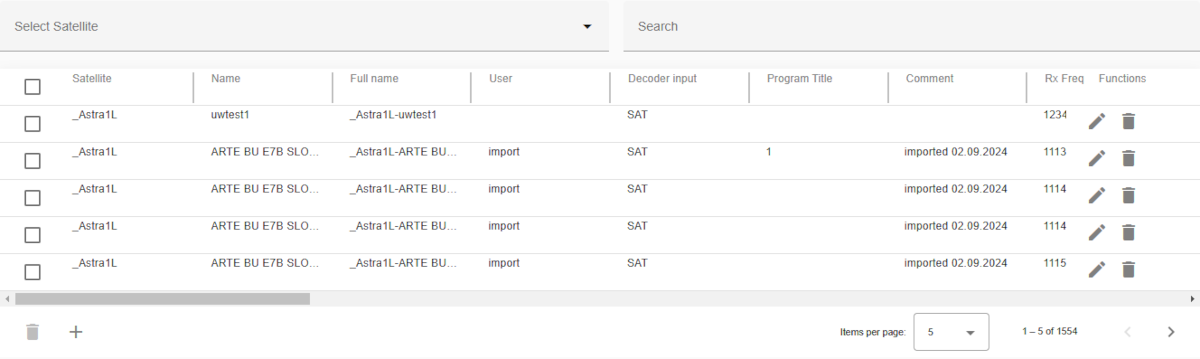
The list of all satellite channels in the database. The table can be scrolled horizontally. Satellite and functions row are sticky.
Satellite channels define the common paramaters of receive equipment (e.g. IRDs, Demodulator) and transmit equipment (e.g. Modulators) for satellite transmission. Typically used for the contribution of newsfeeds or TV over satellite but not limited to. Each channel belongs to a satellite which needs to be configured in the Satellite Database.
To use this database you have to configure the corresponding Channel-Devices on the MNC server(s) which controlls the equipment.
For receive applications the following logical devices are available:
For transmit applications the following logical devices are available:
These logical devices will retrieve the channel information directly from the central database. Please refer to the linked documentation for details how to setup and use the RX and TX Channel devices.
Search bars
Header row
click + hold + drag near from the header name (grey border)Table columns
The first column located at the far left of the table provides a checkbox to select one or more channels (rows) and perform the same operation on all selected channels.
The following function(s) are available:
| Function | Icon | Description |
|---|---|---|
| delete |  |
delete the selected channels from the database |
The last column located at the far right of the tables provides buttons to run actions on the corresponding channel.
The following functions for managing a channel are available:
| Function | Icon | Description |
|---|---|---|
| Delete | |
to delete the channel |
| Edit |  |
modify/edit channel |
The following buttons for global function(s) are available at the the bottom of the table:
| Function | Icon | Description |
|---|---|---|
| Add |  |
add a new channel |
| Delete | |
to delete all selected the channels |
| Page | Pagination controls | set the number of items displayed per page (e.g., 5, 10, or 25) and navigate between pages |
The satellite channel table contains the following columns:
| Column name | Description |
|---|---|
| Satellite | name of satellite |
| Name | user defined channel name |
| Full name | automatically generated full name (satellite's name + - + Name) |
| User | free text to enter a user name which is responsible for this database entry |
| Program title | name of the program transmitted or received with this channel |
| Comment | one line comment describing this satellite channel |
| Rx frequency | receive frequency in MHz. |
| Rx pol. | receive polarization |
| Tx frequency | transmit frequency in MHz |
| Tx pol. | transmit polarization |
| Mode | modulation standard |
| NLC mode | NLC (Non Linear Constellation) mode for NS4 modulation |
| Symbol rate | symbol rate in MSym/sec |
| FEC | FEC rate |
| Modulation | modulation type |
| Roll-off | roll off factor |
| Pilots | pilots on/off switch |
| Bit rate | data rate in MBit/sec |
| Use rate | selects the way the data rate is specified |
| Packet size | packet size |
| Frame size | frame size |
| Video rate | video data rate in MBit/sec |
| VR auto | video rate auto switch |
| Profile | video encoding profile |
| EIRP | transmit EIRP in dBW |
| Reduced EIRP | reduced EIRP for line up in dBW |
| Auto lineup | configures automatic line up |
| Audio rate 1 | audio channel 1 data rate |
| Audio rate 2 | audio channel 2 data rate |
| Audio rate 3 | audio channel 3 data rate |
| Audio rate 4 | audio channel 4 data rate |
| Audio channels | Number of audio channels. |