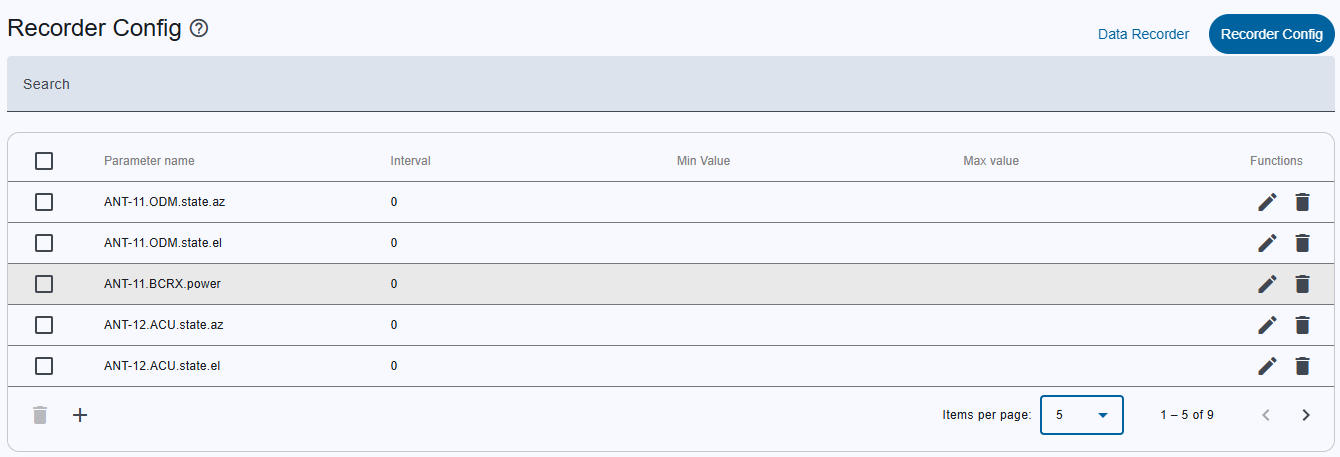
The Recorder Configs page lets users view, create, edit, and delete the set of parameters that are stored in the database during data recording. Only configurations that are present in the recording_config table are used for data collection. The values of those parameters are written to the recording_data table.
Page Layout
| Section | Purpose | Key Elements |
|---|---|---|
| Top Toolbar | Navigation | - Data recorder (default view) - Recorder DB Status - Recorder config |
| Search Bar | Filter the table | Full‑text search across all columns |
| Header Row | Sorting | Click a column header -> toggle ascending/descending. Sorting is global (affects all pages). |
| Table | List of recorder configurations | See “Table columns” below |
| Bottom Toolbar | Batch actions & pagination | - Delete selected configs - Create config (+) - Pagination controls |
Table Columns
| Column | Description |
|---|---|
| Checkbox | Select one or more rows for bulk deletion. • Header checkbox selects/deselects all rows across all pages. • Bottom toolbar Delete selected configs deletes all checked rows. |
| Parameter name | The full parameter ID (e.g., MNC.DeviceName.ParameterId). |
| Interval | Time between stored values (seconds). |
| Min value | Threshold that triggers an alarm (minimum). |
| Max value | Threshold that triggers an alarm (maximum). |
| Functions | Row‑specific actions: • Edit (pencil icon) – opens add/edit dialog. • Delete (trash icon) – opens delete‑confirmation dialog. |
User Actions
| Action | Trigger | Result |
|---|---|---|
| Create Recorder Config | Click Create config (+) button | Opens Recorder config add/edit dialog pre‑filled for a new entry |
| Edit Recorder Config | Click pencil icon in Functions column | Opens Recorder config add/edit dialog populated with existing values |
| Delete Single Config | Click trash icon in Functions column | Opens Delete confirmation dialog for that record |
| Delete Multiple Configs | Select rows via checkboxes → click Delete selected configs | Opens Delete confirmation dialog for all selected rows |
| Pagination | Use page navigation arrows or items‑per‑page selector | Loads the requested page of the table |