Below we detail each modal dialog that can be opened from the Data Recorder status page.
4.1 Remove Retention Policy Confirmation Dialog
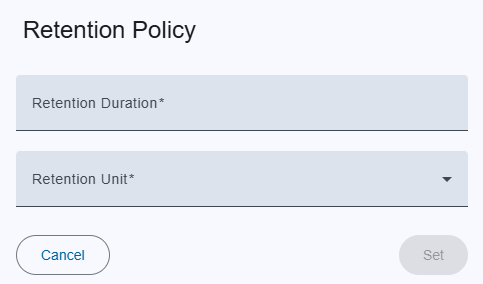
4.2 Add / Modify Retention Policy Dialog
| Field | Description | Notes |
|---|---|---|
| Duration | Numeric input for the amount of time before retention policy runs. | Must be a positive integer. |
| Unit | Dropdown selection: Months or Years. | Determines the time unit for the duration. |
| Button | Action | |
|---|---|---|
| Save / Create | Persists the retention policy to the backend. | Disabled until all fields are valid. |
| Cancel | Closes the dialog without saving. | No changes are sent. |
| Success Behavior | The dialog closes automatically and the Recorder DB info table is refreshed to reflect the new policy. |
4.3 Drop Chunks Dialog
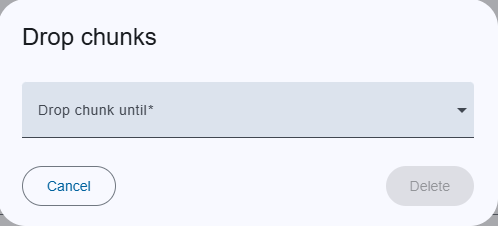
| Field | Description | Notes |
|---|---|---|
| Drop chunk until | Dropdown list of the earliest dates of stored chunks (e.g., “2023‑01‑01”, “2023‑02‑01”, …). | Selecting a date will permanently delete all chunks that were created on or before that date. |
| Button | Action | |
|---|---|---|
| Drop | Sends a request to the backend to delete the selected chunks. | Disabled until a date is chosen. |
| Cancel | Closes the dialog without performing any deletion. | No data is removed. |
| Success Behavior | After successful deletion the chunk list table is refreshed automatically and dialog will closed |
Backend API Reference
All actions on this page communicate with the /api/v1/recordingdata endpoint.
If you need to review the full API contract, see the documentation here: /api/v1/recordingdata.