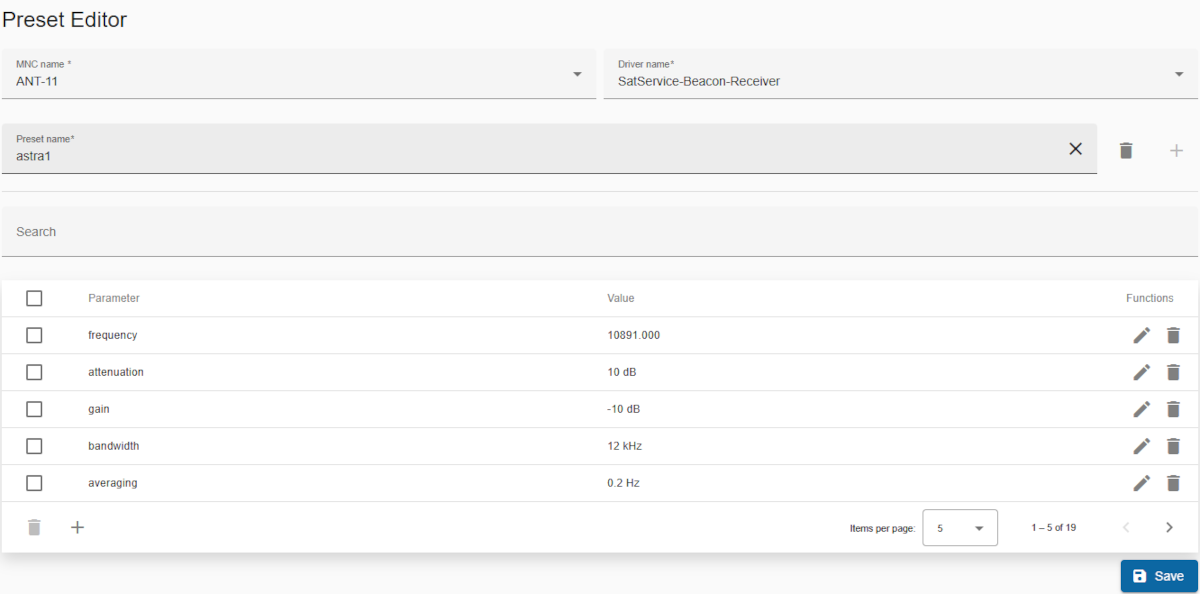
Most sat-nms device drivers allow you to save a snapshot of the device settings in device preset files so that the operator can restore these settings at a later time.
The presets are stored on the server that your client programme connects to. In an M&C environment this is the M&C server, in an NMS environment this is the central NMS server. This means that in the latter case, a preset can be saved when operating a VLC and can later be applied to a device on another VLC.
Presets are always assigned to the device type (driver) with which they were recorded. This is because it makes no sense to transfer the settings of a beacon receiver to a DVB encoder. The target device does not know what to do with the receiver settings. Even with similar devices (e.g. two IRDs from different manufacturers), there may be differences in the number and type of settings that the devices understand. The software therefore saves the preset files in a structure by device driver.
Title: Title of this page.
MNC name: Below the title, you must select an option from the drop-down list.
Driver name: A dropdown with all driver names. Just select from dropdown.
Preset name: Also a dropdown list of preset file names with the search function.
To load a stored preset first you have to select MNC name, then driver name and then preset name. After selection, a table with the saved presets would de displayed, as shown in the image above.
Search bar
Header row
Table columns
Checkbox column:
Parameter: Stored parameter for the preset.
Value: Stored value of parameter.
Functions: Action icons for managing the parameter:
Bottom toolbar
Save: Saves all modifications. NOTE: You must save the changes before leaving the editor, otherwise the changes will be lost.