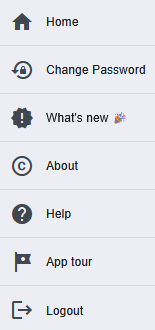
Near the profile icon is the logged-in username. By clicking on name the user menu expands and provides the following options:
- Home: navigate to the default page.
- Change password: open the dialog to change the password.
- What's new: new features and improvements are listed in this sections. It's open a panel on right hand side with details.
- About: open about page. It contains app information like company name, address, app version etc.
- App tour: start the app tour and navigates through the app and it's features.
- Logout: logout the current user.