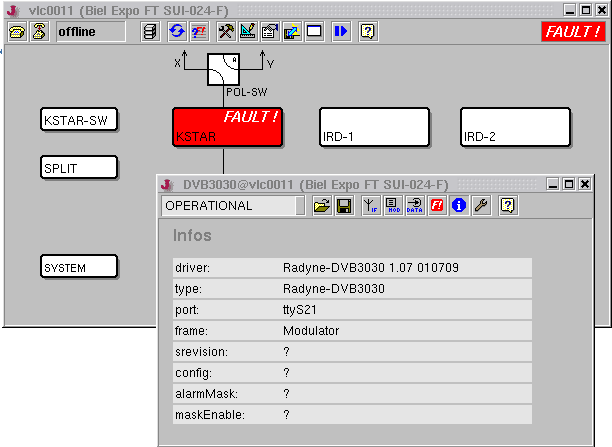
The software foresees one main screen for each M&C / VLC. With a M&C this main screen automatically is shown when the user interface program is started. With a VLC, the 'VLC Main Window' contains this screen. The user interface may be configured to use more than one screen which are switched on the operator's request, either shown in the same window or in separate windows.
Device oriented user interface
There are two major approaches to design and configure a user interface for the sat-nms software. The first one, called the 'device oriented user interface', results in a hierarchically structured user interface. It makes use of the predefined windows / screens coming with the software and can be created with only a few mouse clicks.
Example for a device oriented user interface.
With the device oriented user interface, the main window contains a so called device icon for each device which is controlled by the M&C/VLC. This icon is labeled with the device's name and shows the OK/FAULT state of the device with it's color. A double click to a device icon opens the ' Device Window ' for this device, containing the predefined screens for this device type. Using the ' Device Window ', all parameters of a device supported by the sat-nms software can be monitored or controlled.
To create a main screen for the device oriented user interface, the screen editor provides a function adding a device icon for each device in the system on a single mouse click.
Task oriented user interface
While the device oriented user interface follows predetermined structures, the so called 'task oriented user interface' is entirely customer designed. Using the screen editor , the user places entry fields or status displays in the screen for each parameter he wants to include to the user interface.
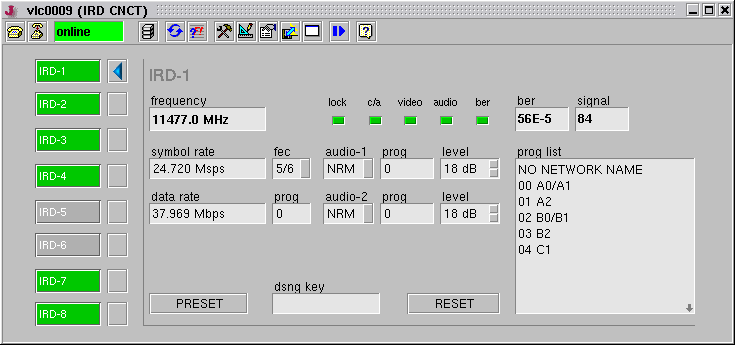
Example for a task oriented user interface.
A task oriented user interface not necessarily contains all available parameters. To keep the user interface clear, only those parameters are included, which the operator needs to fulfill the task the user interface is designed for. Moreover, there also is no need to group parameters by the device they belong to, like the device oriented user interface does. Parameters belonging to diverse devices freely may be mixed in one screen.