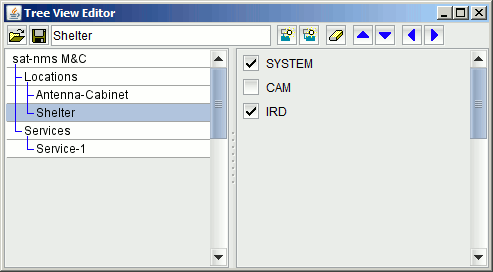
The Tree View Editor window lets you define or modify the tree / subsystem hierarchy used by the M&C Tree View. You open the Tree View Editor by clicking the appropriate tool bar button of the Tree View.
The left part of window shows the subsystem tree structure, the right part a list of all devices configured in the M&C system. Editing / modifying the tree structure is straight forward:
Selecting a tree node with the mouse shows the name of this node in the text field in the tool bar and at the right side places a checkmark in front of all devices which are attached to this node. Checking / unchecking devices attaches or detaches the to/from the actual tree node. Using the toolbar buttons you may add or remove tree nodes and move them up or down:
 --- Re-load the tree definition from its disc file, thus reverting all changes to the last saved state.
 --- Stores the changes made at the tree at the server and updates all Tree View windows actually open.
 --- Shows the name of the selected node. The name may be changed by editing the field and pressing RETURN. Please note, that changing a node's name will re-reference the node from its user screen and also will change the message IDs of the subsystem fault message of this node ans all its children.
 --- Adds a new node to the tree. The new node will be added as the last sibling of the selected node.
 --- Adds a new node to the tree. The new node will be added as the last child of the selected node.
 --- Removes the selected not an all its children from the tree.
 --- Moves the selected node one position up in the list of its siblings. Does nothing if the note is already at the topmost position.
 --- Moves the selected node one position down in the list of its siblings. Does nothing if the note is already at the lowest position.
 --- Moves the selected note on level up in the tree hierarchy. The highest level a node may be of is one below the root node.
 --- Moves the selected node one level down in the tree hierarchy. The node must have at least one sibling for this.
The nodes of the tree view in the sat-nms software also can be seen as subsystems of the M&C. The M&C server creates a fault flag for wach tree view node / subsystem which is defined using the Tree View Editor.
Subsystem fault flags summarize the fault states of all devices and subsequent tree nodes which are children the particular node. Like the summary fault of a device, the subsystem fault is one of "OK.", "WARNING" of "Summary FAULT". It states the most severe fault state one of the summarized devices or subsystems reports.
The subsystem fault flags can be accessed for display at the GUI through their parameter ID, which is defined as "SUBSYSTEM. ... .fault", where the three dots are to be replaced by the fully qualified name of the tree node. If for example a tree node "/Locations/Shelter-B" exists, the fault ID for this node is "SUBSYSTEM.Locations.Shelter-B.fault".