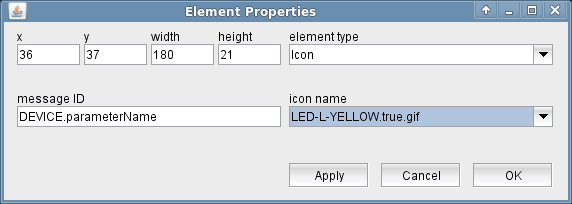
The Icon display element shows an arbitrary GIF/JPEG picture. The image file must reside in the ./images directory on the M&C/NMS server.
The attributes listed below may be configured to customize a display element of this type:
Using an icon to display a parameter
If you specify a message ID with the element properties of an Icon , the image displayed will change with the parameter value addressed by the message identifier.
You must supply one image file for each value the parameter may have. The parameter value must appear in the file name just in front of the gif/jpg suffix, enclosed in dots. All images used for one parameter should be of the same size. If the Icon element receives a parameter value it does not find an image file for, a black rectangle is displayed instead of an image.
Example: Let's assume you want to visualize a TX ON/OFF switch with an antenna symbol changing it's color with the position of the switch. Supply two images called "transmission.ON.gif" and "transmission.OFF.gif" which symbolize these states as you want. Notice that the ON/OFF keywords in the file names exactly reflect the possible values of this parameter and that the file names only differ in this point. Select one of image files for the icon element and enter the message Id of the TX-ON/OFF parameter into the appropriate field.
The mechanism used to select the image file to display mostly limits the usage of dynamically changing icons to CHOICE parameters. Merely numeric (integer) parameters with a very limited number of possible values come into question, too.
Using an icon to display a device summary fault
With device summary faults ("DEVNAME.fault"), and subsystem faults ("SUBSYSTEM. ... .fault") the Icon element translates the fault state to "true" for FAULT and "false" for "OK.". This is because the sat-nms software provides the individual fault flags in a device driver as boolean values, the summary fault however is represented by a text which can be one of "OK.", "WARNING" and "Summary FAULT". Translating the OK/FAULT values lets you use the same image files for individual and summary fault states.
To display a device summary fault as an color changing icon, you have to provide three image files, for example:
 MyIcon.false.gif for the "OK" state
  MyIcon.WARNING.gif for the "WARNING" state
  MyIcon.true.gif for the "FAULT" state