1.16.2.4.25 Thumbnail Icon
The Thumbnail Icon element lets you display a thumbnail of the video actually processed by a device lika an encoder, decoder or gateway. The displayed icon is a static image, updated every couple of seconds.
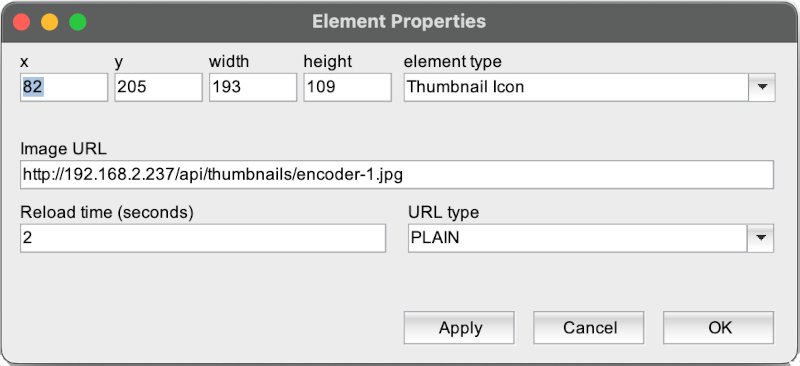
The attributes listed below may be configured to customize a display element of this type:
- Image URL --- The URL where to fetch the image.
- Reload Time --- The interval when the image shall be reloaded (seconds)
- URL Type --- One of PLAIN or ADVANCED. With PLAIN the URL is used as it is, with ADVANCED CGI parameters for the actual time and the image width and height are appended to the URL.
REMARKS
- The device to get the thumbnail images from must support this feature.
- The device to get the thumbnail images from must be accessible in the network from the client's point of view.
- Thumbnail Icons are - when resized by mouse drag in the GUI editor - forced to 16:9 ratio. If another image ratio is required, image width and height must be entered in the dialog shown above.
- in PLAIN mode, the image received from the device gets scaled to fit the screen element size, in ADVANCED mode no scaling is done as the software queries the image already in the correct size from the device.