The button "Add" below the list of TX or RX devices lets you add a new device. The program shows a dialog window where you can enter the ID for the new device. An ID entirely consists of upper case letters and digits, the "-" character is allowed as a separator. The ID must be unique, you cannot define two devices with the same ID. The ID also is unalterable, once you defined a new device you cannot change the ID of the device later.
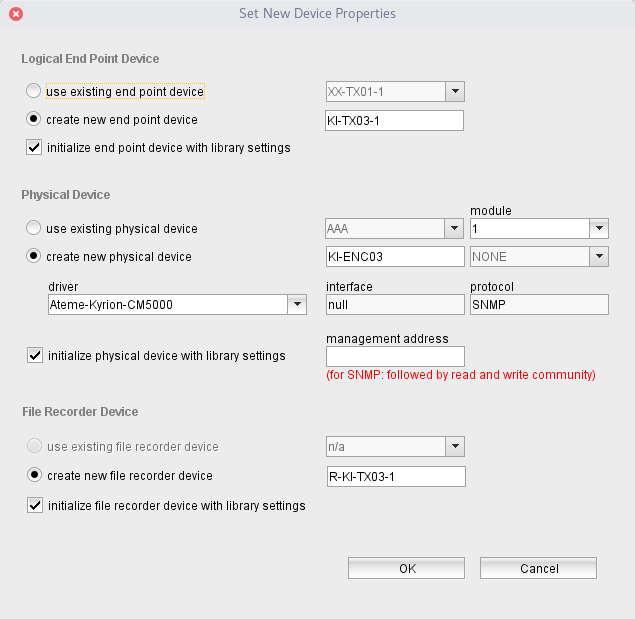
When you entered the ID for new device, the software shows in a next step this dialog which lets you select which aspects of the connection end point actually shall be created and how these aspects shall be initialized.
The first section in this dialog refers to the logical end point device which represents the new connection end point to create. You have the choice either to use an existing VioIP-End-Point device in the M&C for this or to create a new one.
You can select the first choice only if there are VioIP-End-Point devices in the M&C which are not yet used for the VioIP software. The software offers a list of such devices in this case, you can select one from this drop down list.
If you select to create a new logical end point device, the software suggests a name for this device, made up from the location ID and the device ID you specified in the previous step.
Finally the checkmark "initialize end point with library settings" defines if the setup of the used or newly created device shall be initialized with settings derived from choices made in the next step concerning the physical device. This includes the faults to be monitored at the physical device and the start/stop macros used by the logical end point device to perform the start and stop of a connection.
The next section is all about the physical device to be used for the end point. Again you have the choice either to use an existing device or to create a new one. Using an existing device is speically useful to use an unused module in a multi-encoder or multi-decoder device. Regardless of your choice you have to specify a module index beside the device name if the device containes multiple modules.
If you decide to create a new physical device you should select the device driver for the new device as the next step. Selecting the driver sets the communication interface and communication protocol defaults and suggests a name suitable for the new device.
The next step is to specify the management address for the new device. For devices controlled via SNMP the address should contain also the read and write community names (e.g. "10.0.0.1 public private").
The checkmark "initialize physical device with library settings" defines if the setup of the used or newly created device shall be initialized with settings derived from choices made in the next step concerning the physical device. This is important for multi-encoder or multi-decoder devices because this masks stream specific faults of the device in a way, that these faults do not interfere with the state of other streams on the same device.
The last section of the dialog defines the optional file recorder which may be used to log the values of packet counters of the physical device. Like the logical end point device, the file recorder is a logical device and the options given for this device are very similar to the options for the logical end point.
You may choose between using an existing device (if one is available) or to create a new one. Checking "initialize file recorder with library settings" lets you automatically initialize the file recorder to monitor the packet counter parameters of the physical device selected above.