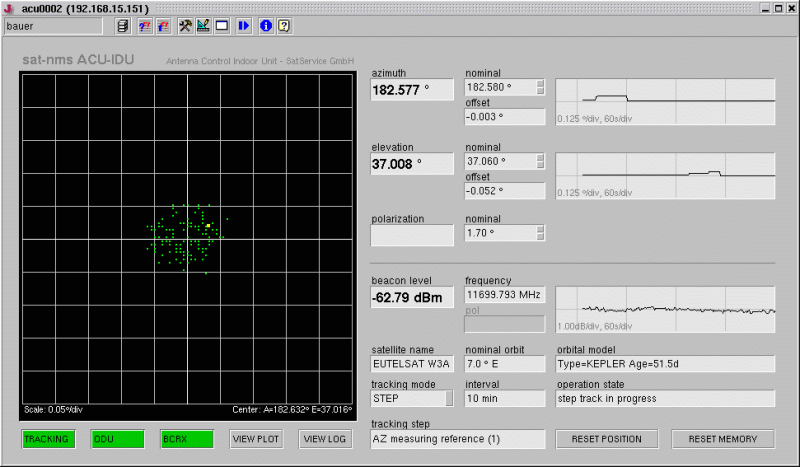
The main screen of the sat-nms ACU Indoor Unit shows the main parameters of the antenna tracking control similar to the front panel of a oscilloscope. The left part of the window contains a diagram which shows the antenna movements of the past 48 hours. The most important settings and status displays are located at the right.
The toolbar on top of the window gives access to user login/logout, the event log and some other functions. As the ACU indoor unit inside principally is a M&C system, the toolbar is exactly the same as for the M&C Main Window .
At the top of the right part of the window the pointing display is located. It shows the actual antenna pointing and a strip chart of the recent history of antenna movements. Below the pointing display you find the beacon level display It reports the actual beacon level in a similar way. At the bottom of the right side the window contains an area with the tracking status display . Finally, below the tracking diagram on the left side, the ACU main screen contains the ACU subsystem menu . These five buttons give you access to subsystem screens with all detail parameters of the ACU / tracking.