The SwitchElement is a special version of the device element which may be used to visualize the position of a switch in a user interface screen designed as a block diagram. The switch icon has all capabilities of a plain device icon display element. The context menu shown with this right mouse button additionally contains an option to toggle the switch position.
Data Model (extends ScreenElement)
| Key | Type | Value |
|---|---|---|
| type | String | Always "SwitchElement". |
| xpos | Number | see ScreenElement |
| ypos | Number | see ScreenElement |
| width | Number | see ScreenElement |
| height | Number | see ScreenElement |
| id | String | The device ID this element represents in the UI. The device ID consists of the M&C name followed by a dot and the device name. |
| privilege | Number | The privilege level required to show details about the device and to change the device's operating state. |
| icon | String | The (base-) name of the icon to show |
| enableId | String | The enable ID (may be empty) |
| enableValue | String | The value which must be matched to enable the field |
| touchScreenMode | Boolean | true = use a different click response, optimized for touch screen |
| font | String | The font to be used for the label |
| color | String | The color used for the label (#RRGGBB) |
| mustQuery | Boolean | true = show a query popup before changing the value |
| queryText | String | The text to show in the query |
Based on the id parameter, the SwitchElement subscribes for a number of parameters, the message IDs of these are as shown below:
{id}.fault: The device's summary fault state. May be one of OK., WARNING or Summary FAULT
{id}.faults.99: (Boolean) The device's communication fault
{id}.mode: The operation mode of the device. This is one of OPERATIONAL, FAULT-SUPPRESSED, OUT-OF-SERVICE and MAINTENANCE
{id}.position: The switch position. May be either 'A' or 'B'. Recognized 'ON'/'OFF' es well and changes the the command sent with a switch toggle accordingly.
Icon Selection
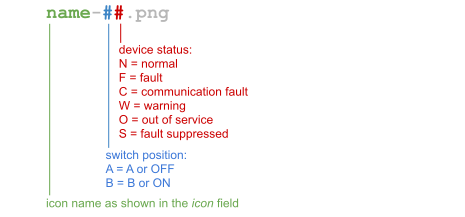
The SwitchElement displays one icon of a given set depending on the switch position and the state of the switch device. For this the SwitchElement appends a '-' character, a 2-character status code and the suffix '.png' to the icon name given in icon in order to ge the file name to load / display: