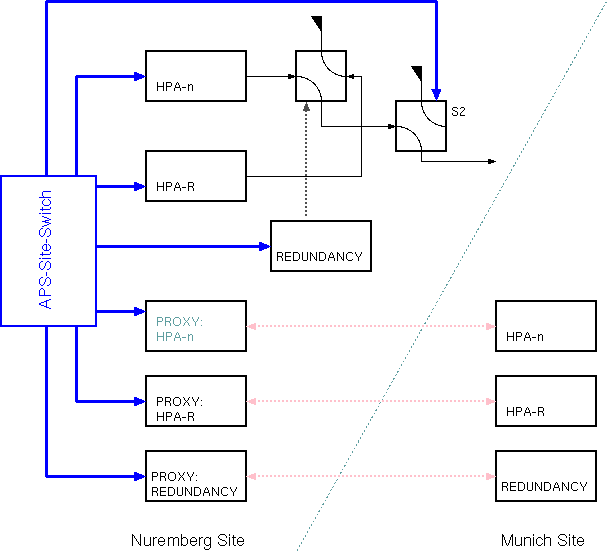
The APS-Site-Switch logical device is a project specific extension to the sat-nms software. The device controls the equipment of one transmit chain for the site diversity application between Nuremberg and Munich.
As shown in the figure above, the APS-Site-Switch logical device is operated at the Nuremberg site. There it controls the HPA which shall take over the Munich uplink, the redundant HPA, the protection switch logical device and the waveguide switch S2 which routes the HPA output either to dummy load or to the antenna. Beside this, the APS-Site-Switch controls three Proxy devices which must be configured to resemble the corresponding HPAs and the protection switch at the Munich site.
Site switch procedure
Switching the uplink from Munich to Nuremberg is a 2-step procedure. With the first step, Nuremberg gets prepared to take over the uplink, the real site switch then is performed as the second step.
To prepare Nuremberg to take over the uplink, the function 'prepare' performs the following operations:
The Nuremberg transmit facility is signalled to be prepared, when the APS-Site-Switch detects the protection switch to be OFF, the HPA to be RF-OFF / BEAM-ON and S2 set to antenna.
The actual switch over can only be performed, if the 'prepared' condition is detected by the APS-Site-Switch. This enables the 'NBG' button at the user interface. The steps of the switch over are:
Switching back to Munich works the same way the other way round.
Device window pages
The following table shows which device window pages are available with this individual device type. Tool-bar functions not mentioned here are described at the general description of device windows .
 --- Shows / commands actual uplink location.
 --- The device info page.
 --- The maintenance page. The configuration parameters from this page are described below.
Configuration parameters
At the maintenance page of the device window there are a couple of configuration parameter which must be set to interconnect the device with the devices that will perform the carrier on/off settings.
| parameter | description |
|---|---|
| s2Device | The device name of the waveguide switch which routes the local uplink either to the antenna or to a dummy load. |
| s2Positions | Two switch positions for the S2 switch, separated by a comma. The first value is used to switch S2 to dummy load, the second one to switch it to antenna. |
| lclHpaDevice | The device name of the local HPA. |
| lclProtectDevice | The device name of the local protection switch device. |
| rmtHpaDevice | The device name of the Proxy device which resembles the corresponding HPA at the Munich site. |
| rmtProtectDevice | The device name of the proxy device which resembles redundancy switch at the Munich site. |
| comment | A short text which is displayed on the main page of the device window to ease the identification of the transmit chain. |
Variables defined by this device driver
| name | type | flags | range |
|---|---|---|---|
| info.driver | TEXT | R/O | StringRange R/O |
| info.type | TEXT | R/O | StringRange R/O |
| info.frame | TEXT | R/O | StringRange R/O |
| config.s2Device | TEXT | SAVE SETUP | StringRange |
| config.s2Positions | TEXT | SAVE SETUP | StringRange |
| config.lclHpaDevice | TEXT | SAVE SETUP | StringRange |
| config.lclProtectDevice | TEXT | SAVE SETUP | StringRange |
| config.rmtHpaDevice | TEXT | SAVE SETUP | StringRange |
| config.rmtProtectDevice | TEXT | SAVE SETUP | StringRange |
| config.comment | TEXT | SAVE SETUP | StringRange |
| muc | TEXT | StringRange | |
| nbg | TEXT | StringRange | |
| prepare | TEXT | StringRange | |
| release | TEXT | StringRange | |
| progressReport | TEXT | R/O | StringRange R/O |
| progressIcon | TEXT | R/O | StringRange R/O |
| reset | TEXT | StringRange | |
| mucAll | TEXT | StringRange | |
| nbgAll | TEXT | StringRange | |
| prepareAll | TEXT | StringRange | |
| releaseAll | TEXT | StringRange |