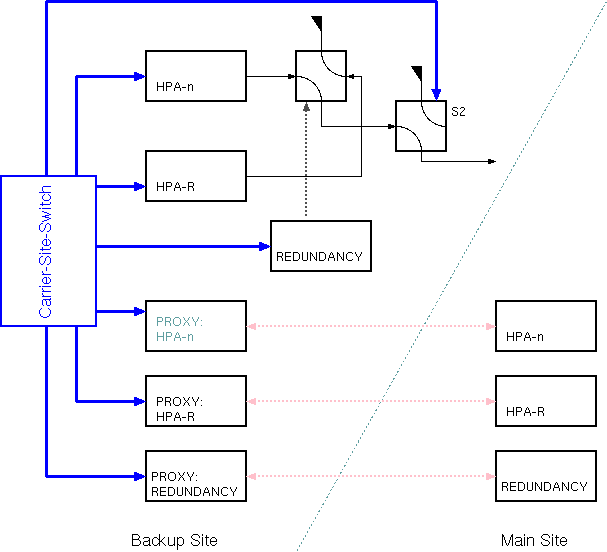
The Carrier-Site-Switch logical device controls the equipment of one transmit chain for a site diversity application between two uplink ground stations.
As shown in the figure above, the Carrier-Site-Switch logical device is operated at the Backup site. There it controls the HPA which shall take over the Main uplink, the redundant HPA, the protection switch logical device and the waveguide switch which routes the HPA output either to dummy load or to the antenna. Beside this, the Carrier-Site-Switch controls three Proxy devices which must be configured to resemble the corresponding HPAs and the protection switch at the main site.
Site switch procedure
Switching the uplink from the main site to backup is a 2-step procedure. With the first step, the backup site gets prepared to take over the uplink, the real site switch then is performed as the second step. The description below uses a configuration with HPAs controlled by a N:1 redundancy at both sites. This is only an example, the Carrier-Site-Switch device may be configured to work with various transmit devices with or without redundancy. This may be separately configured for both sites.
To prepare the backup site to take over the uplink, the function 'prepare' performs the following operations:
The backup transmit facility is signalled to be prepared, when the Carrier-Site-Switch detects the protection switch to be OFF, the HPA to be RF-OFF / BEAM-ON and S2 set to antenna.
The actual switch over can only be performed, if the 'prepared' condition is detected by the Carrier-Site-Switch. This enables the 'BACKUP' button at the user interface. The steps of the switch over are:
Switching back to the main site works the same way the other way round.
Device window pages
The following table shows which device window pages are available with this individual device type. Tool-bar functions not mentioned here are described at the general description of device windows .
 --- Shows / commands actual uplink location.
 --- The device info page.
 --- The maintenance page. The configuration parameters from this page are described below.
Configuration parameters
At the maintenance page of the device window there are a couple of configuration parameter which must be set to interconnect the device with the devices that will perform the carrier on/off settings.
| parameter | description |
|---|---|
| dummyLoadSwitch | The device name of the waveguide switch which routes the backup site uplink either to the antenna or to a dummy load. |
| dlSwitchPositions | Two switch positions for the this switch, separated by a comma. The first value is used to switch to dummy load, the second one to switch it to antenna. |
| bckpProtectMode | Selects the type of protection switch used with the TX equipment at the backup site. May be one of NONE, 1-TO-1 or N-TO-1, should be set to the value describing the protection mode of the TX equipment. |
| bckpProtectDevice | The name of the N:1 protection controller device used at the backup site. Actually the Carrier-Site-Switch supports the Protection-Switch-N-To-1 logical device for this and devices which resemble the control parameter structure if this device. Must be set if the bckpProtectMode is N-TO-1, for other protection mode settings this parameter is not required. |
| bckpTxDevice | The device name of the transmit device (typically an HPA) which produces the carrier at the backup site. Any device processing the carrier and providing a 'tx.on' parameter to switch the carrier on/off may be configured for this. |
| bckpTxRedDevice | The name of the redundant transmit device in cases where a bckpProtect mode is not NONE. For a symmetrical 1:1 redundancy this is the name of the second HPA (see redundancy configuration below. |
| bckpChainNo | If the backup site is configured for a N-TO-1 protection, this must be set to the chain number of the bckpTxDevice in the protection device (1..12). |
| mainProtectMode | Selects the type of protection switch used with the TX equipment at the main site. May be one of NONE, 1-TO-1 or N-TO-1, should be set to the value describing the protection mode of the TX equipment. |
| mainProtectDevice | The name of the N:1 protection controller device used at the main site. Actually the Carrier-Site-Switch supports the Protection-Switch-N-To-1 logical device for this and devices which resemble the control parameter structure if this device. Must be set if the mainProtectMode is N-TO-1, for other protection mode settings this parameter is not required. |
| mainTxDevice | The device name of the transmit device (typically an HPA) which produces the carrier at the main site. Any device processing the carrier and providing a 'tx.on' parameter to switch the carrier on/off may be configured for this. |
| mainTxRedDevice | The name of the redundant transmit device in cases where a mainProtect mode is not NONE. For a symmetrical 1:1 redundancy this is the name of the second HPA (see redundancy configuration below. |
| mainChainNo | If the main site is configured for a N-TO-1 protection, this must be set to the chain number of the mainTxDevice in the protection device (1..12). |
| mainName | A short (one word) name for the main site |
| mainDescription | A descriptive name for the main site. This appears in event log entries and in status messages of the device, hence it should not be to long (max 15 characters are recommended) |
| bckpName | A short (one word) name for the backup site |
| bkcpDescription | A descriptive name for the backup site. This appears in event log entries and in status messages of the device, hence it should not be to long (max 15 characters are recommended) |
| comment | The text is presented in the device's GUI as a description of the carrier which is switched between the sites. |
| bckpTxChgReadDelay | This parameters sets the delay between an RF ON/OFF command sent to the backup TX device and the first read back which is done to check if the carrier is really at the commanded state. Some devices echo the RF ON/OFF state without switching the carrier and report the true state two seconds later because the command could not be executed as expected. Increasing the delay can help to suppress the consequences of this effect. |
| mainTxChgReadDelay | This parameters sets the delay between an RF ON/OFF command sent to the main TX device and the first read back which is done to check if the carrier is really at the commanded state. Some devices echo the RF ON/OFF state without switching the carrier and report the true state two seconds later because the command could not be executed as expected. Increasing the delay can help to suppress the consequences of this effect. |
| abortOn | The CarrierSiteSwitch aborts a preparation or switchover procedure if one of the transmit devices reports a fault. This setting selects if this shall happen in case of a FAULT or also if the device reports a WARNING. |
Redundancy configuration
The Carrier-Site-Switch supports three different modes of redundancy for the transmit devices. These modes are configured individually for both sites, this means you can have two 1:1 redundante HPAs at the one site and at the other site HPAs which are part of a N:1 redundancy. The three redundancy modes are:
Variables defined by this device driver
| name | type | flags | range |
|---|---|---|---|
| info.driver | TEXT | R/O | StringRange R/O |
| info.type | TEXT | R/O | StringRange R/O |
| info.frame | TEXT | R/O | StringRange R/O |
| info.mainProtectMode | TEXT | R/O | StringRange R/O |
| info.bckpProtectMode | TEXT | R/O | StringRange R/O |
| info.mainHasBeamOn | TEXT | R/O | StringRange R/O |
| info.bckpHasBeamOn | TEXT | R/O | StringRange R/O |
| info.hasDummyLoadSwitch | TEXT | R/O | StringRange R/O |
| config.dummyLoadSwitch | TEXT | SAVE SETUP | StringRange |
| config.dlSwitchPositions | TEXT | SAVE SETUP | StringRange |
| config.bckpProtectMode | CHOICE | SAVE SETUP | EnumRange (NONE 1-TO-1 N-TO-1) |
| config.bckpProtectDevice | TEXT | SAVE SETUP | StringRange |
| config.bckpTxDevice | TEXT | SAVE SETUP | StringRange |
| config.bckpTxRedDevice | TEXT | SAVE SETUP | StringRange |
| config.bckpTxChainNo | INTEGER | SAVE SETUP | IntegerRange (0 .. 0) |
| config.mainProtectMode | CHOICE | SAVE SETUP | EnumRange (NONE 1-TO-1 N-TO-1) |
| config.mainProtectDevice | TEXT | SAVE SETUP | StringRange |
| config.mainTxDevice | TEXT | SAVE SETUP | StringRange |
| config.mainTxRedDevice | TEXT | SAVE SETUP | StringRange |
| config.mainTxChainNo | INTEGER | SAVE SETUP | IntegerRange (0 .. 0) |
| config.mainName | TEXT | SAVE SETUP | StringRange |
| config.mainDescription | TEXT | SAVE SETUP | StringRange |
| config.bckpName | TEXT | SAVE SETUP | StringRange |
| config.bckpDescription | TEXT | SAVE SETUP | StringRange |
| config.comment | TEXT | SAVE SETUP | StringRange |
| config.bckpTxChgReadDelay | INTEGER | SAVE SETUP | IntegerRange (0 .. 15000) |
| config.mainTxChgReadDelay | INTEGER | SAVE SETUP | IntegerRange (0 .. 15000) |
| config.abortOn | CHOICE | SAVE SETUP | EnumRange (WARNING FAULT) |
| config.autoPrepare | CHOICE | SAVE SETUP | EnumRange (OFF ON) |
| main | TEXT | StringRange | |
| bckp | TEXT | StringRange | |
| prepare | TEXT | StringRange | |
| release | TEXT | StringRange | |
| progressReport | TEXT | R/O | StringRange R/O |
| progressIcon | TEXT | R/O | StringRange R/O |
| reset | TEXT | StringRange | |
| prepared | BOOLEAN | R/O | BooleanRange R/O (true false) |
| location | TEXT | R/O | StringRange R/O |
| save.state | INTEGER | SAVE | IntegerRange (0 .. 0) |
| save.mainProtection | TEXT | SAVE | StringRange |