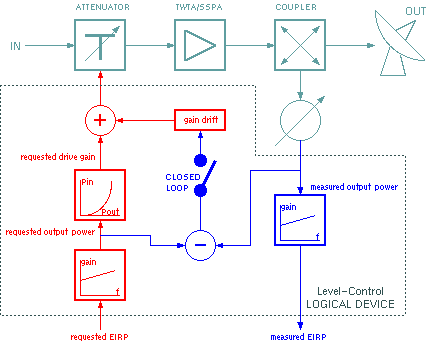
The Level-Control logical device provides a gain setting linearizer for TWT amplifiers as well as a level control loop mode. The figure below explains how the Level-Control device works. The RF devices controlled by the Level-Control are shown in cadet blue, the level setting appears in red and the level measurement is marked blue.
When the operator sets an EIRP value, the Level-Control device first computes the amplifier output power which is required for this EIRP. The conversion is done according to a user supplied calibration table, it takes the actual signal frequency into account as well as the signal path.
The requested amplifier output power then is translated into the requested drive level. For TWT amplifiers the Pin/Pout compression curve is used for this. The Level-Control device is able to measure this characteristic by itself, however, the measurement points of this curve may be entered manually, too.
Before setting the drive value at the device used for this (usually a modem, upconverter or the gain setting parameter of the amplifier itself), the Level-Control adds a parameter called "gain drift" to the setting.
After the signal passed the amplifier, the Level-Control reads the measured output power. With amplifiers providing a sufficiently precise output power reading, this value can be used, with other amplifiers a separate power meter will be required. The measured output power gets translated to EIRP by means of the same calibration table mentioned above.
In close loop mode, the Level-Control device takes the difference between the requested output power and the measured power on a regular basis, sets the gain drift parameter to this value and adjusts the drive level accordingly. The closed loop level adjustment, even if enabled by the operator, automatically is suppressed in one of the following cases:
Device window pages
The following table shows which device window pages are available with this individual device type. Tool-bar functions not mentioned here are described at the general description of device windows .
 --- This page shows the operational parameters, meter readings and status displays.
 --- This page shows the parameter required for the calibration of the amplifier's Pin/Pout characteristic.
 --- The faults page.
 --- The device info page.
 --- The maintenance page. The configuration parameters described below are set at this page.
Configuration parameters
At the maintenance page of the device window there are a couple of configuration parameters which must be set to interconnect the Level-Control device to the devices it monitors and controls.
| parameter | description |
|---|---|
| rfOn1Id | |
| rfOn2Id | |
| rfOn3Id | You define the message IDs of up to three RF-ON switches in the transmit chain. For instance, the carrier can be switched on/off at the modulator, upconverter and the HPA. |
| ampStateId | Enter the "state" parameter of a TWTA here if applicable. The Level-Control monitors the state and suppresses the closed loop adjustment if the amplifier is not in "BEAM ON" state. Leave this empty if you're using a SSPA. |
| levelSetId | This is the message ID for the drive setting. |
| levelReadId | This is the message ID for the output power reading. |
| gain1Id | This is the message ID for the first of two invariant gain settings, the Level-Control issues with a RF-ON command. This may be used to ensure certain level settings in the transmit chain. Leave this empty, if there is no gain setting to be initialized at RF-ON. |
| gain2Id | This is the message ID for a second invariant gain setting. Leave this empty, if not applicable |
| gain1 | The value to be sent to "gain1Id" |
| gain2 | The value to be sent to "gain2Id" |
| txFrequencyId | The message ID of the transmit frequency, usually the upconverter tx.frequency setting. The Level-Control device listens to this parameter to perform the amplifier output power vs. EIRP calculations based on the actual frequency. |
| txSwitch1Id | The message ID of the first of two switches in the transmit signal path which affect the EIRP calibration. Usually here the ID of the polarization switch is entered. |
| txSwitch2Id | The message ID of a second switch in the transmit signal path. |
| redPosId | In cases where the Level-Control device controls a redundant HPA in a N:1 configuration and deltas shall be applied to the input/output calibration of the device depending on the transmit chain this one is actually replacing, then the parameter ID of the "location" parameter of the Protection-Switch-N-To-1 device must be entered here. In all other cases the redPosId parameter must stay empty. For details see the paragraph "N:1 redundant configuration" below. |
| redEirpDeltas | A comma separated list of delta values to be included to the EIRP calculation if the above parameter "redPosId" is set. For details see the paragraph "N:1 redundant configuration" below. |
| redDriveDeltas | A comma separated list of delta values to be included to the amplifier drive calculation if the above parameter "redPosId" is set. For details see the paragraph "N:1 redundant configuration" below. |
| maxDisplay | The EIRP value to be displayed at the right edge of a GaugeElement which uses the 'gauge' status variable provided by this device. Set maxDisplay and minDisplay both to 0.0 in order to set the gauge's display range to the complete valid range of the eirp setting. |
| minDisplay | The EIRP value to be displayed at the left edge of a GaugeElement which uses the 'gauge' status variable provided by this device. Set maxDisplay and minDisplay both to 0.0 in order to set the gauge's display range to the complete valid range of the eirp setting. |
Calibration parameters
At the "Calibration" page of the device window there are a number of parameters which mark out the basic performance of the device. They are explained below.
Leveling And Pin/Pout Calibration
To make the Level-Control device work properly, the level ranges must be adjusted and the Pin/Pout calibration curve must contain values which exactly represent the amplifier's characteristic. When defining the levels / level ranges the following should be considered.
Below the steps necessary to adjust the Level-Control device for a certain setup are described.
The Level-Control device now starts to measure the Pin/Pout characteristic of the amplifier. It sets the lowest possible drive value, waits 10 seconds (the value set with the "delay" parameter) an then takes a reading of the output power. If the power reading is below the minimum value, this measurement point is discarded. If considered to be OK, the measurement point is added to the power transfer characteristic. The Level-Control device increases the drive by 1 dB and starts the next measurement cycle. The measurement procedure stops if
The ongoing measurement procedure can be watched with the messages displayed in the "calibration state" and "state" fields. At any time the measurement may be aborted by commanding a RF-OFF at the device's main settings page.
Unless aborted by the operator, the LevelControl device replaces the stored Pin/Pout curve by the recently measured one when it finishes. Additionally the "gain drift" value is cleared and the maximum amplifier output power value is adjusted to the saturation value if applicable.
EIRP Calibration Table
The Level-Control device requires an EIRP calibration table which defines the level difference between the measured output power reading and the EIRP over the frequency. This in most cases is the antenna gain reduced by the waveguide loss between the measurement point and the antenna.
The calibration table is a plain text file, called "XXXX.eirpCal" where XXXX is the name of the Level-Control device. The file must reside in the M&C software's home directory. Below an example for such a file is shown:
    #
    # /home/mnc/EIRP-1.eirpCal
    #
    #           TRANSMIT 1    TRANSMIT-2
    #           X      Y      X      Y
       14000.0  20.2   20.2   20.2   20.2
       14100.0  20.27  20.27  20.27  20.27
       14200.0  20.31  20.31  20.31  20.31
       14300.0  20.44  20.44  20.44  20.44
       14400.0  20.5   20.5   20.5   20.5
       14500.0  20.5   20.5   20.5   20.5
The file is formatted as a table of 5 columns and an arbitrary number of lines. Empty lines and lines starting with a "#" are ignored. Columns are separated by spaces.
| column | description |
|---|---|
| 1 | The frequency value in MHz. The frequency values must be sorted in the order low values first. |
| 2 | The gain value for the signal path indicated by SWITCH1=A (OFF), SWITCH2=A (OFF). |
| 3 | The gain value for the signal path indicated by SWITCH1=B (ON), SWITCH2=A(OFF). |
| 4 | The gain value for the signal path indicated by SWITCH1=A (OFF), SWITCH2=B (ON). |
| 5 | The gain value for the signal path indicated by SWITCH1=B (ON), SWITCH2=B (ON). |
Limit Checking
At the primary device page, two pairs of min / max threshold values may be defined. These values apply to the measured EIRP, they are checked while the Level-Set device is set RF-ON. If the measured EIRP exceeds the limit values a fault is generated. The fault gets cleared if the EIRP value returns inside the limit window of id the EIRP is switched off. If the Level-Set device shall not do any limit checking, set both threshold values to 0.0.
The minEirp/maxEirp settings are included into the 'gauge' parameter which controls the appearance of a Gauge screen element which follows this parameter. There is a second parameter of the same format called 'gauge2' which includes the minEirp2/maxEirp2 limits instead.
N:1 Redundant Configuration
For a Level-Control device operating a redundant transmit chain in a N:1 redundant configuration, the Pin/Pout calibration must be corrected depending on which chain actually is replaced.
For this case the Level-Control device provides a mechanism to monitor the actual "location" setting of the Protection-Switch-N-To-1 device managing the redundancy control an to apply individual offsets to the displayed EIRP and initial drive power values for each chain.
To use this feature, fill out the configuration settings redPosId, redEirpDeltas, and redDriveDeltas as described below:
Variables defined by this device driver
| name | type | flags | range |
|---|---|---|---|
| info.driver | TEXT | R/O | StringRange R/O |
| info.type | TEXT | R/O | StringRange R/O |
| info.frame | TEXT | R/O | StringRange R/O |
| config.rfOn1Id | TEXT | SAVE SETUP | StringRange |
| config.rfOn2Id | TEXT | SAVE SETUP | StringRange |
| config.rfOn3Id | TEXT | SAVE SETUP | StringRange |
| config.ampStateId | TEXT | SAVE SETUP | StringRange |
| config.levelSetId | TEXT | SAVE SETUP | StringRange |
| config.levelReadId | TEXT | SAVE SETUP | StringRange |
| config.gain1Id | TEXT | SAVE SETUP | StringRange |
| config.gain2Id | TEXT | SAVE SETUP | StringRange |
| config.gain1 | FLOAT | SAVE SETUP | DoubleRange (0.0 .. 0.0) |
| config.gain2 | FLOAT | SAVE SETUP | DoubleRange (0.0 .. 0.0) |
| config.txFrequencyId | TEXT | SAVE SETUP | StringRange |
| config.txSwitch1Id | TEXT | SAVE SETUP | StringRange |
| config.txSwitch2Id | TEXT | SAVE SETUP | StringRange |
| config.redLocId | TEXT | SAVE SETUP | StringRange |
| config.redEirpDeltas | TEXT | SAVE SETUP | StringRange |
| config.redDriveDeltas | TEXT | SAVE SETUP | StringRange |
| config.maxDisplay | FLOAT | SAVE SETUP | DoubleRange (0.00 .. 0.00) |
| config.minDisplay | FLOAT | SAVE SETUP | DoubleRange (0.00 .. 0.00) |
| compression | TEXT | SAVE | StringRange |
| calibrate | TEXT | NOPRESET | StringRange |
| delay | FLOAT | SAVE | DoubleRange (0.0 .. 0.0) |
| drift | FLOAT | SAVE | DoubleRange (0.0 .. 0.0) |
| minAmpPower | FLOAT | SAVE | DoubleRange (0.0 .. 0.0) |
| maxAmpPower | FLOAT | SAVE | DoubleRange (0.0 .. 0.0) |
| hysteresis | FLOAT | SAVE | DoubleRange (0.0 .. 0.0) |
| closedLoop | CHOICE | SAVE | EnumRange (OFF ON) |
| on | CHOICE | SAVE | EnumRange (OFF ON) |
| eirp | FLOAT | SAVE | DoubleRange (0.0 .. 0.0) |
| minEirp | FLOAT | SAVE | DoubleRange (0.00 .. 0.00) |
| maxEirp | FLOAT | SAVE | DoubleRange (0.00 .. 0.00) |
| minEirp2 | FLOAT | SAVE | DoubleRange (0.00 .. 0.00) |
| maxEirp2 | FLOAT | SAVE | DoubleRange (0.00 .. 0.00) |
| measuredEirp | FLOAT | R/O | DoubleRange R/O (0.0 .. 0.0) |
| measuredPower | FLOAT | R/O | DoubleRange R/O (0.0 .. 0.0) |
| drive | FLOAT | R/O | DoubleRange R/O (0.0 .. 0.0) |
| loopState | TEXT | R/O | StringRange R/O |
| redEirpDelta | FLOAT | R/O | DoubleRange R/O (0.0 .. 0.0) |
| redDriveDelta | FLOAT | R/O | DoubleRange R/O (0.0 .. 0.0) |
| gauge | TEXT | R/O | StringRange R/O |
| gauge2 | TEXT | R/O | StringRange R/O |
| faults.01 | ALARM | R/O | AlarmFlagRange R/O (High drive limit) |
| faults.02 | ALARM | R/O | AlarmFlagRange R/O (Low drive limit) |
| faults.03 | ALARM | R/O | AlarmFlagRange R/O (Gain deviation) |
| faults.04 | ALARM | R/O | AlarmFlagRange R/O (Low EIRP threshold 1) |
| faults.05 | ALARM | R/O | AlarmFlagRange R/O (High EIRP threshold 1) |
| faults.06 | ALARM | R/O | AlarmFlagRange R/O (Low EIRP threshold 2) |
| faults.07 | ALARM | R/O | AlarmFlagRange R/O (High EIRP threshold 2) |