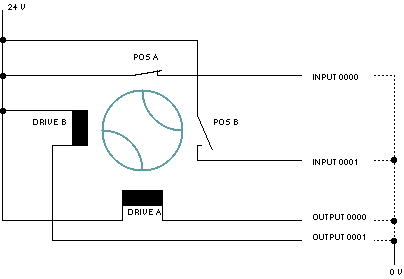
This page describes the device driver and the device window for the NAIS-FP-Latching-Relay device. This device controls a latching relay or wave guide switch. To change the position, it applies a current pulse to one of the motors/drive coils at the switch. On the other hand it monitors the switch position by means of two position contacts. The figure below shows an example how to connect a wave guide switch to the PLC.
Multiple devices of this type (and other members of the NAIS-FP-* -family) may refer to one single PLC device. To do so, configure these devices to share the serial interface of the PLC and set the configuration parameters of each particular switch/monitoring device to the same PLC (address) but to individual ports.
Device window pages
The following table shows which device window pages are available with this individual device type. Tool-bar functions not mentioned here are described at the general description of device windows .
 --- Shows / commands the switch position.
 --- The faults page.
 --- The device info page.
 --- The maintenance page. The configuration parameters described below are set at this page.
Configuration parameters
At the maintenance page of the device window there are a couple of configuration parameters which must be set to make the software talk to the alarm monitoring input at the PLC.
| parameter | description |
|---|---|
| address | The packet address of the PLC device. Usually this is "01". |
| drivePortA | The address of the output port connected to the drive A motor/coil. |
| drivePortB | The address of the output port connected to the drive B motor/coil. |
| readbackPortA | The address of the input port connected to the contact closed at position A. |
| readbackPortB | The address of the input port connected to the contact closed at position B. |
| pulse | The duration of the current impulse sent in order to change the position. |
| Serial | Remember to set the line parameters for the serial interface connected to the FPx PLC device. It requires the somewhat unusual setting 9600,O,8,1 . With multiple NAIS-FP-* -devices referring to the same PLC, the line speed needs to be setup only once. |
Remarks
Variables defined by this device driver
| name | type | flags | range |
|---|---|---|---|
| info.driver | TEXT | R/O | StringRange R/O |
| lowLevel.cmd | TEXT | StringRange | |
| lowLevel.reply | TEXT | R/O | StringRange R/O |
| faults.99 | ALARM | R/O | AlarmFlagRange R/O (Communication) |
| faults.commstat | TEXT | R/O | StringRange R/O |
| info.type | TEXT | R/O | StringRange R/O |
| info.port | TEXT | R/O | StringRange R/O |
| info.frame | TEXT | R/O | StringRange R/O |
| config.drivePortA | TEXT | SAVE SETUP | StringRange |
| config.drivePortB | TEXT | SAVE SETUP | StringRange |
| config.readbackPortA | TEXT | SAVE SETUP | StringRange |
| config.readbackPortB | TEXT | SAVE SETUP | StringRange |
| config.pulse | FLOAT | SAVE SETUP | DoubleRange (0.0 .. 2.0) |
| position | CHOICE | EnumRange (A B) | |
| internal.readA | BOOLEAN | R/O | BooleanRange R/O (true false) |
| internal.readB | BOOLEAN | R/O | BooleanRange R/O (true false) |
| faults.01 | ALARM | R/O | AlarmFlagRange R/O (Indifferent position) |