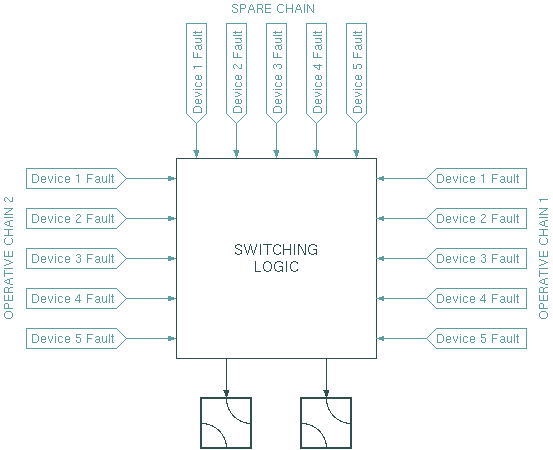
The Protection-Switch-2-To-1 logical device provides a completely software based solution for a 2:1 redundancy switch. The logical device monitors the fault states of a couple of devices, deriving from this the information whether to switch the (usually transmit-) chain.
As illustrated by the figure above, the redundancy switch reads up to five device fault variables for each chain and controls two switches. The latter not necessarily need to be waveguide switches as shown here. Any device may be configured to receive a command when the protection switch toggles the chain.
With a 2:1 redundancy, there is a dedicated spare chain which is placed into operation when one of the operative chains fails. A redundancy switch over takes place if these conditions become true at one time:
When specifying the delay times, you should consider that the values become effective in steps of the IDLE time defined for the 'null' interface in the device setup. If the default value of 1000 msecs applies, all delays will be rounded up the next full second even if you specify fractions of a second.
The Protection-Switch-2-To-1 also is able to switch back to the original equipment in case of a a failure in the spare chain. Such a 'reverse redundancy switching' is performed under the following conditions:
Device window pages
The following table shows which device window pages are available with this individual device type. Tool-bar functions not mentioned here are described at the general description of device windows .
 --- This page controls the operational parameters of the device.
 --- The faults page.
 --- The device info page.
 --- The maintenance page. The configuration parameters described below are set at this page.
Configuration parameters
At the maintenance page of the device window there are a couple of configuration parameter which must be set to interconnect the redundancy switch with the devices it shall monitor and control.
| parameter | description |
|---|---|
| fault11Id | The message ID for the first fault flag to be monitored for the operative chain 1. The the switch recognized device summary fault flags ('XXXXX.fault') and individual fault flags ('XXXXX.faults.yy') as well. Be aware that the latter are individually defined for each device driver. |
| fault12Id ... fault15Id | The message IDs for up to four additional fault flags to be monitored for the operative chain 1. You may leave this fields empty if there are no more faults to monitor. |
| fault21Id ... fault25Id | The message IDs for the fault flags to be monitored for the operative chain 2. |
| faultS1Id ... faultS5Id | The message IDs for the fault flags to be monitored for the spare chain |
| switch1Id | The message ID for the first switch to control. Usually this is 'ZZZ. position' if 'ZZZ' is the name of the switch device. |
| switch2Id | The message ID for the second switch to control. Usually this is 'ZZZ. position' if 'ZZZ' is the name of the switch device. |
| location1Val | The commands to be sent to the switches if the protection switch wants to switch the spare equipment in place of chain 1. You have to enter the switch positions of S1 and S2, separated by a comma. Example: 'OFF,ON' |
| location2Val | The commands to be sent to the switches if the protection switch wants to switch the spare equipment in place of chain 2. You have to enter the switch positions of S1 and S2, separated by a comma. Example: 'OFF,ON' |
| locationSVal | The commands to be sent to the switches if the protection switch wants to switch the spare equipment into spare position. You have to enter the switch positions of S1 and S2, separated by a comma. Example: 'OFF,ON' |
| inhibitId | You may provide the message ID of a parameter here which the protection switch monitors and inhibits it's operation if the parameter reads a certain value. |
| inhibitVal | Enter the value here, the 'inhibitId' parameter is checked against. If the parameter matches this value, not redundancy switching takes place. |
Variables defined by this device driver
| name | type | flags | range |
|---|---|---|---|
| info.driver | TEXT | R/O | StringRange R/O |
| info.type | TEXT | R/O | StringRange R/O |
| info.frame | TEXT | R/O | StringRange R/O |
| config.fault11Id | TEXT | SAVE SETUP | StringRange |
| config.fault12Id | TEXT | SAVE SETUP | StringRange |
| config.fault13Id | TEXT | SAVE SETUP | StringRange |
| config.fault14Id | TEXT | SAVE SETUP | StringRange |
| config.fault15Id | TEXT | SAVE SETUP | StringRange |
| config.fault21Id | TEXT | SAVE SETUP | StringRange |
| config.fault22Id | TEXT | SAVE SETUP | StringRange |
| config.fault23Id | TEXT | SAVE SETUP | StringRange |
| config.fault24Id | TEXT | SAVE SETUP | StringRange |
| config.fault25Id | TEXT | SAVE SETUP | StringRange |
| config.faultS1Id | TEXT | SAVE SETUP | StringRange |
| config.faultS2Id | TEXT | SAVE SETUP | StringRange |
| config.faultS3Id | TEXT | SAVE SETUP | StringRange |
| config.faultS4Id | TEXT | SAVE SETUP | StringRange |
| config.faultS5Id | TEXT | SAVE SETUP | StringRange |
| config.switch1Id | TEXT | SAVE SETUP | StringRange |
| config.switch2Id | TEXT | SAVE SETUP | StringRange |
| config.location1Val | TEXT | SAVE SETUP | StringRange |
| config.location2Val | TEXT | SAVE SETUP | StringRange |
| config.locationSVal | TEXT | SAVE SETUP | StringRange |
| config.inhibitId | TEXT | SAVE SETUP | StringRange |
| config.inhibitVal | TEXT | SAVE SETUP | StringRange |
| location | CHOICE | SAVE | EnumRange (OFF 1 2) |
| protection | CHOICE | SAVE | EnumRange (OFF ON) |
| switchDelay | FLOAT | SAVE | DoubleRange (0.0 .. 300.0) |
| recovDelay | FLOAT | SAVE | DoubleRange (0.0 .. 300.0) |
| reset | TEXT | StringRange | |
| chain1Fault | BOOLEAN | R/O | BooleanRange R/O (true false) |
| chain2Fault | BOOLEAN | R/O | BooleanRange R/O (true false) |
| chainSFault | BOOLEAN | R/O | BooleanRange R/O (true false) |
| faults.01 | ALARM | R/O | AlarmFlagRange R/O (Chain 1) |
| faults.02 | ALARM | R/O | AlarmFlagRange R/O (Chain 2) |
| faults.03 | ALARM | R/O | AlarmFlagRange R/O (Spare) |
| faults.04 | ALARM | R/O | AlarmFlagRange R/O (Protection) |
| faults.05 | ALARM | R/O | AlarmFlagRange R/O (Switch configuration) |