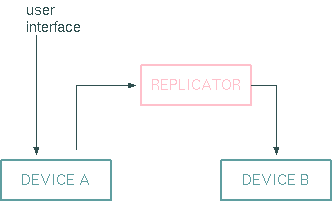
The Replicator logical device replicates a parameter setting from one device to another. A typical application for the Replicator is to bind frequencies or data rates at communicating devices to the same value.
The Replicator listens to the reply of the primary parameter the operator controls and commands this value to the secondary device. You should only bind parameters of the same type and preferable the same range. You will get unpredictable results when binding a frequency to a switch position e.g.
Filtering
Additionally, the Replicator device is capable to filter the replicated messages. If you set the filter configuration parameter to a comma separated list of values, the Replicator device only processes messages which match one of the given values. You should not use this feature with floating point parameters as rounding inaccuracies may cause unpredictable results.
Conditional enabling
The replication function may be enabled / disabled by an external parameter. If the enableId configuration parameter is set, the device watches this parameter and replicates only if the parameter value matches the reference value set with the enableVal configuration parameter. The info.enabled status variable tells if replication is actually enabled.
If the enable state changes from false to true, the device replicates the input once - provided the actual input value matches the filter. If enableId ist empty or undefined, the replication function is always enabled.
Startup behavior
After system start the device stays disabled for 10 driver cycles (which are about 10 seconds at an IDLE time of 1000msecs). At the end of this initialization delay it replicates the input value once if all enabling factors are true. This avoids unintended replications during the startup phase if the first input value arrives before filter and enableId are processed by the device.
Device window pages
The following table shows which device window pages are available with this individual device type. Tool-bar functions not mentioned here are described at the general description of device windows .
 --- The device info page.
 --- The maintenance page. The configuration parameters from this page are described below.
Configuration parameters
At the maintenance page of the device window there are a couple of configuration parameter which must be set to interconnect the Replicator device with the devices that will perform the frequency setting.
| parameter | description |
|---|---|
| inputId | Enter the message identifier here of the parameter the replicator shall listen to, e.g. "MODULATOR.tx.dataRate". |
| outputId | Enter the message identifier here of the parameter the replicator shall control, e.g. "ENCODER.dataRate". |
| filter | Enter a comma separated list of the values that the Replicator device shall process. If a 'filter' list is given, the Replicator ignores all messages which do not match one of the values of the filter list. Leave the list empty to prevent the Replicator from performing any filtering (all messages are replicated in this case). |
| enableId | If set, the device watches this parameter and enables replication only if the value of this parameter matches the enableVal defined below. |
| enableVal | The value to compared to the value of the enabling parameter defined above with enableId. The device does a string compare with the value and its reference, hence comparing floating point values will give unpredictable results. |
Variables defined by this device driver
| name | type | flags | range |
|---|---|---|---|
| info.driver | TEXT | R/O | StringRange R/O |
| info.type | TEXT | R/O | StringRange R/O |
| info.frame | TEXT | R/O | StringRange R/O |
| info.state | TEXT | R/O | StringRange R/O |
| info.enabled | TEXT | R/O | StringRange R/O |
| config.inputId | TEXT | SAVE SETUP | StringRange |
| config.outputId | TEXT | SAVE SETUP | StringRange |
| config.filter | TEXT | SAVE SETUP | StringRange |
| config.enableId | TEXT | SAVE SETUP | StringRange |
| config.enableVal | TEXT | SAVE SETUP | StringRange |