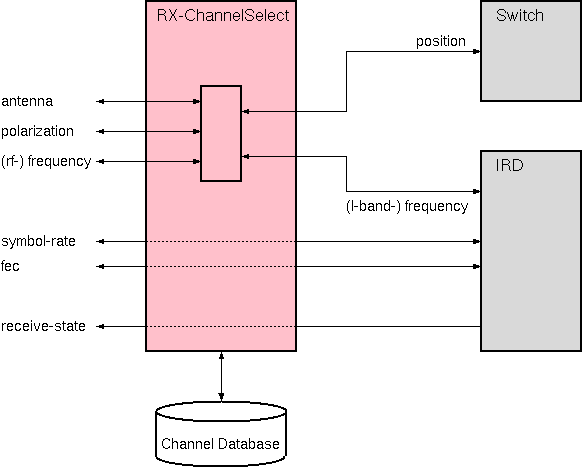
The RX-ChannelSelect-CDB logical device controls the basic parameters of an IRD and an input switch for the IRD which selects frequency band and polarization. RX-ChannelSelect-CDB is comparable to the RX-ChannelSelect device, but is intendended for the use in a sat-nms NMS system. "CDB" in the driver name stands for "Central Data Base", underlining that all RX-ChannelSelect-CDB instances use one central satellite channel database located at the NMS server. The RX-ChannelSelect-CDB device primarily is used for VLC configurations where several IRDs are connected to an L-band switch matrix which distributes the signals from multiple antennas. It however can be used for simpler applications as well.
The RX-ChannelSelect-CDB device is complemented by the TX-ChannelSelect-CDB logical device which may be used to control the equipment of a (DVB) transmit chain in a similar way. Both ChannelSelect devices share the same channel database.
Although all individual IRD parameters are individually accessible with the RX-ChannelSelect-CDB device, the typical way to operate the device is to select a satellite channel from the list and to select the proper input signal for the IRD. The RX-ChannelSelect-CDB device assists the operator in this task with the following functions:
Device window pages
The following table shows which device window pages are available with this individual device type. Tool-bar functions not mentioned here are described at the general description of device windows .
 --- The main control (channel select) page for the device.
 --- The channel database editor page.
 --- The fault page.
 --- The device info page.
 --- The maintenance page. The configuration parameters from this page are described below.
Operation (channel select)
Selecting an already defined satellite channel is a simple 2-step procedure:
Instead of selecting the satellite and channel you also may enter the receive parameters at the frequency / pol / symbol rate / fec fields. The RX-ChannelSelect-CDB device forwards these settings to the IRD. The input selection list gets confined to the inputs matching the frequency band of the entered frequency.
Operation (database edit)
With the second page of the device window of the RX-ChannelSelect-CDB device channel definitions are edited, copied or deleted. All RX-ChannelSelect devices in a sat-nms NMS share one common channel database located at the NMS server. The VLC containing the RX-ChannelSelect-CDB device requires an online connection to the NMS central database in order to make any changes to the database. Selecting channels at this page or changing any channel parameters do not change the receiver settings.
Local database copy
sat-nms VLCs may be operated locally by connecting an M&C client directly to the VLC. This may be used as a backup operation mode in cases where the NMS server is down or unreachable. To uphold the RX-ChannelSelect-CDB functionality even in this backup case, the VLC maintains a local copy of the channel database. This copy is used if the CDB at the NMS is unreachable. You cannot edit the channels in this local backup copy, but you can apply stored channels to the IRD.
There are two ways to update the local copy of the channel database at the VLC:
EBU DREAMS channel list import
The channel database is capable to import channel lists from the EBU DREAMS software. The DREAMS channel lists are distributed as two CSV tables, on for RX and one for TX. In the sat-nms channel database these lists get merged. EBU channels are marked "read-only" in the database, they only may be changed by importing a new EBU channel list.
To import a pair of EBU channel lists, click the "IMPORT" button at the "Database" page of the RX-ChannelSelect-CDB device's device screen. This opens a new window where the names of the files to import must be entered. The small buttons beside the file name entry fields open a file select dialog which lets you select the file names fom the directory.
After you have set the file names, click "READ". The software reads and parses the CSV files. It also matches corresponding RX and TX channels, because the sat-nms channel database stores only one entry for each channel containing both, the RX and TX parameters.
The software reports the number channels read from each file and the number of channels matched. Sometimes the numbers slightly differ, e.g. if the original channel names in the RX and TX lists are not really identical. You have to edit and repair the original files if you want to fix this.
If you are satisfied with the parsing result, click "IMPORT". This imports the channel definitions to the sat-nms database. All existing EBU channel definitions are deleted and replaced by the new ones. The user defined channels in the database remain unchanged by this.
Please note, that this procedure copies the EBU channels directly from the client PC to the NMS server, the RX-ChannelSelect-CDB device is not involved in this and does not recognize the new channels immediately. This happens with the next regular update of the channel list, max 5 minutes later.
Configuration parameters
At the maintenance page of the device window there are a couple of configuration parameters which must be set to interconnect the RX-ChannelSelect-CDB device with the IRD and the input switch.
| parameter | description |
|---|---|
| switchId | Enter the message identifier here of the parameter which shall receive the switch setting, e.g. "MATRIX.12.position". Look at the list of device driver variable definitions to see correct name of this setting at the device type you are using. |
| configFile | The name of the configuration file, the RX-ChannelSelect-CDB device reads the matrix input assignments from. You may use a common configuration file for all RX-ChannelSelect-CDB devices in the system or an individual file. The file format is described at the end of this chapter. |
| frequencyId | The parameter with the message ID entered receives the receive frequency setting from the device. |
| fecId | The message ID for setting the FEC |
| symbolRateId | The message ID for setting the symbol rate |
| dvbModeId | The message ID for setting the DVB-S/DVB-S2 mode. For most IRDs use the 'dvbMode' parameter for this. For the Scopus IRD2900 please read it's driver documentation for this parameter. |
| irdLockFaultId | The message ID for the lock fault flag of the IRD. |
To make the RX-ChannelSelect-CDB device work, at least the frequencyId and symbolRateId fields must be set to the message IDs of the corresponding IRD parameters. If some other parameters are not supported by the IRD, leave the message ID fields empty, the same applies to the lock fault if a lock fault signalling in the RX-ChannelSelect-CDB device is not desired.
The configuration file format
The RX-ChannelSelect's configuration file is a plain text file which defines the matrix / switch input assignments. As this is a system wide assignment, you usually will edit one common configuration file for all RX-ChannelSelect-CDB devices connected to one input matrix.
In the file all empty lines and lines starting with a '#' character are ignored. All other lines are treated as table rows where the cells are separated by space characters. Each row describes one matrix input as follows:
| column | contents | remark |
|---|---|---|
| 1 | switch position / matrix input | If the input numbering starts at one or at zero, depends on the matrix / switch device driver. |
| 2 | antenna name | The antenna name must not contain spaces, commas ot pipe characters (' |
| 3 | polarization | A one letter code, one of the following: X for horizontal Y for vertical |
| 4 | LNB LO frequency for this port | The LO frequency must be given as a decimal number (MHz) with a decimal point (no commas, no thousand's separators are allowed) |
| 5 | < or > | If this column contains ' < ', the switch position is used for frequencies below the limit contained in the next column. ' < ' works the other way round. |
| 6 | frequency limit for this port | The frequency limit must be given as a decimal number (MHz) with a decimal point (no commas, no thousand's separators are allowed) |
Example:
#  Example configuration file for a RX-ChannelSelect-CDB device
#
#
#  input no.    polarization       freq. limit [MHz]
#  |            |                  |
#  |   antenna  |  LO freq. [MHz]  |
#  |   |        |  |               |

  01   ARD      X  9750.0        < 11800.0
  02   ARD      Y  9750.0        < 11800.0
  03   ARD      X  10600.0       > 11800.0
  04   ARD      Y  10600.0       > 11800.0

  05   NDR      X  9750.0        < 11800.0
  07   NDR      X  10600.0       > 11800.0

  17   SNGR     X  9750.0        < 11800.0
  18   SNGR     Y  9750.0        < 11800.0
  19   SNGR     X  10600.0       > 11800.0
  20   SNGR     Y  10600.0       > 11800.0

  09   EBU      X  10000.0       < 11800.0
  10   EBU      Y  10000.0       < 11800.0

  11   W1       X  9750.0        < 11800.0
  12   W1       Y  9750.0        < 11800.0
  23   W1       X  10600.0       > 11800.0
  24   W1       Y  10600.0       > 11800.0

  13   ASTRA    X  9750.0        < 11800.0
  14   ASTRA    Y  9750.0        < 11800.0
  15   ASTRA    X  10600.0       > 11800.0
  16   ASTRA    Y  10600.0       > 11800.0

  21   EB_12V   Y  10600.0       > 11800.0

  22   W1_V     Y  10000.0       < 11800.0
The RX-ChannelSelect-CDB device parses this file on startup and when it receives a new name for the configuration file. So when you change the configuration file in the running M&C system, the best way is to restart the M&C server process to make all devices read the configuration file again.
Variables defined by this device driver
| name | type | flags | range |
|---|---|---|---|
| info.driver | TEXT | R/O | StringRange R/O |
| info.type | TEXT | R/O | StringRange R/O |
| info.frame | TEXT | R/O | StringRange R/O |
| config.switchId | TEXT | SAVE SETUP | StringRange |
| config.configFile | TEXT | SAVE SETUP | StringRange |
| config.frequencyId | TEXT | SAVE SETUP | StringRange |
| config.fecId | TEXT | SAVE SETUP | StringRange |
| config.symbolRateId | TEXT | SAVE SETUP | StringRange |
| config.dvbModeId | TEXT | SAVE SETUP | StringRange |
| config.nlcModeId | TEXT | SAVE SETUP | StringRange |
| config.irdLockFaultId | TEXT | SAVE SETUP | StringRange |
| antenna | TEXT | R/O | StringRange R/O |
| input | CHOICE | EnumRange (unknown) | |
| fec | CHOICE | EnumRange (AUTO 1/2 1/3 1/4 2/3 3/4 2/5 3/5 4/5 5/6 6/7 7/8 8/9 9/10) | |
| polarization | TEXT | R/O | StringRange R/O |
| comment | TEXT | SAVE | StringRange |
| rxFrequency | FLOAT | DoubleRange (0.000 .. 0.000) | |
| symbolRate | FLOAT | DoubleRange (0.0000 .. 0.0000) | |
| dvbMode | CHOICE | EnumRange (DVBS DVBS2 NS3 NS4) | |
| nlcMode | CHOICE | EnumRange (OFF ON) | |
| channel | CHOICE | EnumRange (@@@channels.m) | |
| reset | TEXT | StringRange | |
| locked | BOOLEAN | SAVE | BooleanRange (true false) |
| edit.channel | CHOICE | EnumRange (@@@channels) | |
| edit.satellite | TEXT | StringRange | |
| edit.chanid | TEXT | StringRange | |
| edit.rxpol | CHOICE | EnumRange (X Y) | |
| edit.rxfreq | FLOAT | DoubleRange (0.000 .. 0.000) | |
| edit.txpol | CHOICE | EnumRange (X Y) | |
| edit.txfreq | FLOAT | DoubleRange (0.000 .. 0.000) | |
| edit.symbolRate | FLOAT | DoubleRange (0.0000 .. 0.0000) | |
| edit.fec | CHOICE | EnumRange (AUTO 1/2 1/3 1/4 2/3 3/4 2/5 3/5 4/5 5/6 6/7 7/8 8/9 9/10) | |
| edit.modulation | CHOICE | EnumRange (QPSK 8PSK 16APSK 32APSK) | |
| edit.rollOff | CHOICE | EnumRange (0.02 0.05 0.10 0.15 0.20 0.25 0.35) | |
| edit.dvbMode | CHOICE | EnumRange (DVBS DVBS2 NS3 NS4) | |
| edit.nlcMode | CHOICE | EnumRange (OFF ON) | |
| edit.pilots | CHOICE | EnumRange (OFF ON) | |
| edit.comment | TEXT | StringRange | |
| edit.store | TEXT | StringRange | |
| edit.delete | TEXT | StringRange | |
| edit.read | TEXT | StringRange | |
| edit.sync | TEXT | StringRange | |
| display | TEXT | R/O | StringRange R/O |
| dispColor | TEXT | R/O | StringRange R/O |
| cdbState | TEXT | R/O | StringRange R/O |
| faults.01 | ALARM | R/O | AlarmFlagRange R/O (IRD lock) |
| faults.02 | ALARM | R/O | AlarmFlagRange R/O (Config file) |
| faults.03 | ALARM | R/O | AlarmFlagRange R/O (Wrong input) |