9.630 SNG-Pointing
The SNG-Pointing logical device is a 'high level' driver for motor driven, car-mounted antennas. It is used together with a driver for the type of antenna controller used. In order to work properly together with the SGN-Pointing device, the antenna controller / driver must provide parameters to read and command the antenna elevation in terms of 'world coordinates'. The SNG-Pointing device does not make any calculations to include the nick/roll angles of the car into the antenna pointing angles.
The features of the SNG-Pointing device are:
- It supports the operator in calibrating the azimuth angle for the actual position of the car. The azimuth calibration is done in the traditional way: Setting the elevation to the value of a known satellite and then scanning the azimuth until the satellite signal is received. Once the antenna pointing is optimized for this satellite, pressing the 'Calibrate' button adds an internal offset to the azimuth, making it read the value calculated from the satellite's orbit position and the geodetic location of the antenna.
- It permits to set the antenna pointing by supplying a satellite orbit position. The Antenna-Pointing logical device computes the antenna pointing from the satellite position and sends these values to the low level antenna driver. The device may read the geodetic location automatically from a GPS receiver (this must be present as a NMEA-GPS-Receiver device) or the operator may enter the location parameters manually.
Device window pages
The following table shows which device window pages are available with this individual device type. Tool-bar functions not mentioned here are described at the general description of device windows .
 --- Contains the antenna pointing values, the selected satellite name and the orbit position of this satellite. You should use this page if you want to move the antenna to a certain orbit position. For details, read the paragraph 'Operation' below.
 --- This page contains the antenna location coordinates. The values may be entered manually if there is no GPS receiver configured or if GPS positioning is not possible at the actual location. As soon as the GPS receiver has determined the geodetic position, any manually entered values get over written.
 --- The device info page.
 --- The maintenance page. The configuration parameters described below are set at this page.
Configuration parameters
At the maintenance page of the device window there are a couple of configuration parameters which must be set to make the SNG-Pointing device work properly.
| acuDevice |
The device name of the antenna controller. |
| antennaParkId |
The message ID used to park the antenna. |
| antennaParkCmd |
The value / command sent to the ID above. |
| antennaUnparkId |
The message ID used to unpark the antenna. |
| antennaUnparkCmd |
The value / command sent to the ID above. |
| gpsDevice |
The device name of the GPS receiver. Leave this field empty if there is no GPS receiver available. |
| azStep |
The azimuth displacement applied when the operator clicks a (single arrow) jog button. The large step buttons (double arrow) move the antenna ten times of this value. |
| elStep |
The elevation displacement applied when the operator clicks a (single arrow) jog button. The large step buttons (double arrow) move the antenna ten times of this value. |
| plStep |
The polarization displacement applied when the operator clicks a jog button. |
| azOffset |
The azimuth calibration offset. The value usually gets determined with the calibration procedure described below, there is no need to set the offset manually. |
Operation
The primary page of the device window is used to operate the antenna. The first row of parameters show the actual antenna pointing. The azimuth reading already implies the offset derived from the last calibration procedure.
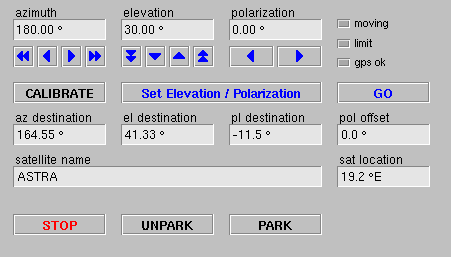
The blue arrow buttons allow to move the antenna in small or larger steps. The step size is configurable individually for each axis at the device setup page. Repeatedly pressing a button accumulates the displacements.
The CALIBRATE button recalculates the azimuth offset to make the actual azimuth value read the value in the 'az destination' field. The calculated offset is stored permanently, even if the VLC is switched off.
The GO button commands the antenna to move to the pointing angles shown in the 'destination' fields. Set Elevation/Polarization does the same, but does not move the azimuth. The latter button is intended to prepare the antenna for the azimuth calibration procedure.
The 'destination' pointing angles are either manually supplied or values calculated from the satellite's orbit position. Changing these values does not move the antenna until GO or Set Elevation/Polarization is pressen.
'pol offset' is a satellite-depending parameter describing the offset to be added to the theoretically calculated polarization angle in order to optimize the polarization separation for this satellite. If you change this value, the 'destination' angles get recalculated from the new polarization offset and the satellite location.
Changing the satellite location parameter ('sat location') recalculates the destination pointing angles, taking the actual 'pol offset' into account. The antenna is not moved by this.
Preset Storage
The parameters of frequently used satellites may be stored as device presets of the SNG-Pointing device. The satellite name, orbit position and polarization offset are the only values stored in the preset. Recalling the preset means updating these values. In succession the device also recalculates the destination pointing angles to the antenna pointing valid for the actual antenna location. Finally GO must be pressed to move the antenna to the selected satellite.
Calibration Process
The SNG-Pointing device supports the operator in calibrating the azimuth offset for the actual antenna location / setup. This usually is done in the following way:
- Ensure, that the SNG-Pointing device knows the precise geodetic location of the antenna. This may happen automatically with the values supplied by the GPS receiver or the location coordinated must be entered manually.
- Unpark the antenna. This moves up the antenna, leaving the azimuth in park position.
- The azimuth reading still includes the calibration offset from the previous application of the antenna. If you find the obviously wrong reading bothersome, reset the offset at the device's setup page or do a first calibration by eye: Enter the azimuth value you are guessing the antenna is viewing to in the 'az destination' field an press CALIBRATE .
- Now select a known satellite as the reference to calibrate the antenna to. Either select the satellite from the list of stored presets or enter the orbit position of the satellite in the 'sat location' field. The 'destination' fields now read the antenna pointing angles for this satellite.
- Now press Set Elevation/Polarization to set the elevation angle. If you did a coarse calibration by eye before, you may press GO , which als moves the azimuth roughly to where the satellite is expected.
- Watch your receiver or spectrum analyzer and horizontally move the antenna in small steps until you found the satellite.
- Fine-tune the antenna adjustment for a max. receive level.
- Press CALIBRATE to store the azimuth offset.
Variables defined by this device driver
| info.driver |
TEXT |
R/O |
StringRange R/O |
| info.type |
TEXT |
R/O |
StringRange R/O |
| info.port |
TEXT |
R/O |
StringRange R/O |
| info.frame |
TEXT |
R/O |
StringRange R/O |
| config.acuDevice |
TEXT |
SAVE SETUP |
StringRange |
| config.antennaParkId |
TEXT |
SAVE SETUP |
StringRange |
| config.antennaParkCmd |
TEXT |
SAVE SETUP |
StringRange |
| config.antennaUnparkId |
TEXT |
SAVE SETUP |
StringRange |
| config.antennaUnparkCmd |
TEXT |
SAVE SETUP |
StringRange |
| config.gpsDevice |
TEXT |
SAVE SETUP |
StringRange |
| config.azStep |
FLOAT |
SAVE SETUP |
DoubleRange (0.000 .. 0.000) |
| config.elStep |
FLOAT |
SAVE SETUP |
DoubleRange (0.000 .. 0.000) |
| config.plStep |
FLOAT |
SAVE SETUP |
DoubleRange (0.000 .. 0.000) |
| config.azOffset |
FLOAT |
SAVE SETUP |
DoubleRange (0.00 .. 0.00) |
| config.presetDefault |
TEXT |
R/O |
StringRange R/O |
| azimuth |
FLOAT |
NOPRESET |
DoubleRange (0.00 .. 0.00) |
| elevation |
FLOAT |
NOPRESET |
DoubleRange (0.00 .. 0.00) |
| polarization |
FLOAT |
NOPRESET |
DoubleRange (0.0 .. 0.0) |
| orbit |
FLOAT |
SAVE |
DoubleRange (0.0 .. 0.0) |
| satname |
TEXT |
SAVE |
StringRange |
| poloffset |
FLOAT |
SAVE |
DoubleRange (0.0 .. 0.0) |
| step |
TEXT |
NOPRESET |
StringRange |
| park |
TEXT |
NOPRESET |
StringRange |
| unpark |
TEXT |
NOPRESET |
StringRange |
| go |
TEXT |
NOPRESET |
StringRange |
| goelpl |
TEXT |
NOPRESET |
StringRange |
| calibrate |
TEXT |
NOPRESET |
StringRange |
| reset |
TEXT |
NOPRESET |
StringRange |
| state.az |
FLOAT |
R/O |
DoubleRange R/O (0.00 .. 0.00) |
| state.el |
FLOAT |
R/O |
DoubleRange R/O (0.00 .. 0.00) |
| state.pl |
FLOAT |
R/O |
DoubleRange R/O (0.00 .. 0.00) |
| state.aped |
FLOAT |
R/O |
DoubleRange R/O (0.00 .. 0.00) |
| state.gpsOk |
BOOLEAN |
R/O |
BooleanRange R/O (true false) |
| state.moving |
BOOLEAN |
R/O |
BooleanRange R/O (true false) |
| state.limit |
BOOLEAN |
R/O |
BooleanRange R/O (true false) |
| longitude |
FLOAT |
SAVE NOPRESET |
DoubleRange (0.0000 .. 0.0000) |
| latitude |
FLOAT |
SAVE NOPRESET |
DoubleRange (0.0000 .. 0.0000) |
| altitude |
FLOAT |
SAVE NOPRESET |
DoubleRange (0.0 .. 0.0) |
| faults.01 |
ALARM |
R/O |
AlarmFlagRange R/O (Antenna Controller) |
| faults.02 |
ALARM |
R/O |
AlarmFlagRange R/O (GPS Receiver) |