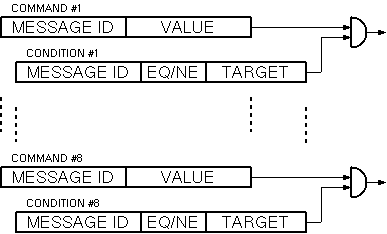
The Switch-Cross-Link logical device translates a ON/OFF command into a set of arbitrary messages / commands. Individual commands may be bound to a condition, i.e. the command is sent only if another parameter matches (or matches not) a given target value. The Switch-Cross-Link device mostly is used to perform carrier ON/OFF switching in an environment where this cannot be simply by switching one device on or off.
The device stores two tables of eight commands each. The commands defined on the "ON" table get issued if the Switch-Cross-Link device receives an "ON" command, the commands defined in the second table are sent if the device receives "OFF".
The figure above shows the structure of one of the (identical) command tables. Up to eight commands may be defined by specifying a message ID (where to send the message to) and a parameter value. The value is not limited to be a switch position, also other choice parameters or even numerical values may be set. Hence you may change device operating modes, transmit levels or other parameters based on the single ON/OFF command directed to the Switch-Cross-Link device.
Additionally a condition may be specified for each of the commands. A command only is sent, if the actual value of the parameter specified by the condition message ID matches ("EQ", equal) or matches not ("NE", not equal) the given target value. Using conditionally commands, the effect of the primary ON/OFF command can be modified with respect to other settings like signal routings or fault conditions.
Device window pages
The following table shows which device window pages are available with this individual device type. Tool-bar functions not mentioned here are described at the general description of device windows .
 --- The commands to be sent if the device receives an "ON" command.
 --- The commands to be sent if the device receives an "OFF" command.
 --- The device info page.
 --- The maintenance page.
Setting up a Switch-Cross-Link logical device
The first two device window pages contain the command tables used by the device. The table below explains the parameters defined in these tables.
| parameter | description |
|---|---|
| message id | You specify the destination of the command with the fields in this column. A message identifier is made of the name of the device followed by a dot and the name of the parameter which shall be sent. A complete list of parameter names for all device types is found later in this document. Leave this field empty if no command shall be sent. |
| value | In this column the value to be sent for each command is specified. |
| conditional parameter | You specify the message id of the conditional parameter in this column. Leave this field empty if the command shall be sent unconditionally. |
| comparison | If "EQ" is selected here, the command in this row only is sent if the parameter value matches the target. The selection of "NE" reverses this. |
| target value | The actual value of the conditional parameter gets compared against this target value to determine if the command on this row shall be sent. Be aware that this is a textual comparison, FLOAT parameters may fail to match the target value due to rounding errors. |
Variables defined by this device driver
| name | type | flags | range |
|---|---|---|---|
| info.driver | TEXT | R/O | StringRange R/O |
| info.type | TEXT | R/O | StringRange R/O |
| info.frame | TEXT | R/O | StringRange R/O |
| on | CHOICE | EnumRange (OFF ON) | |
| out.on.0.id | TEXT | SAVE | StringRange |
| out.on.0.value | TEXT | SAVE | StringRange |
| out.on.0.cond | TEXT | SAVE | StringRange |
| out.on.0.target | TEXT | SAVE | StringRange |
| out.on.0.inv | CHOICE | SAVE | EnumRange (EQ NE) |
| out.on.1.id | TEXT | SAVE | StringRange |
| out.on.1.value | TEXT | SAVE | StringRange |
| out.on.1.cond | TEXT | SAVE | StringRange |
| out.on.1.target | TEXT | SAVE | StringRange |
| out.on.1.inv | CHOICE | SAVE | EnumRange (EQ NE) |
| out.on.2.id | TEXT | SAVE | StringRange |
| out.on.2.value | TEXT | SAVE | StringRange |
| out.on.2.cond | TEXT | SAVE | StringRange |
| out.on.2.target | TEXT | SAVE | StringRange |
| out.on.2.inv | CHOICE | SAVE | EnumRange (EQ NE) |
| out.on.3.id | TEXT | SAVE | StringRange |
| out.on.3.value | TEXT | SAVE | StringRange |
| out.on.3.cond | TEXT | SAVE | StringRange |
| out.on.3.target | TEXT | SAVE | StringRange |
| out.on.3.inv | CHOICE | SAVE | EnumRange (EQ NE) |
| out.on.4.id | TEXT | SAVE | StringRange |
| out.on.4.value | TEXT | SAVE | StringRange |
| out.on.4.cond | TEXT | SAVE | StringRange |
| out.on.4.target | TEXT | SAVE | StringRange |
| out.on.4.inv | CHOICE | SAVE | EnumRange (EQ NE) |
| out.on.5.id | TEXT | SAVE | StringRange |
| out.on.5.value | TEXT | SAVE | StringRange |
| out.on.5.cond | TEXT | SAVE | StringRange |
| out.on.5.target | TEXT | SAVE | StringRange |
| out.on.5.inv | CHOICE | SAVE | EnumRange (EQ NE) |
| out.on.6.id | TEXT | SAVE | StringRange |
| out.on.6.value | TEXT | SAVE | StringRange |
| out.on.6.cond | TEXT | SAVE | StringRange |
| out.on.6.target | TEXT | SAVE | StringRange |
| out.on.6.inv | CHOICE | SAVE | EnumRange (EQ NE) |
| out.on.7.id | TEXT | SAVE | StringRange |
| out.on.7.value | TEXT | SAVE | StringRange |
| out.on.7.cond | TEXT | SAVE | StringRange |
| out.on.7.target | TEXT | SAVE | StringRange |
| out.on.7.inv | CHOICE | SAVE | EnumRange (EQ NE) |
| out.off.0.id | TEXT | SAVE | StringRange |
| out.off.0.value | TEXT | SAVE | StringRange |
| out.off.0.cond | TEXT | SAVE | StringRange |
| out.off.0.target | TEXT | SAVE | StringRange |
| out.off.0.inv | CHOICE | SAVE | EnumRange (EQ NE) |
| out.off.1.id | TEXT | SAVE | StringRange |
| out.off.1.value | TEXT | SAVE | StringRange |
| out.off.1.cond | TEXT | SAVE | StringRange |
| out.off.1.target | TEXT | SAVE | StringRange |
| out.off.1.inv | CHOICE | SAVE | EnumRange (EQ NE) |
| out.off.2.id | TEXT | SAVE | StringRange |
| out.off.2.value | TEXT | SAVE | StringRange |
| out.off.2.cond | TEXT | SAVE | StringRange |
| out.off.2.target | TEXT | SAVE | StringRange |
| out.off.2.inv | CHOICE | SAVE | EnumRange (EQ NE) |
| out.off.3.id | TEXT | SAVE | StringRange |
| out.off.3.value | TEXT | SAVE | StringRange |
| out.off.3.cond | TEXT | SAVE | StringRange |
| out.off.3.target | TEXT | SAVE | StringRange |
| out.off.3.inv | CHOICE | SAVE | EnumRange (EQ NE) |
| out.off.4.id | TEXT | SAVE | StringRange |
| out.off.4.value | TEXT | SAVE | StringRange |
| out.off.4.cond | TEXT | SAVE | StringRange |
| out.off.4.target | TEXT | SAVE | StringRange |
| out.off.4.inv | CHOICE | SAVE | EnumRange (EQ NE) |
| out.off.5.id | TEXT | SAVE | StringRange |
| out.off.5.value | TEXT | SAVE | StringRange |
| out.off.5.cond | TEXT | SAVE | StringRange |
| out.off.5.target | TEXT | SAVE | StringRange |
| out.off.5.inv | CHOICE | SAVE | EnumRange (EQ NE) |
| out.off.6.id | TEXT | SAVE | StringRange |
| out.off.6.value | TEXT | SAVE | StringRange |
| out.off.6.cond | TEXT | SAVE | StringRange |
| out.off.6.target | TEXT | SAVE | StringRange |
| out.off.6.inv | CHOICE | SAVE | EnumRange (EQ NE) |
| out.off.7.id | TEXT | SAVE | StringRange |
| out.off.7.value | TEXT | SAVE | StringRange |
| out.off.7.cond | TEXT | SAVE | StringRange |
| out.off.7.target | TEXT | SAVE | StringRange |
| out.off.7.inv | CHOICE | SAVE | EnumRange (EQ NE) |