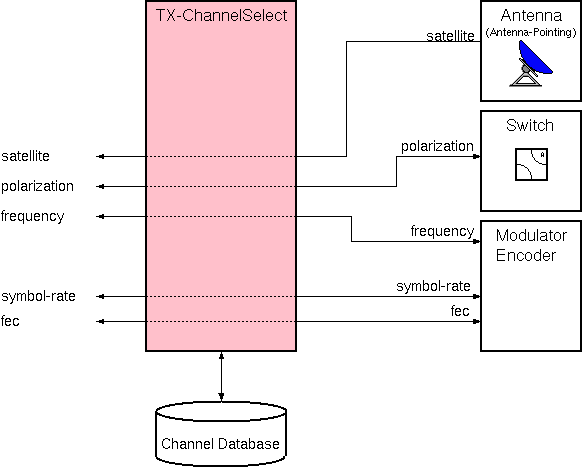
The TX-ChannelSelect logical device controls some basic parameters of an encoder / modulator from a common channel database. The device complements the RX-ChannelSelect logical device which provides the same (and more) functions for receive chains.
The TX-ChannelSelect device simply routes the user level parameters 'satellite', 'polarization' and 'frequency' to the physical device which are configured for the particular TX-ChannelSelect device. The TX-ChannelSelect device is definitely assigned to one antenna, this is one major difference to the RX-ChannelSelect device which supports a signal selection from multiple antennas.
Beside the function described above, the TX-ChannelSelect device implements a locking mechanism which prevents users from changing parameters at a transmit chain which is currently in use. This protection mechanism also works together with RX-ChannelSelect devices, in fact antenna pointing as a common resource are locked for both types of devices at the same time.
Device window pages
The following table shows which device window pages are available with this individual device type. Tool-bar functions not mentioned here are described at the general description of device windows .
 --- The main control (channel select) page for the device.
 --- The channel database editor page.
 --- The fault page. The device provides four configurable fault inputs. Unconfigured faults appear as 'Fault 01' .. 'Fault 04'. A configured fault inherits the description from the fault it refers to.
 --- The device info page.
 --- The maintenance page. The configuration parameters from this page are described below.
Operation (channel select)
Selecting an already defined satellite channels is a simple 2-step procedure:
Instead of selecting the satellite and channel you also may enter the receive parameters at the frequency / pol / symbol rate / fec fields. The TX-Channelselect device forwards these settings to the ancillary devices.
Operation (database edit)
With the second page of the device window of the TX-Channelselect device channel definitions are edited, copied or deleted. All RX/TX-Channelselect devices in a sat-nms M&C share one common channel database. Changes you make at one device apply to all others as well. Selecting channels at his page or changing any channel parameters do not change the receiver settings.
To edit the channel database, first select the satellite which broadcasts the channel you want to edit. Here a few examples:
Configuration parameters
At the maintenance page of the device window there are a couple of configuration parameters which must be set to interconnect the RX-ChannelSelect device with the IRD and the input switch.
| parameter | description |
|---|---|
| polSwitchId | The message / parameter ID used to switch the transmit polarization, e.g. a waveguide switch. |
| polSwitchHval | The value commanded to the polSwitchId to select horizontal polarization for transmit. |
| polSwitchVval | The value commanded to the polSwitchId to select vertical polarization for transmit. |
| antennaName | The name of the Antenna-Pointing device which controls the antenna. |
| frequencyId | The message / parameter ID used to set the frequency. This parameter sends the true transmit frequency, any frequency converting calculations must be made behind this. |
| symbolRateId | The message / parameter ID used to set the symbol rate. |
| fecId | The message / parameter ID used to set the FEC. |
| fault1Id fault2Id fault3Id fault4Id | The device provides four configurable fault inputs. Enter the message ID of the faults to monitor. (e.g. MOD-1.faults.02 or ENCODER.fault ) A configured fault inherits the description from the fault it refers to. |
Variables defined by this device driver
| name | type | flags | range |
|---|---|---|---|
| info.driver | TEXT | R/O | StringRange R/O |
| info.type | TEXT | R/O | StringRange R/O |
| info.frame | TEXT | R/O | StringRange R/O |
| config.polSwitchId | TEXT | SAVE SETUP | StringRange |
| config.polSwitchHval | TEXT | SAVE SETUP | StringRange |
| config.polSwitchVval | TEXT | SAVE SETUP | StringRange |
| config.antennaName | TEXT | SAVE SETUP | StringRange |
| config.frequencyId | TEXT | SAVE SETUP | StringRange |
| config.symbolRateId | TEXT | SAVE SETUP | StringRange |
| config.fecId | TEXT | SAVE SETUP | StringRange |
| config.fault1Id | TEXT | SAVE SETUP | StringRange |
| config.fault2Id | TEXT | SAVE SETUP | StringRange |
| config.fault3Id | TEXT | SAVE SETUP | StringRange |
| config.fault4Id | TEXT | SAVE SETUP | StringRange |
| config.lockByIP | CHOICE | SAVE SETUP | EnumRange (NO YES) |
| antenna | TEXT | R/O | StringRange R/O |
| satellite | CHOICE | EnumRange (?) | |
| channel | CHOICE | EnumRange (?) | |
| polarization | CHOICE | EnumRange (H V) | |
| frequency | FLOAT | DoubleRange (0.0 .. 0.0) | |
| symbolRate | FLOAT | DoubleRange (0.00000 .. 0.00000) | |
| fec | CHOICE | EnumRange (?) | |
| comment | TEXT | StringRange | |
| edit.satellite | CHOICE | EnumRange (?) | |
| edit.channel | CHOICE | EnumRange (?) | |
| edit.rxpol | CHOICE | EnumRange (H V) | |
| edit.rxfreq | FLOAT | DoubleRange (0.000 .. 0.000) | |
| edit.txpol | CHOICE | EnumRange (H V) | |
| edit.txfreq | FLOAT | DoubleRange (0.000 .. 0.000) | |
| edit.symbolRate | FLOAT | DoubleRange (0.000000 .. 0.000000) | |
| edit.fec | CHOICE | EnumRange (1/2 2/3 3/4 4/5 5/6 6/7 7/8 8/9 AUTO) | |
| edit.comment | TEXT | StringRange | |
| edit.newchannel | TEXT | StringRange | |
| edit.store | TEXT | StringRange | |
| edit.delete | TEXT | StringRange | |
| edit.read | TEXT | StringRange | |
| reset | TEXT | StringRange | |
| alias | TEXT | SAVE | StringRange |
| locked | TEXT | R/O | StringRange R/O |
| satLocked | TEXT | R/O | StringRange R/O |
| polLocked | TEXT | R/O | StringRange R/O |
| togglelock | TEXT | NOPRESET | StringRange |
| locksource | TEXT | R/O | StringRange R/O |
| faults.01 | ALARM | R/O | AlarmFlagRange R/O (Fault 01) |
| faults.02 | ALARM | R/O | AlarmFlagRange R/O (Fault 02) |
| faults.03 | ALARM | R/O | AlarmFlagRange R/O (Fault 03) |
| faults.04 | ALARM | R/O | AlarmFlagRange R/O (Fault 04) |