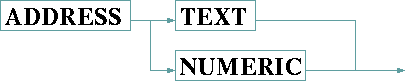
The ADDRESS step reads the device address and compares it to the address value set in the device's setup menu. If the ADDRESS step received other data than expected, the reception of this message is aborted and a communication fault is reported.
The ADDRESS keyword must be followed by one of TEXT or NUMERIC:
If TEXT is specified, the step reads as many characters as the address string configured for this device is long. The address is compared character by character to the received data.
If NUMERIC is specified, one character (byte) is read. The address string is converted to a integer number and compared to the received byte.