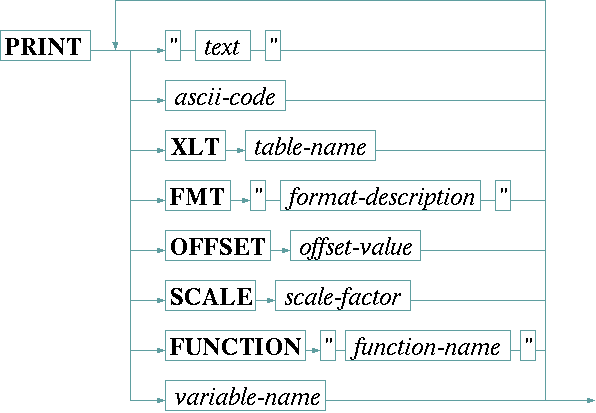
The PRINT statement is used to send commands to a device which uses a text based protocol. It composes a command string from the elements following the the PRINT keyword, packs this string in the protocol frame defined by the communication protocol and sends this message to the device. The syntax of the PRINT statement is:
The table below describes the elements which may follow the PRINT keyword.
| "text" | Plain text, enclosed in double quotes, is added to the output buffer as it is. |
| ascii-code | A decimal number is interpreted as the ASCII code of a single character to output. You may use this to send special characters like carriage-return or line-feed to the device. |
| XLT table | The XLT keyword, followed by the name of an already defined table, tells the driver to translate the next variable value which shall be printed through this translation table. Chapter Using conversion tables gives more information about tables in general. |
| FMT "..." | The FMT keyword, followed by a format description in double quotes, tells the device driver to format the next variable following the format description given. FMT is used to format numeric variables into the representation the device expects in it's remote control command. INTEGER variables may be printed using a floating point format, and FLOAT variables may be printed with a d or x format likewise. With FLOAT variables you should format in any case as internal precision/rounding problems may cause unpredictable results when floating point values are printed unformatted. |
A format description consists of the following elements:
| format characters | description |
|---|---|
| d b x X f | The first letter of the format description defines the general number representation: d (decimal), b (binary), x (hex, lower case), X (hex, upper case) or f (floating point) |
| + | If the + option is given, the number is preceded by a +/- character even if it is positive. Together with the 0 option below, the sign appears as an additional character at the first column, hence the field width is increased by one on this case. |
| 0 | If the 0 option is given, the field is padded up with zeroes instead of spaces. |
| 1 .. 99 | Here follows a one or two digit field width. The field width is the total number of characters the formatted number occupies including the padding characters. If there are more digits needed to show a number correctly, the field with is enlarged automatically. Specifying a field width 1 disables the right orientation in a fixed width completely. This specially is useful for floating point numbers where only the number of fraction digits shall be fixed, not the complete field width. |
| . | For floating point formats the dot separates the precision from the field width. |
| 0 .. 9 | The dot is followed by a one digit specification of the number of fraction digits which shall be printed. The dot and fraction digits specification is valid only with the floating point format. |
The table below describes the more elements which may follow the PRINT keyword.
| OFFSET o | The OFFSET keyword, followed by the (floating point) offset value, tells the driver to add the offset value to the next variable before it is printed. |
| SCALE s | The SCALE keyword, followed by the (floating point) scale factor, tells the driver to multiply the next variable with the scale factor before it is printed |
| FUNCTION "name" | The FUNCTION keyword, followed by the name of the function as a quoted string, tells the driver to apply this function to the next variable before it is printed. The function name is extended by appending .txt to achieve the file name to read for the function definition. Chapter Function tables in I/O functions gives an extensive description about functions an how they are used. |
| variable-name | A variable name tells the driver to print the value stored in this variable. Usually the commanded value is used rather than the value which has been read back from the device. If, however, there has been never a value commanded, or if this variable is a read only variable, the value recently read from the device is used. |
Before the variable is printed to the output buffer, any XLT, FMT, OFFSET or SCALE operations which have been specified are applied. This happens in a fixed order:
SCALE operation has been specified, this is done first.SCALE operation is followed by an OFFSET addition.FUNCTION if there is one.FMT specification if one is given.XLT operation has been specified.This scheme applies to numeric (INTEGER, HEX, FLOAT) and to text type variables as well. As soon as a SCALE, OFFSET, FUNCTION or FMT keyword is present in front of a variable, this gets converted to a floating point number. Strings which cannot be converted give a zero value.
Example
PRINT "TUN;FRQ=" SCALE 8.0 FMT "d06" frequencyThe example above sends a command of the format TUN;FRQ=###### to the device. The FLOAT variable frequency is multiplied by 8.0 and the output as an integer number, 6 digits wide with leading zeroes.