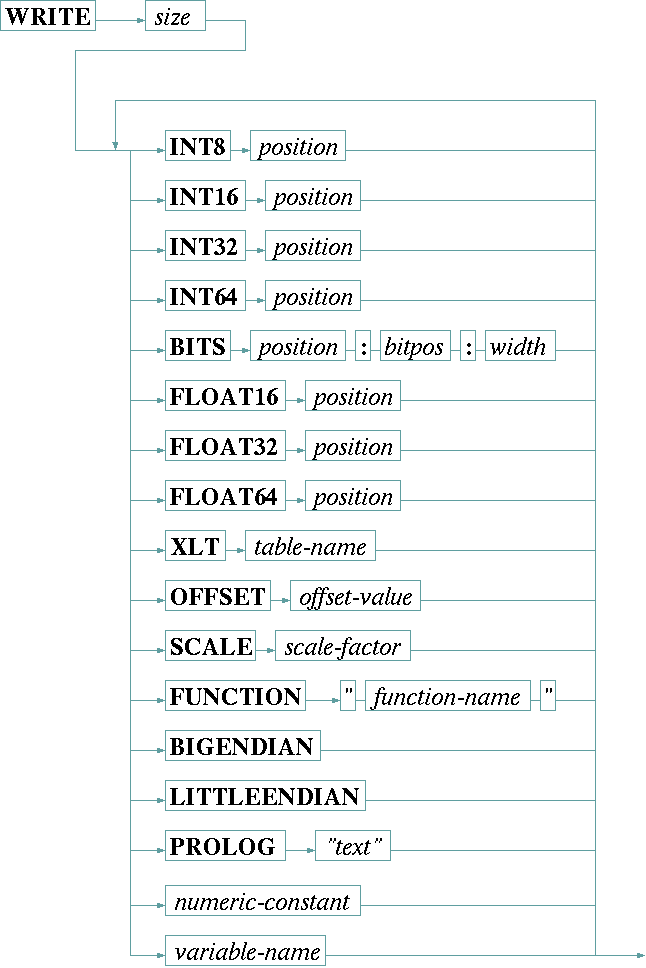
The WRITE statement is used to send data to the device which uses a binary communication protocol. Such a device expects a command as a binary data structure rather than as a readable text. The syntax of the WRITE command is:
The WRITE statement creates a buffer of the specified number of bytes which initially is filled with zeroes. Variables or constant values are copied into this buffer according to the size and position specifications given.
The WRITE statement by default works in little endian mode. 16, 32 or 64 bit values are copied into the buffer with the least significant byte first. Specifying BIGENDIAN mode reverses this byte order.
| size | The size (number of bytes) of the message buffer to create must be specified as the first argument following the WRITE keyword. The size value is expected as a decimal number. |
| INT8 p | The INT8 keyword, followed by a decimal position value, tells the driver that the next constant or variable shall be copied to the buffer as a single byte value at the given position (position zero denotes the first byte in the buffer). |
| INT16 p | The INT16 keyword, followed by a decimal position value, tells the driver that the next constant or variable shall be copied to the buffer as a two-byte value starting at the given position (position zero denotes the first byte in the buffer). The least significant byte of the number is placed first unless BIGENDIAN was specified. |
| INT32 p | The INT32 keyword, followed by a decimal position value, tells the driver that the next constant or variable shall be copied to the buffer as a four-byte value starting at the given position (position zero denotes the first byte in the buffer). The least significant byte of the number is placed first unless BIGENDIAN was specified. |
| INT64 p | The INT64 keyword, followed by a decimal position value, tells the driver that the next constant or variable shall be copied to the buffer as a eight-byte value starting at the given position (position zero denotes the first byte in the buffer). The least significant byte of the number is placed first unless BIGENDIAN was specified. |
| BITS p : b : w | The BITS keyword tells the driver to place the next value as a 1 to 7 bit wide bit field within a certain byte. In this case the position parameter consists of three values, separated by colons: |
position p addresses the byte within the buffer. |
|
bitpos b defines a number of bit positions the value shall be shifted left before it is pasted into the byte. |
|
width w the number of bits (starting with the least significant one) which shall be copied from the next constant or variable into the destination byte. |
|
| FLOAT16 p | The FLOAT16 keyword, followed by a decimal position value, tells the driver that the next constant or variable shall be copied to the buffer as a half precision (16 bit) IEEE754 floating point value starting at the given position (position zero denotes the first byte in the buffer). The least significant byte of the number is placed first unless BIGENDIAN was specified. |
| FLOAT32 p | The FLOAT32 keyword, followed by a decimal position value, tells the driver that the next constant or variable shall be copied to the buffer as a single precision (32 bit) IEEE754 floating point value starting at the given position (position zero denotes the first byte in the buffer). The least significant byte of the number is placed first unless BIGENDIAN was specified. |
| FLOAT64 p | The FLOAT64 keyword, followed by a decimal position value, tells the driver that the next constant or variable shall be copied to the buffer as a double precision (64-bit) IEEE754 floating point value starting at the given position (position zero denotes the first byte in the buffer). The least significant byte of the number is placed first unless BIGENDIAN was specified. |
| XLT table | The XLT keyword, followed by the name of an already defined table, tells the driver to translate the next variable value which shall be printed through this translation table. When output by a WRITE statement, any non-numeric variable must be translated through a table into a numeric value. Chapter Using conversion tables gives more information about tables in general. |
| OFFSET o | The OFFSET keyword, followed by the (floating point) offset value, tells the driver to add the offset value to the next variable before it is pasted into the buffer. |
| SCALE s | The SCALE keyword, followed by the (floating point) scale factor, tells the driver to multiply the next variable with the scale factor before it is pasted into the buffer. |
| FUNCTION "name" | The FUNCTION keyword, followed by the name of the function as a quoted string, tells the driver to apply this function to the next variable before it is printed. The function name is extended by appending .txt to achieve the file name to read for the function definition. Chapter Function tables in I/O functions gives an extensive description about functions an how they are used. |
| BIGENDIAN | The BIGENDIAN keyword turns the byte order from little endian (LSB first) which is the default to big endian (MSB first). This applies to all values written after BIGENDIAN. |
| LITTLEENDIAN | The LITTLEENDIAN keyword turns the byte order back to little endian (LSB first). This applies to all values written after LITTLEENDIAN. |
| PROLOG "text" | The PROLOG keyword followed by a quoted string sets this string as a prolog to be sent before the binary data specified in the WRITE statement. Actually, this is only usable together with the HTTP11 protocol to generate a HTTP 1.1 POST request. Example: PROLOG "POST some/url " prepends this text before the binary data. |
| numeric-constant | Numeric (decimal) constants can be used like variable names. The constant value is pasted into the output buffer in this case. If a quoted string is given, this is treated as a hexadecimal constant and translated into a numeric value. |
| variable-name | A variable name tells the driver to paste the value stored in this variable into the output buffer according to the size and position specification given before. Usually the commanded value is used rather than the value which has been read back from the device. If, however, there has been never a value commanded, or if this variable is a read only variable, the value recently read from the device is used. |
Before the variable is printed to the output buffer, any XLT, OFFSETorSCALE` operations which have been specified are applied. This happens in a fixed order:
SCALE operation has been specified, this is done first.SCALE operation is followed by an OFFSET addition.FUNCTION if there is one.FMT specification if one is given.XLT operation has been specified.Remarks
INT8, INT16, INT32, INT64 or BITS specification to be pasted properly into the output buffer.INTEGER, HEX or FLOAT type variables can be used directly with the WRITE statement. For other variable types an XLT table translation must be used to turn the variable into a numeric value.FLOAT variables are converted to 64-bit integer values before they are used. OFFSET or SCALE operations are done before this conversion.Example
    TABLE T02 "QPSK=0,BPSK=1"

    ...

    WRITE 3 BIGENDIAN
        INT16 0  9734
        INT8  2  XLT T02          tx.mod.type
The example above -- taken from the Radyne DVB3030 modulator driver -- explains how to write a CHOICE parameter to a device. Table T02 is used to convert the QPSK/BPSK selection into the numeric values 0/1. The WRITE statement sends a message (three bytes long plus protocol frame overhead) in big endian byte order. The first two bytes are filled with the decimal constant 9734 (a command code). The third byte is set to 0 or 1 according to the contents of tx.mod.type.