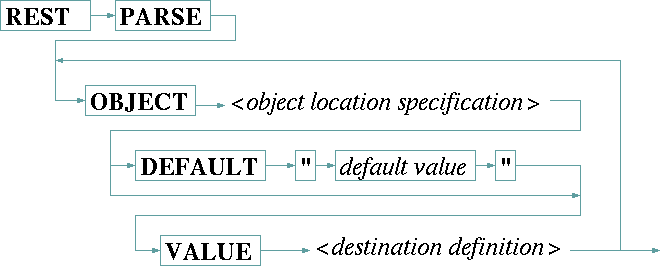
The REST PARSE statement accesses the objects contained in the most recent reply from the device and assigns the object values to sat-nms driver variables. It uses the same object model as described above for the REST TRANSACT statement to address and extract the desired information from the JSON document the device replied through its REST API.
The OBJECT keyword followed by the object location specification addresses the object in the JSON tree to be read. The object location specification works exactly as described above with one difference: non-existent objects are not created but treated as a fault unless there is a default value defined for this object.
The optional DEFAULT keyword denotes the default value to be assigned if the specified object does not exist in the object tree. The default value is given as a quoted string following the DEFAULT keyword. Please note, this value is treated as value read from the JSON document, it undergoes the modifications like XLT, SCALE or OFFSET following VALUE before it is assigned to the sat-nms driver variable. If no DEFAULT is defined within an OBJECT clause and the addressed object is missing in the JSON document, the driver will raise a communication fault.
The keyword VALUE starts the definition of the sat-nms driver variable which shall receive the extracted value together with some modifiers known from the INPUT statement. The destination definition in any case ends with then name of the sat-nms driver variable which may be prepended by zero or more of the modifiers XLT, OFFSET or SCALE as shown below:
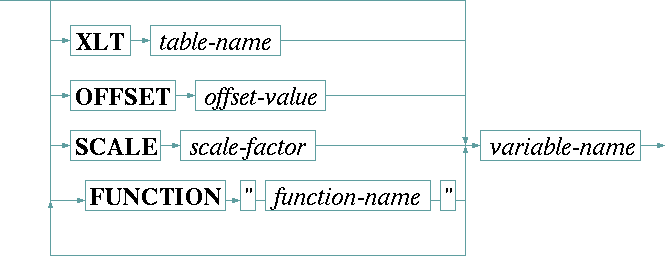
| XLT table | The XLT keyword, followed by the name of an already defined table, tells the driver to translate the object's value through this translation table from right to left. Chapter Using conversion tables gives more information about tables in general. |
| OFFSET o | The OFFSET keyword, followed by the (floating point) offset value, interprets the object's value as a floating point number and replaces it with the sum of the value and the offset. |
| SCALE s | The SCALE keyword, followed by the (floating point) scale factor, interprets the object's value as a floating point number and replaces it with the product of the value and the scale factor. |
| FUNCTION "name" | The FUNCTION keyword, followed by the name of the function as a quoted string, tells the driver to apply this function to the next variable before it is printed. The function name is extended by appending .txt to achieve the file name to read for the function definition. Chapter Function tables in I/O functions gives an extensive description about functions an how they are used. |
If there are multiple driver variables to be read from a single REST reply sent by the device, you may either use separate REST PARSE statements for this or use a single statement with multiple OBJECT clauses. Example
REST TRANSACT "GET /api/v1/modulators"
REST PARSE
  OBJECT "/settings/modulator[slot=" config.slotNo "]/frequency"
    DEFAULT "1500.000" VALUE tx.frequency
  OBJECT "/settings/modulator[slot=" config.slotNo "]/fec"
    DEFAULT "3_4" VALUE XLT tFec tx.fec