3.16.2.4.7 Line / Arrow
The Line / Arrow display element draws a horizontal and/or a vertical line and optionally an arrowhead. The line's color is selectable. Strictly speaking the Line / Arrow element is a rectangle with only one or two sides drawn.
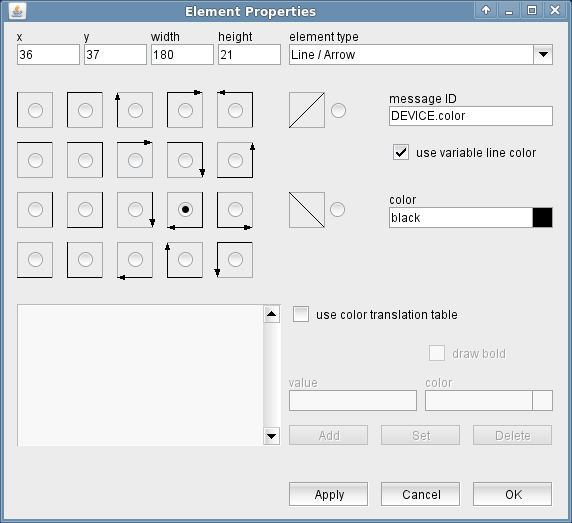
The attributes listed below may be configured to customize a display element of this type:
- shape --- To select which parts of the bounding rectangle of the element shall be drawn as a line, select one of the shape symbols.
- message ID --- The message ID addresses a parameter which controls the color of the rectangle. No message ID is required if the rectangle shall be drawn with a fixed color.
- use variable line color --- Check this mark to let the software draw the rectangle with a color specified by the value of the variable specified by 'message ID'. Unless you check the mark 'use color translation table', the software interprest the variable contents as described below in the paragraph 'Color / Line Width Codes'.
- color --- The color to be used to draw the rectangle unless a variable line color is specified. Colors may be specified by standard color names like red / green / blue or using a hexadecimal RGB notation. '#FFFF00' for example specifies yellow. You may click to the color example field in order to open a color chooser dialog and select the color from there.
- use color translation table --- Checking this mark enables a color translation table which works much like the variable background color feature for entry elements. Depending on the actual value of the variable addressed by 'message ID', the element's line color and thickness is set using the translation table shown in the lower left corner of the dialog. If the actual value of the variable does not match any of the table entries or if no message ID is specified, the first color in the list is used to draw the element's background.The buttons Add/Set/Delete along with the value and color fields are used to edit the color translation table.
- draw bold --- The line thickness specification of the actually selected table entry. If the mark is checked, the line is drawn 3 pixels wide, with the mark unchecked the line width is 1 pixel.
- value --- The parameter value of the actually selected table entry
- color --- The color specification of the actually selected table entry. This may either be the name of a basic color (red, yellow etc.) or a hexadecimal RGB color specification like '#FF8000'. The latter defines some sort of orange, consisting of 0xFF red, 0x80 green and 0x00 blue. The actually selected color is shown in the right part of the entry field, clicking to this opens a color chooser dialog which lets you select / compose the the color to your needs.
- Add / Set / Delete --- These buttons control editing the color translation list.
- To add a new value / color pair to the list, fill the value and color fields, then click to "Add".
- To change the color assigned to a given parameter value, first select the table entry of interest, change the color value and finally click "Set".
- To delete a value / color pair from the list, select the table entry and then click "Delete".
Color / Line Width Codes
If you check the 'use variable line color' mark without using a color translation table, the software interprets the variable contents as a text value and parses it using the following rules (upper/lower case doesn't matter):
- If the variable value starts with one of the keywords BLACK, WHITE, RED, GREEN, BLUE, YELLOW or GRAY, this color is used.
- If the variable value ends with BOLD, the line is drawn 3 pixels wide (instead of 1 pixel default width).
- If the variable value is TRUE or it contains the text FAULT, the line is drawn red, 3 pixels wide if the variable denotes a fault flag.
- If the variable value is TRUE and the variable does not denote a fault flag, the line is drawn green, 3 pixels wide.
- If the variable value is ON, the line is drawn green, 3 pixels wide.
- If the variable value starts with a '#' character, the following six characters are interpreted as a hexadecimal number, specifying the RGB parts of an arbitrary color. Example: "#FF00FF-BOLD" defines a 3 pixels wide, magenta colored line.
- If none of the rules above matches, the line is drawn with the default color, 1 pixel wide.
The ' Gate-Array ' logical device may be used to combine several state variables in the M&C and generate the color codes expected by the line / arrow element.