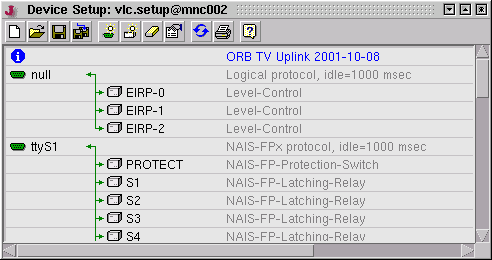
The 'Device Setup Editor' lets you define / modify the equipments setup, i.e. the assignment of monitored/controlled devices to the physical interfaces of a VLC or M&C computer. You need to be connected on-line and logged in as a fully authorized operator to edit the equipment setup.
As shown in the figure above, the editor presents the equipment setup as a list of interface and device definitions. Green arrows connect the devices with the interface they use to communicate with the computer.
In the VLC/M&C computer, the equipment setup is stored as a file 'vlc.setup'. This file is read by the M&C server software on startup. Changes you make in the editor window are temporary until save this file to the target system (the  function). A changed equipment setup you stored on the target machine will become effective when the M&C server application gets restarted.
Tool-bar Functions
 --- Clears the setup, lets you define a new setup from scratch.
 --- Loads a equipment setup from disc. With a NMS system the file is loaded from the NMS server, not from the VLC. --- Saves the edited setup as 'vlc.setup' to the target computer. It will use this equipment setup with the next start.
 --- Saves the edited setup with a different file name. Setup definitions are stored in a folder 'setups' which is located at the NMS server computer with NMS systems, on the M&C server computer with M&C systems.
 --- Adds a new interface definition. The definition is inserted just below the actually highlighted one.
 --- Adds a new device definition to the setup. The new definition is inserted just below the actually highlighted one unless the latter describes an interface. In this case, the new definition gets appended at the end of the list of devices already connected to this interface
 --- Deletes the actually highlighted definition.
 --- Lets you edit/change the actually highlighted definition. You also may double click to the definition for this.
 --- Restarts the M&C server application on the target computer. You must do this, to make the target system use a modified equipment setup. With a M&C application, this will break the user interface's connection to the server. With a NMS/VLC application the VLC will go off-line with the restart. You should wait at least 2 minutes before you try to connect again.
 --- Prints the edited setup.
Multiple Devices At One Interface
With RS232 interfaces, you will connect one piece of equipment to one interface in most cases. However, there are a couple of situations where multiple devices at one interface make sense:
Storing Setups For Backup Or As Templates
With an NMS application you are encouraged to backup every equipment setup at the NMS site by means of the 'save as ( )' function. This backs up the settings at a central place and builds a set of template setups.
Restarting The Target System
When modifying an equipment setup, be sure to store the changes setup using the - function and then to restart the target with . Without restart, the target continues using the old setup until a restart occurs for some other reason.
Stored Equipment Settings
Apart from the plain interface assignments done by this configuration window, the equipment setup comprises a large number of settings like interface line speeds, device addresses etc. When changing device names, be aware that these settings are lost.