3.14.3.3 The Tracking Status Display
The lower right area of the ACU main window shows the tracking status display and the basic tracking mode parameters.
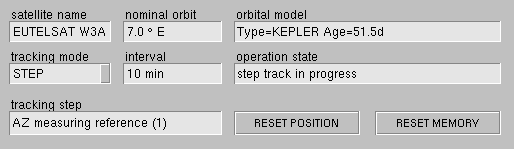
The table below gives a short description of each parameter in this area. The all refer to the TRACKING subsystem , this chapter gives a more detailed description of the tracking.
- satellite name --- The name of the satellite you are tracking.
- nominal orbit --- The nominal orbit position of the satellite.
- orbital model --- The type and age of the orbital model the ACU uses for the PROGRAM track mode. During ADAPTIVE tracking, the the number of hours in memory are displayed here.
- tracking mode --- With this parameter you set the basic tracking mode. Available modes are OFF, STEP, ADAPTIVE and PROGRAM..te .ts intervalWith this parameter you define in which intervals the ACU shall perform tracking steps.
- operation state --- This field shows the general operation state of the tracking engine.
- tracking step --- This field tells what the tracking engine is doing actually in this moment.
- RESET POSITION --- Moves the antenna back to the nominal pointing values. If you do this in ADAPTIVE or in PROGRAM track mode, the antenna will return to the estimated pointing with the next tracking step. With STEP track mode, the antenna starts tracking at the nominal pointing if you click to this button
- RESET MEMORY --- Clicking to this button clears the tracking memory, the ACU remembers to estimate the antenna pointing in ADAPTIVE mode. You should do this if you change tracking to another satellite or if you recognize a significant repositioning of the satellite.