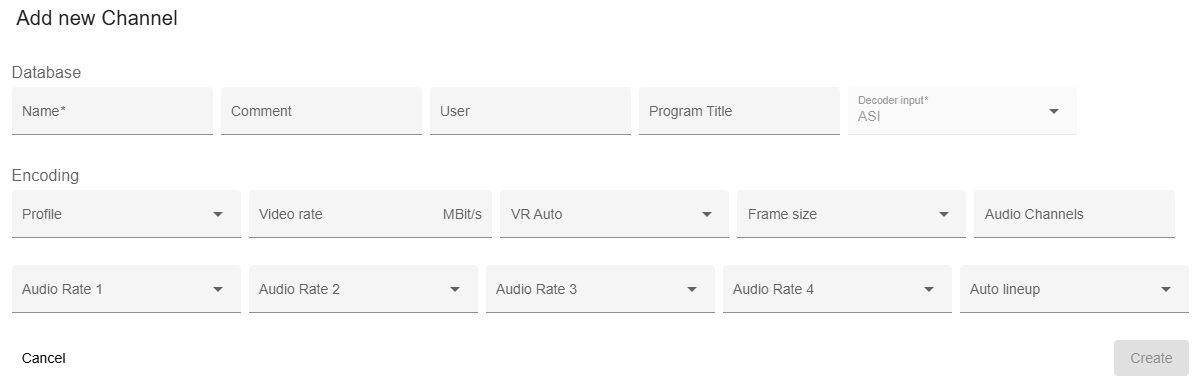
The Add or Edit ASI channel dialog shows up on
 button on the bottom toolbar
 in the channel row
The dialog title clearly indicates whether you are creating a new channel or editing an existing one, ensuring clarity in the action being performed.
Required fields are marked with an asterisk *. Fields which you don't plan to use in your installation (e.g. TX settings if you only receive channels) can be can remain empty or on defaults. Certain setting will anyway only be applied to equipment if this is configured in the RX/TX-Channel devices.
| Field | Description |
|---|---|
| Name* | user defined channel name, must be unique |
| Comment | describe this IP channel |
| User | free text to enter a user name which is responsible for this database entry, must not match to a username of this M&C system |
| Program title | name of the program transmitted or received with this channel. |
| Decoder input | read-only channel type |
| Profile | select video encoding profile from drop-down list |
| Video rate | video data rate in MBit/sec (4 digits precision) |
| VR auto | video rate auto switch, one of FIXED or AUTO |
| Frame size | frame size, one of SHORT or NORMAL |
| Audio channels | number of audio channels should be between 1-4 |
| Audio rate 1 | audio channel 1 data rate select from drop-down list |
| Audio rate 2 | audio channel 2 data rate select from drop-down list |
| Audio rate 3 | audio channel 3 data rate select from drop-down list |
| Audio rate 4 | audio channel 4 data rate select from drop-down list |
The following actions are available:
| Function | Description |
|---|---|
| Create | For new channel, this creates the channel with the provided details |
| Save | For existing channel, this saves modifications. |
| Cancel | Closes the dialog without saving |
The form tests the input fields for validity and display hints in red in each field with wrong input. If an error occurs in the input fields, the button Create/Save button is deactivated.