2.6.6 Dialogs
Recorder config add/edit dialog
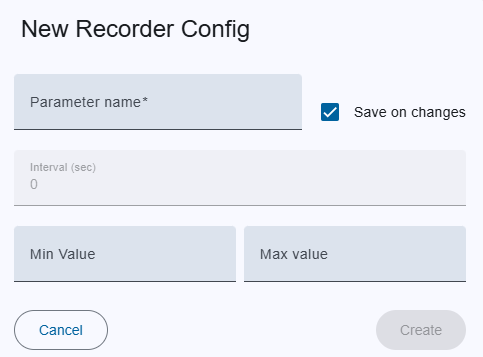
Trigger:
- when you click on the "+" button on the bottom toolbar to create new config or
- an on pencil icon to edit in the menu column
- The dialog title clearly indicates whether you are creating a new recorder config, editing an existing one, ensuring clarity in the action being performed.
Fields:
- Parameter name: The full parameter ID (MNC.DeviceName.ID).
- Save on Changes: Enables or disables the Interval input field. When enabled, the interval value is automatically set to 0.
- Interval: If the value is 0, the backend records data only when the value changes. If the value is greater than 0, the backend stores values at the specified interval (for example, every 10 seconds), regardless of whether the value has changed.
- Min value: minimum threshold value to generate an alarm.
- Max value: maximum threshold value to generate an alarm.
Actions:
- Create/Save:
- For new Recorder config, this creates the event with the provided details.
- For existing config, this saves modifications.
- If an error occurs in the input fields, the button is deactivated.
- Cancel: Closes the dialog without saving.
On delete kex confirmation dialog
- Trigger: Opens when you click the trash icon for an config from menu column or trash icon from bottom toolbar .
- Content: Asks the user to confirm whether they want to delete the selected event(s).
- Actions:
- Yes: Deletes the event(s) permanently.
- Cancel: Cancels the deletion action.