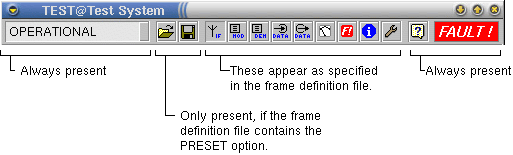
The set of screens making up the window for a particular device type is called a frame. Frames are defined by text files located in the ~/dframes directory of the software installation. To add a new frame type to the software, you have to edit such a file.
                 PRESETS
tb-if.gif;       /dscreens/Modem-General;          General / IF parameters
tb-mod.gif;      /dscreens/Modem-TX;               Modulator parameters
tb-dem.gif;      /dscreens/Modem-RX;               Demodulator parameters
tb-dinput.gif;   /dscreens/Modem-TX-IFC;           TX interface parameters
tb-doutput.gif;  /dscreens/Modem-RX-IFC;           RX interface parameters
tb-meter.gif;    /dscreens/Modem-Measure;          Meter Readings
tb-fault.gif;    @FAULTS;                          Faults and fault mask
tb-info.gif;     @INFO;                            Device Info
tb-tool.gif;     @CONFIG;                          Maintenance
The example above shows a frame definition file for a SCPC satellite modem. Lines starting with a '#' are comments, they are ignored when the file is read. Below the button bar of the device window resulting from this frame definition is shown:
PRESET keyword in the third line of the frame definition file tells the software to display the buttons for parameter preset storage and retrieval in the button bar of the device window. The preset load / save buttons by default require the operator to be logged in with privilege level 100 or higher. You may append a number to the PRESET keyword, separated by a blanc character in order to specify the minimum privilege level for load / save preset buttons in this device window explicitly. PRESET 150 for example makes the buttons requires privilege level 150 or higher.The table starting at line five of the file specifies the other buttons in the tool bar and the screens bound to them. The buttons appear in the same order as the lines of the table. Each table row consists of three fields, separated by semicolon characters:
The first entry selects the icon to be displayed. The following chapter shows the icons available with their file names.
The second entry specifies the screen that shall be shown on a click to this button. This either is the name of a screen file (usually from the dscreens directory) or one of these keywords selecting a special screen:
The third field defines the the help text for this button which is shown above the mouse cursor if this id hold above the button.
All device frames provided by SatService contain the @FAULTS, @INFO and @CONFIG screens in the way shown in the example.