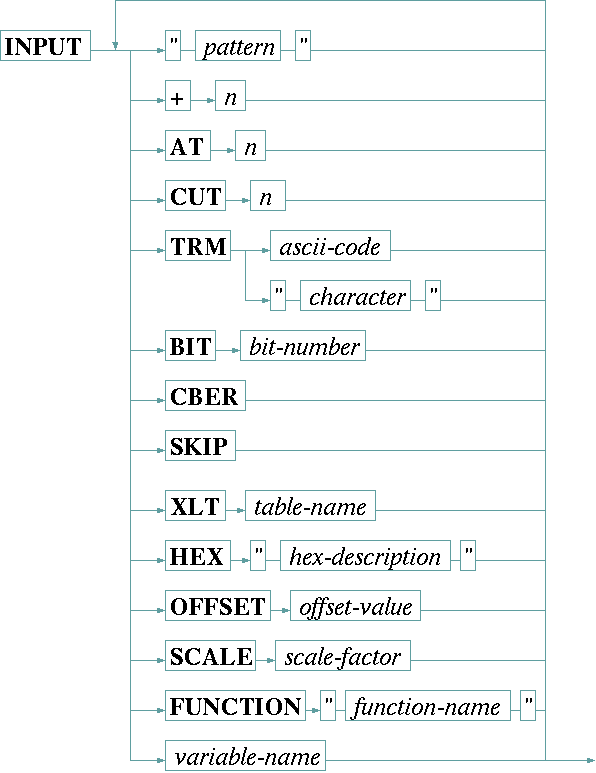
The INPUT statement is used to read and interpret the reply of a device which uses a text based communication protocol. It reads a protocol frame from the device and parses the received message according to the rules defined by the description following the INPUT keyword. The syntax of the INPUT statement is:
While parsing the device's reply, the driver deals with three information buffers.
To understand the way how the parsing operations work which may follow the INPUT keyword, it is necessary to learn how the driver uses these buffers.
The first buffer contains the original reply string as it is received from the device (with the protocol frame stripped off).
The driver initially copies this string into a second buffer called pad . Search operations (text in double quotes) and the "+" operation modify the pad . The AT operation is the only way to restore the pad from the original data.
Every time, the pad is modified, the driver copies it's contents into the third buffer called value . Value is the string which will be assigned to a variable if it appears in the list of arguments to the INPUT statement. Operations in the INPUT statement like CUT, TRM, or XLT work on the value buffer but leave the pad unchanged. This is important to understand if you have to parse the value of more than one variable in a single INPUT statement.
| " pattern " | Searches the text/pattern in the current pad buffer. If the pattern is found, all text including the first occurrence of the pattern is removed from the beginning of the pad buffer. The pattern text may contain escape sequences like \n or \t to search for line feeds or tabulator characters. |
| + n | Removed n characters from the beginning of the pad buffer. |
| AT n | Restores the pad buffer with a substring of the original data, starting at column n. |
| CUT n | Cuts the value buffer to a length of n characters. |
| TRM "c" | Removes the first occurrence of the termination character and all following text from the value buffer. The termination character may be specified as a decimal number (e.g. 10 is the ASCII code for line feed) or as a single character enclosed in double quotes. |
| BIT n | Interprets the value buffer as a decimal number and isolates the bit number n ( n = 0 means the least significant bit). The value buffer is replaced by 0 or 1 depending on the bit value. |
| CBER | Interprets the value buffer as a bit error rate value as it is returned by Comstream modems. A string mn is converted into the more common notation mE-n. |
| SKIP | Removes any whitespace (space characters, line feeds, carriage returns or tabs) from the beginning of the value buffer. |
| XLT table | The XLT keyword, followed by the name of an already defined table, tells the driver to translate the value buffer through this translation table from right to left. Chapter Using conversion tables gives more information about tables in general. |
| OFFSET o | The OFFSET keyword, followed by the (floating point) offset value, interprets the value buffer as a floating point number and replaces the buffer with the sum of the value and the offset. |
| SCALE s | The SCALE keyword, followed by the (floating point) scale factor, interprets the value buffer as a floating point number and replaces the buffer with the product of the value and the scale factor. |
| FUNCTION "name" | The FUNCTION keyword, followed by the name of the function as a quoted string, tells the driver to apply this function to the next variable before it is printed. The function name is extended by appending .txt to achieve the file name to read for the function definition. Chapter Function tables in I/O functions gives an extensive description about functions an how they are used. |
| variable-name | A variable name tells the driver to assign the contents of the value buffer to this variable. The driver performs format conversions and range checks according to the type and limit specifications made in the VAR definition of this variable. |
| HEX ".." | Interprets the contents of the value buffer as a hex number and replaces it by it's decimal equivalent. |
| BIN | Interprets the contents of the value buffer as an ASCII character and replaces it by it's decimal equivalent. |
The format definition string which must follow the HEX keyword may contain the following characters:
| L | The hex number is in little endian notation. This means the least significant byte is written at first. If no L character is in the format string, big endian notation is assumed. |
| S | The hex number is signed. The number of digits is used to calculate the sign extension: 80 for example is calculated as -1 as the two digit number is assumed to be a byte value. 0080 in contrast is computed to 128 as a 16 bit number of this value is positive. |
Remarks
If a value is not assigned to a variable as you expect, you should check the following issues:
CHOICE variables and tables (referenced with the XLT operation) expect an input value which exactly matches one of the valid choices. See chapter Using conversion tables to read how you can make tables somewhat fault tolerant.Example
    INPUT AT 2  SCALE 0.001            tx.frequency
          AT 11 SCALE -0.1 OFFSET 30.0 tx.gain
          AT 15 CUT 1 XLT T03          faults.01
          AT 17 CUT 1 XLT T02          info.if
          AT 19 CUT 1 XLT T01          tx.on
          AT 21 CUT 1                  faults.02
          AT 22 CUT 1                  faults.03
          AT 23 CUT 1                  faults.04
          AT 24 CUT 1                  faults.05
          AT 25 CUT 1                  faults.06
          AT 26 CUT 1                  faults.07
The example above - taken from the NDSatCom-KuBand-Upconverter device driver - parses all settings an faults flags from a single status string the upconverter returns. Note that the numeric variables tx.frequency and tx.gain are isolated from the string without specifying a length or a termination character. The number recognition routine automatically stops where it finds a non-numeric character after the number to read. The other values however all are cut to one character length before they are interpreted.