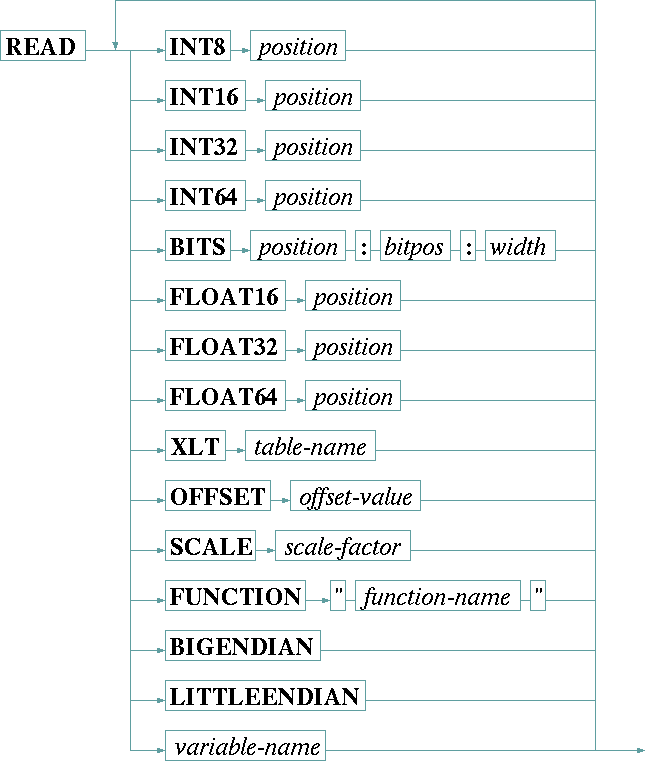
Receiving and interpreting of data returned from devices which use a binary communication protocol is done with the READ statement. The READ statement gets a message from the device, strips off the protocol frame and places the result in an internal buffer. Subcommands/operations following the READ keyword are used to copy values from the buffer into one or more variables of the device driver.
The READ statement by default works in 'little endian' mode. 16, 32 or 64 bit values are read from the buffer with the least significant byte first. Specifying BIGENDIAN mode reverses this byte order.
| INT8 p | The INT8 keyword, followed by a decimal position value, tells the driver that the next variable appearing in the argument list shall be filled from a single byte value at the given position (position zero denotes the first byte in the buffer). |
| INT16 p | The INT16 keyword, followed by a decimal position value, tells the driver that the next variable appearing in the argument list shall be filled from a two-byte value starting at the given position (position zero denotes the first byte in the buffer). The least significant byte of the number is read first unless BIGENDIAN was specified. |
| INT32 p | The INT32 keyword, followed by a decimal position value, tells the driver that the next variable appearing in the argument list shall be filled from a four-byte value starting at the given position (position zero denotes the first byte in the buffer). The least significant byte of the number is read first unless BIGENDIAN was specified. |
| INT64 p | The INT64 keyword, followed by a decimal position value, tells the driver that the next variable appearing in the argument list shall be filled from a eight-byte value starting at the given position (position zero denotes the first byte in the buffer). The least significant byte of the number is read first unless BIGENDIAN was specified. |
| BITS p : b : w | The BITS keyword tells the driver to read a 1 to 7 bit wide bit field from a certain byte in the buffer. In this case the position parameter consists of three values, separated by colons: |
position p addresses the byte within the buffer, |
|
bitpos b defines the bit-number (0 to 7) of the least significant bit to read. |
|
width w the number of bits which shall be copied from the buffer into the destination variable. |
|
| FLOAT16 p | The FLOAT16 keyword, followed by a decimal position value, tells the driver that the next variable appearing in the argument list shall be filled from a half precision (16 bit) IEEE754 floating point value starting at the given position (position zero denotes the first byte in the buffer). The least significant byte of the number is read first unless BIGENDIAN was specified. |
| FLOAT32 p | The FLOAT32 keyword, followed by a decimal position value, tells the driver that the next variable appearing in the argument list shall be filled from a single precision (32 bit) IEEE754 floating point value starting at the given position (position zero denotes the first byte in the buffer). The least significant byte of the number is read first unless BIGENDIAN was specified. |
| FLOAT64 p | The FLOAT64 keyword, followed by a decimal position value, tells the driver that the next variable appearing in the argument list shall be filled from a double precision (32 bit) IEEE754 floating point value starting at the given position (position zero denotes the first byte in the buffer). The least significant byte of the number is read first unless BIGENDIAN was specified. |
| XLT table | The XLT keyword, followed by the name of an already defined table, tells the driver to translate the value read through this translation table from right to left. Chapter Using conversion tables gives more information about tables in general. |
| OFFSET o | The OFFSET keyword, followed by the (floating point) offset value, tells the driver to add the given offset to the value read. |
| SCALE s | The SCALE keyword, followed by the (floating point) scale factor, tells the driver to multiply value read with the given factor. |
| FUNCTION "name" | The FUNCTION keyword, followed by the name of the function as a quoted string, tells the driver to apply this function to the next variable before it is printed. The function name is extended by appending .txt to achieve the file name to read for the function definition. Chapter Function tables in I/O functions gives an extensive description about functions an how they are used. |
| BIGENDIAN | The BIGENDIAN keyword turns the byte order from little endian (LSB first) which is the default to big endian (MSB first). This applies to all values read after BIGENDIAN. |
| LITTLEENDIAN | The LITTLEENDIAN keyword turns the byte order back to 'little endian' (LSB first). This applies to all values read after LITTLEENDIAN. |
| variable-name | A variable name tells the driver to store the value read into the variable. |
Example
    READ BIGENDIAN
        INT32 1  SCALE 0.000001   tx.frequency
        INT32 7                   tx.mod.dataRate
        INT32 11 SCALE 0.000001   refClkFreq
        INT8  15 XLT T01          refClkSrc
        INT8  16 XLT T02          tx.mod.type
        INT8  17 XLT T03          tx.mod.fec
        INT16 22 SCALE 0.1        tx.power
        INT8  24 XLT T04          tx.on
        INT8  24 XLT T04          internal.tx.on
        INT8  25 XLT T05          tx.mod.cwMode
        INT8  26 XLT T06          tx.mod.spectrumInvert
        INT8  28 XLT T14          tx.ifc.hardware
        INT8  29 XLT T06          tx.ifc.clockPhase
        INT8  30 XLT T06          tx.ifc.dataPhase
        INT8  31 XLT T07          tx.mod.clockSource
        INT8  44 XLT T08          info.maskEnable
        INT32 45                  info.alarmMask
        INT32 49                  tx.mod.symbolRate
        INT8  53 XLT T09          tx.ifc.framingMode
        INT8  54 XLT T10          tx.mod.rollOff
        INT8  55 XLT T11          config.control
        INT8  57 XLT T12          modemType
The example above - taken from the Radyne DVB3030 modulator driver - shows the main settings READ statement of this driver. In one step almost all parameter settings are read.