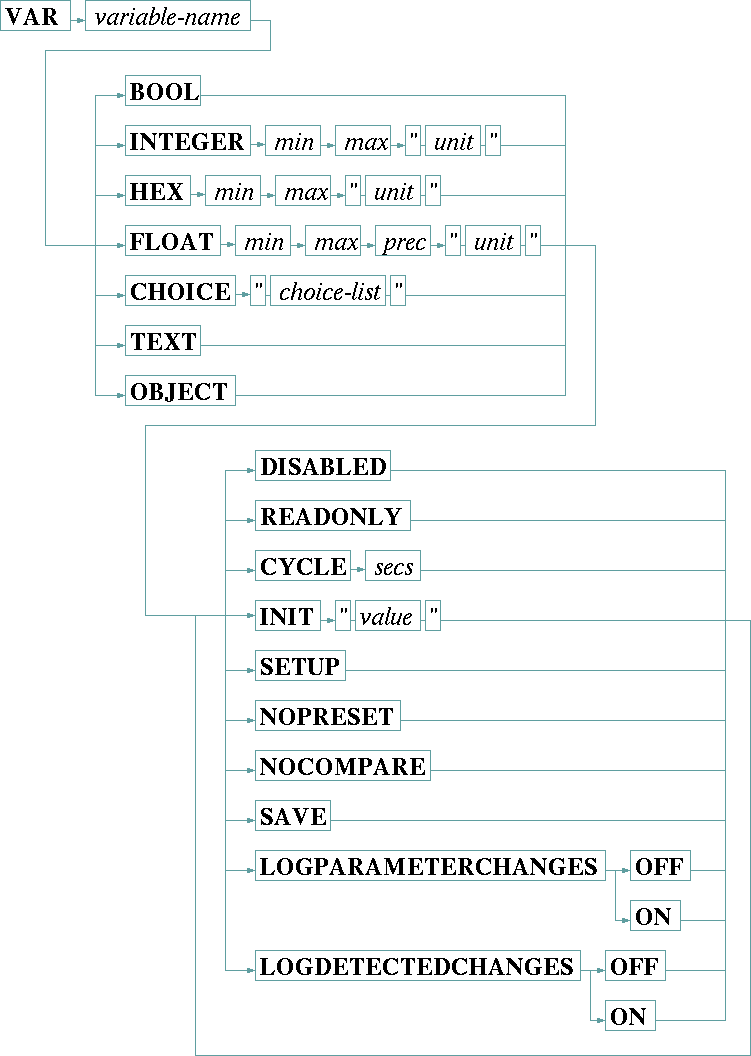
Device driver variables are defined using the VAR statement. With the VAR statement you define the name, the data type, the valid range and some other properties of the variable. This is the general syntax for a VAR statement:
A variable definition consists of the VAR keyword, the variable's name, a data type / range definition and optional modifiers which control the behavior of this variable.
Data type / range definition
The sat-nms device driver knows about 7 data types. The data type of a variable is defined by one of the data type keywords BOOL, INTEGER, HEX, FLOAT, CHOICE, TEXT or OBJECT, followed by the range definition for the selected data type. Here the data types listed in tabular form:
| BOOL | The BOOL data type can have the values true and false. the BOOL type mainly is used for flags which shall be displayed as signal lamps at the user interface. |
| INTEGER | The INTEGER data type carries numeric integer values (64 bit length). When you define an INTEGER variable, you must provide the valid range (min / max) of the variable and a unit string which is shown at the user interface right of the data. If both, min and max are zero the user interface software does no range check at all. The unit string may be empty, but the double quotes are required (""). |
| HEX | The HEX data type also is a 64 bit integer, but formatted in hexadecimal notation. |
| FLOAT | The FLOAT data type carries double precision (64 bit length) floating point values. When you define a FLOAT variable, you must provide the valid range (min / max) of the variable, the number of fraction digits and a unit string which is shown at the user interface right of the data. If both, min and max are zero the user interface software does no range check at all. The unit string may be empty, but the double quotes are required (""). FLOAT variables are displayed with a fixed precision. Alternatively you may force a scientific notation by adding 100 to the precision value. Example: VAR myFloat FLOAT 0 0 103 "" defines a scientific formatted floating point variable shown with 3 digits precision (e.g. 0.123E-2) |
| CHOICE | The CHOICE data type defines a parameter which may contain one of a fixed set of string values. You define this set as a comma separated list, enclosed in double quotes. At the user interface such a parameter appears as a drop down box where you can select a value from this list. |
| TEXT | The TEXT data type carries an arbitrary character string. |
| OBJECT | The OBJECT data type is used with complex variables which cannot be shown by the standard user interface routines. OBJECT variables only appear together with logical devices, you never will need this data type when writing a device driver. |
Modifiers
Modifiers control some properties of a variable concerning it's state, usage, initialization and polling cycle. Modifiers may before or after the type definition.
| DISABLED | Variables may be enabled or disabled. Disabled variables appear grey at the user interface, no value is displayed and no value may be entered. The RANGESET command is used to change the enable state. By default variables start in enabled state unless they are marked as DISABLED in the VAR statement. Disabling a variable at this point may be useful if the variable stands for a parameter which is not available at all models of the device type the driver is written for. The variable can be enables by the driver when it detects that the device actually connected to the MNC supports this parameter. |
| READONLY | Marking a variable READONLY prohibits the operator from changing it's value. This is used for state variables like meter readings. The range information for the data type used must be provided even if the variable is marked READONLY. |
| CYCLE | The CYCLE modifier controls the frequency (expressed as time interval in seconds), this variable shall be polled from the device. By default, variables are read from the device with every working cycle of the driver. This is about one a second if only a few parameters are to read. With many parameters the polling rate will be lower as the response time for each interrogation extends the cycle time.Hence, most device drivers poll only a few parameters like alarm flags or some meter readings with the maximum possible rate. Other parameters, e.g. settings you do not expect to change by themselves, are polled at a much lower rate.Setting the CYCLE time to zero causes the driver to do no regular polling for this variable at all. However, after power up and after communication failures, such a variable still is read once from the device |
| INIT | Using the INIT modifier, a variable may be initialized to a certain value. This value remains valid until the variable gets polled the first time. The INIT option often is used with variables which are used to configure the driver and never are read from the device itself. |
| SETUP | The SETUP modifier marks a variable to be listed in the maintenance/setup window of the standard device screens. Chapter Setup variables tells more about this special variable type. |
| NOPRESET | Using the NOPRESET modifier, a variable can be explicitly excluded from the set of parameters which are written to a device preset. A device preset contains all variables which define a PUT procedure and are no SETUP parameters and don't have the NOPRESET modifier set. The reset variable - if defined - is also implicitly excluded from device presets preset, for backward compatibility reasons. Please note, if you add NOPRESET to a variable in an existing device driver, this will not remove the value for this variable from existing device presets, it only will prevent the software from adding the value to new presets. You may use the preset editor to remove the unwanted value manually from existing device presets. |
| NOCOMPARE | Without the NOCOMPARE modifier the device driver will compare a value it commanded to the device against the value it read back after this. If the two values differ, an informational message showing the commanded and the read value is added to the log. NOCOMPARE suppresses this check. This is useful with parameters which are known for reading back in a wrong way, frequent messages in the log can be avoided this way. |
| SAVE | The SAVE modifier tells the driver to save this variable on disk and to restore it's value when the program starts. Usually all device settings are stored in the device itself, the MNC system does not change anything at a device when it starts.In some cases, e.g. with SETUP variables or if the driver implements a receive level threshold, it is useful to store variable values in the MNC system rather in the device. |
| LOGPARAMETERCHANGESON/OFF | Defines if this variables shall log changes which are commanded to it. Parameter changes are logged if this is set ON and the logParameterChanges switch in the device setup page is activated as well. LOGPARAMETERCHANGES is ON by default for all variables, hence you only need to state LOGPARAMETERCHANGES OFF for variables you want explicitly to be excluded from logging. |
| LOGDETECTEDCHANGESON/OFF | Defines if this variables shall log changes which are detected when reading back the values. Detected changes are logged if this is set ON and the logDetectedChanges switch in the device setup page is activated as well. LOGDETECTEDCHANGES is ON by default for all variables, hence you only need to state LOGDETECTEDCHANGES OFF for variables you want explicitly to be excluded from logging. Please note, the this modifier has no effect on read-only variables, they are not logged regardless of the logDetected setting. |
Example
    VAR audio.1.dotprogram       CYCLE 0   INTEGER 0 0 ""
    VAR audio.1.dotrouting       CYCLE 0   CHOICE "NRM,MON,LFT,RGT"
    VAR audio.1.dotoutput        CYCLE 0   CHOICE "ANALOG,AES/EBU,SPDIF,AC3"
    VAR audio.1.dotlevel         CYCLE 0   INTEGER 6 18 "dB"
    VAR audio.1.dotlanguage      CYCLE 0   TEXT
    VAR audio.1.dottest          CYCLE 0   CHOICE "NRM,TEST-1,TEST-2,TEST-3,TEST-4,TEST-5"
    VAR audio.1.dotinfo          CYCLE 4   TEXT READONLY