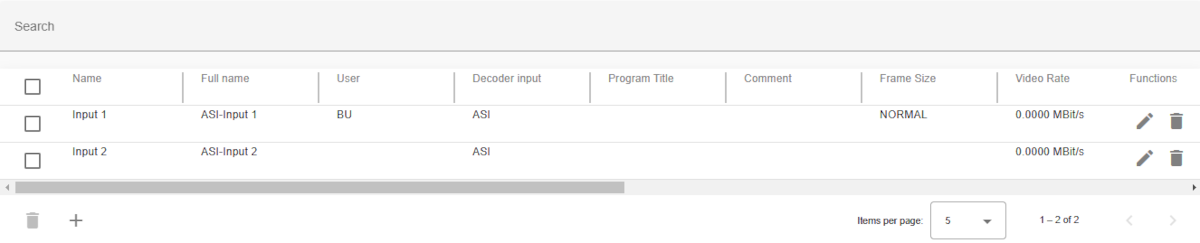
The list of all ASI channel records in the database. The table can be scrolled horizontally. Name and functions row are sticky.
Some receives (e.g. IRDs) provides between Satellite- and IP-Inputs also plain ASI inputs. In this mode no configuration of the input is required, you just have to switch to ASI input. Therefore the related channels are used in most cases as placeholder and to setup encoding (audio,video settings) in case that the receiver get a signal to ASI input. Nevertheless these channel type is available to allow a consistent operation with all input methods.
For receive applications the following logical devices are available:
For transmit applications the following logical devices are available:
These logical devices will retrieve the channel information directly from the central database. Please refer to the linked documentation for details how to setup and use the RX and TX Channel devices.
Search bars
Header row
click + hold + drag near from the header name (grey border)Table columns
The first column located at the far left of the table provides a checkbox to select one or more channels (rows) and perform the same operation on all selected channels.
| Function | Icon | Description |
|---|---|---|
| delete |  |
delete the selected channels from the database |
The last column located at the far right of the tables provides buttons to run actions on the corresponding channel.
The following functions for managing a channel are available:
| Function | Icon | Description |
|---|---|---|
| Delete | |
to delete the channel |
| Edit |  |
modify/edit channel |
The following buttons for global function(s) are available at the the bottom of the table:
| Function | Icon | Description |
|---|---|---|
| Add |  |
add a new channel |
| Delete | |
to delete all selected the channels |
| Page | Pagination controls | set the number of items displayed per page (e.g., 5, 10, or 25) and navigate between pages |
The ASI channel table contains the following columns:
| Column name | Description |
|---|---|
| Name | user defined channel name |
| Fullname | automatically generated full name (IP + - + Name) |
| User | name of the user who lastly edited the channel |
| Program title | name of the program transmitted or received with this channel |
| Comment | one line comment describing this satellite channel |
| Frame size | frame size |
| Video rate | video data rate in MBit/sec |
| VR auto | video rate auto switch |
| Profile | video encoding profile |
| Audio channels | number of audio channels between 1-4 |
| Audio rate 1 | audio channel 1 data rate select from drop-down list |
| Audio rate 2 | audio channel 2 data rate select from drop-down list |
| Audio rate 3 | audio channel 3 data rate select from drop-down list |
| Audio rate 4 | audio channel 4 data rate select from drop-down list |