1.13.1 Upload/edit document
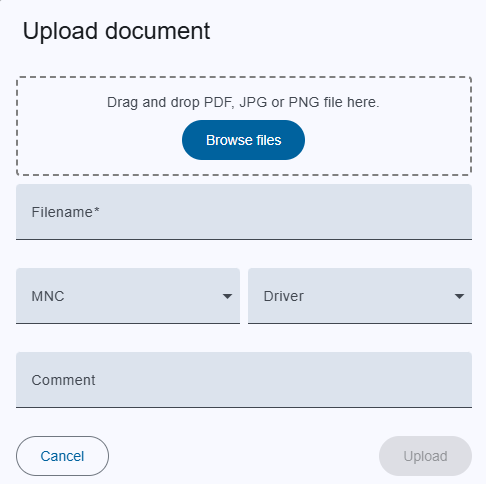
Trigger:
- when you click on the "upload" button on the top toolbar to upload or
- from drop down
 "Upload file" or
- an on pencil icon to edit document in the menu column
- The dialog title clearly indicates whether you are creating a new, editing an existing one, ensuring clarity in the action being performed.
Fields:
- File: You can just drop the file in section or just browse the files by clicking on "Browse files". Supported format are pdf, png, jpg.
- Filename: Once you selected the file or dropped the file, filename will be taken from dropped file. Can also be changed.
- MNC: M&C name to whom document belongs. If driver name is selected M&C input will be disabled.
- Driver: Driver name to whom document belongs. If M&C name is selected M&driver input will be disabled.
- Comment: Some information about document.
NOTE: If M&C and Driver fields are empty, the document will belongs to Global Category.
Edit document: If you want to change the document properties but do not want to upload the document, you do not need to drop or browse the "File" section.
- Actions:
- Upload:
- this upload document.
- If an error occurs in the input fields, the button is deactivated.
- Cancel: Closes the dialog without saving.