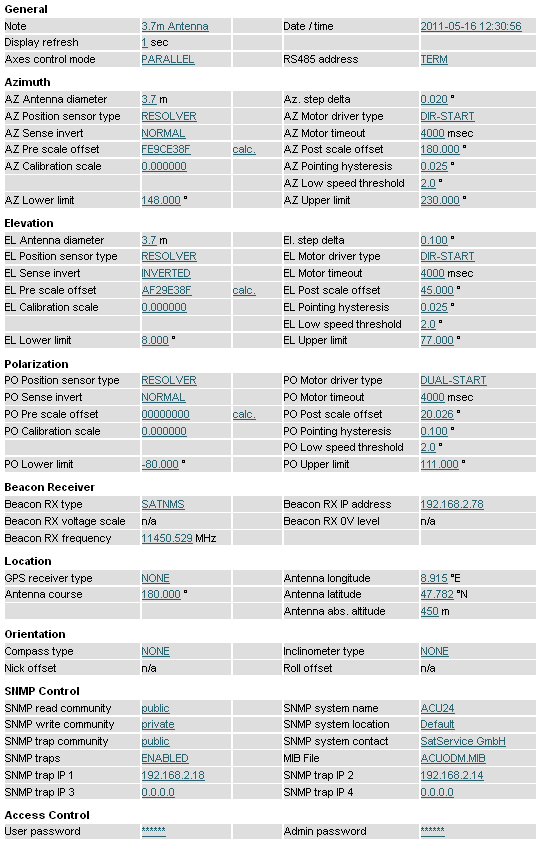
 Setup Page
Example
Setup Page
ExampleThe page 'Setup' contains the ACU's installation parameters. The page displays a table with the parameters actually set. Each parameter value is a hyper-link to a separate page which lets you change this parameter. This parameter change page shows the actual parameter setting either in an entry field or in a drop down box. You may change the parameter to the desired value and then click to the 'Submit' button to pass the changed value to the ACU ODM. The ACU automatically returns to the setup page when the parameter has been changed. To cancel a parameter modification you already started, either use the 'Back' button of you web browser or click to the 'Setup' button on navigation bar. Both returns to the setup page without changing the parameter you edited.
The table below lists the settings provided by this page.
General
This section of the setup page contains some general setup parameters.
| Parameter Name | Description |
|---|---|
| Axes control mode | The ACU knows two axes control modes. The PARALLEL mode treats the azimuth/elevation axes independently. If a new pointing is commanded, both motors are activated in parallel, the antenna moves to the new location in the shortest possible time. In SEQUENTIAL mode, the ACU does not move the elevation axis while the azimuth motor is running. The antenna movement is done sequentially: First azimuth, then elevation. You should prefer the PARALLEL mode unless special conditions require a sequential antenna movement. The performance of the ACU in terms of pointing speed and wind load compensation will be much better in PARALLEL mode. |
| Date / time | By changing this value you can set the internal clock of the ACU. The clock is set as soon you click to the 'Submit' button in the data entry dialog. The most precise method to set the time is to enter a time one or two minutes ahead and click to 'Submit' when this time is reached. |
| RS485 address | With this parameter you select the device address used control the ACU through a serial interface. See chapter 7.3 The RS232 remote control interface for more information about this. At ACU-RMU and ACU19 this parameter has to be set to 'NONE'. If you use a sat-nms Handheld this parameter has to be set to 'TERM'. The Handheld function is not implemented in ACU-RMU and ACU19 Version. |
| Watchdog pulse on AUX8 | The AUX 8 output may be configured to act as a heartbeat output. If enabled, the output switches every 1000 ms between on/off. If using this signal for an external watchdog circuit, be aware that in adaptive tracking mode delays of some seconds are possible while the acu calculates the orbital model. |
| Display refresh | With this parameter you select the refresh-rate of the ACU's main window. This parameter is available from software version 2.1.007 or higher. |
| Note | The ACU's pointing page by default shows the title 'Antenna pointing'. By entering a different text here, you can make the ACU show a customized title. |
Azimuth / Elevation / Polarization
The Azimuth / Elevation / Polarization sections contains the parameters which are specific to the individual axis. They are the same for each axis.
For the azimuth axis there is another offset which also is taken into account, the 'Antenna course'. This value is provided for mobile applications where a compass reading has to be included into the azimuth value.
Calibration scale --- Normally the ACU assumes that the full range of a position sensor corresponds 360°. If you are using a multiturn position sensor or if the position sensor is mounted to the shaft of a gear rather than to the antenna axis directly, the position sensor reading must be scaled. The displayed angle is computed as follows:displayed-value = ((raw-reading+pre-scale-offs) * scale) + pos-scale-offsMathematically a scale value of 1.0 disables the scaling. Beside this, the ACU also accepts the special value 0 to disable scaling at all. If you set 1.0, the ACU performs the scaling with this factor. With the value 0 the scaling is skipped completely, including the conversion of the reading to floating point. This ensures, that the full accuracy is retained in cases where no scaling is necessary.
Sense invert --- With this parameter you easily can reverse the sense of a position sensor. The sense should be as follows:
Motor driver type --- The ACU knows two different configuration modes to control a motor driver. They are called DIR-START and DUAL-START. In DIR-START mode, the FWD signal switches the motor on/off, the REV signal controls the motor direction. This is the configuration many frequency inverters use. In DUAL-START mode, the FWD signal switches the motor on in forward direction, REV activates the motor in reverse direction. This configuration mode is convenient to control a motor with relays. Beside the modes DIR-START and DUAL-START you may set the motor driver type to NONE which prevents the ACU from controlling the motor at all.
Low speed threshold --- The ACU controls a motor at two speeds. If the actual position is far away from the target value, the ACU commands the motor to use the fast speed. Once the antenna comes close to the target value, the ACU slows down the motor. The low speed threshold sets the angle deviation which lets the ACU use the fast motor speed.
Pointing hysteresis --- The ACU performs the motor control as a closed loop: if the angle reading and the target value differ, the motor is switched on to compensate the difference. If the difference is less than the hysteresis value, the ACU leaves the motor switched off. This prevents the antenna from oscillating around the target value.
Motor timeout --- The ACU monitors the position readings while the motor is running. If there is no change in the position readings for some time, the ACU assumes to motor to be blocked and switches it off. This 'motor timeout' fault must be reset by the operator to release it. A timeout value 0 disables the timeout.
Lower limit --- The minimum target value accepted at the user interface and via remote control. This software limit prevents the ACU from running the antenna to the limit position under normal conditions.
Upper limit --- The maximum target value accepted at the user interface and via remote control. This software limit prevents the ACU from running the antenna to the limit position under normal conditions.
Beacon Receiver
| Parameter Name | Description |
|---|---|
| Beacon RX type | Selects the source of the beacon level the ACU shall use. Available options are SATNMS and VOLTAGE. In SATNMS mode the ACU reads the beacon level from a sat-nms beacon receiver via UDP, in VOLTAGE mode the A/D converter input of the ACU is read. Please mention, that in SATNMS mode, the beacon receiver must be set to send UDP datagrams to the ACU/ODM. |
| Beacon RX IP address | The IP address of the beacon receiver. Applicable only in SATNMS mode. |
| Beacon RX voltage scale | The scale factor for the analog beacon level input. The value must match the scaling of the beacon level signal. |
| Beacon RX 0V level | The beacon level which is displayed if the ACU recognizes 0V beacon level input. |
Location
Orientation
| Parameter Name | Description |
|---|---|
| Compass type | Applicable only for car-mobile variants of the ACU |
| Inclinometer type | Applicable only for car-mobile variants of the ACU |
| Nick offset | Applicable only for car-mobile variants of the ACU |
| Roll offset | Applicable only for car-mobile variants of the ACU |
SNMP Control
From Software version 2.1.007 or higher, the sat-nms ACU contains an SNMP agent listening at UDP port 161. The SNMP agent provides a common subset of the MIB-II system / interface parameters and gives full access to the remote control capabilities of the sat-nms ACU with a number of MIB objects placed in the private.enterprises tree.
The actual MIB file defining the ACU's private MIB may be downloaded from the ACU itself by FTP (user 'service', password 'service'). The file 'ACUODM.MIB' contains all necessary information.
| Parameter Name | Description |
|---|---|
| SNMP read community | Sets the SNMP community string expected for read access. The default is 'public'. |
| SNMP write community | Sets the SNMP community string expected for write access. The default is 'public'. |
| SNMP trap community | Sets the SNMP community string sent with traps. The default is 'public'. |
| SNMP traps | This parameter decides if the SNMP traps are enabled or disabled. |
| SNMP system name | The ACU replies to MIB-II sysName requests with the text entered at this place. |
| SNMP system location | The ACU replies to MIB-II sysLocation requests with the text entered at this place |
| SNMP system contact | The ACU replies to MIB-II sysContact requests with the text entered at this place. |
| MIB File | click here to download the MIB file |
| SNMP trap IP 1-4 | Enter up to 4 trap destination IP addresses (dotted quad notation) to make the ACU sending traps by UDP to these hosts. Setting the parameter to 0.0.0.0 disables the trap generation. |
Access Control
Setup Page
Example