J10 Drive Interface
Connector Type: D-Sub25 female The ACU19V2 provides a digital signal interface based on 24V signal level for an external drive cabinet.
| pin | signal | description | type |
|---|---|---|---|
| 1 | Az CW | Azimuth CW Cmd | OUT |
| 2 | Az Com | Azimuth Common (0V) | IN |
| 3 | Az CCW | Azimuth CCW Cmd | OUT |
| 4 | El UP | Elevation Up Cmd | OUT |
| 5 | El Com | Elevation Common (0V) | IN |
| 6 | El DWN | Elevation Down Cmd | OUT |
| 7 | Pl CW | Pol CW Cmd | OUT |
| 8 | Pl Com | Pol Common (0V) | IN |
| 9 | Pl CCW | Pol CCW Cmd | OUT |
| 10 | Sum Lim | Sum Limit (+) | IN |
| 14 | Az FLT | Az Fault (+) | IN |
| 15 | El FLT | El Fault (+) | IN |
| 16 | E-Stop | E-Stop (-) | IN |
| 17 | Com FLT | Az El Fault Common(-) | IN |
| 18 | Sum Lim | Sum Limit (-) | IN |
| 19 | E-Stop | E-Stop (+) | IN |
| 21 | Az HSP | Azimuth high Sp Cmd | OUT |
| 22 | El HSP | Elevation high Sp Cmd | OUT |
| 23 | DRV EN | Az/El Drive Enable Cmd | OUT |
| 24 | MAINT | Maintenance (+) | IN |
| 25 | MAINT | Maintenance (-) | IN |
J21 Analog beacon level input
Connector Type: D-Sub9 female The ACU19V2 preferably is used together with the sat-nms LBRX beacon receiver. With the sat-nms LBRX the ACU talks though UDP or TCP over IP, no additional cabling is required in this case. At J21 the ACU19V2 provides an analog interface to third party beacon receivers.
| pin | signal | description | type |
|---|---|---|---|
| 2 | IN+ | Analog In (0..10V) | IN |
| 3 | IN- | Analog In GND | OUT |
| 7 | SHLD | Shield |
J6, J7 and J8 Polarisation and Az/ El Angle encoders
Connector Type: J7,J8 D-Sub25 male, J6 D-Sub9 male The sat-nms ACU19V2 provides the possibility to connect two different types of angle encoders at the azimuth and elevation axis: optical SSI encoders (S) and Resolvers (R). The polarisation axis is always a Resolver (R) type You have to decide at point of order which variant you want to have. The angle encoder type is specified by an add-on to the name of the unit. The sequence is azimuth, elevation, polarisation An example: ACU19V2-SSR contains SSI interfaces at azimuth and elevation axis and an resolver interface at polarisation axis.
SSI encoder interface J7, J8 The SSI positional encoder may be powered from the ACU internal power supply. +24V is provided as standard at the connector. To avoid ground loops, the cable shield should be connected either to pin xxx at the ACU or to the ground at the encoder housing, never at both ends. The power supply outputs are internally fused. Be aware not to cause a short circuit. If this happens, the unit has to be opened and the fuse has to be replaced. Do not open the unit by yourself, you will loose warranty in that case.
| pin | signal | description | type |
|---|---|---|---|
| 15 | Clk+ | SSI clock | OUT |
| 16 | Clk- | SSI clock | OUT |
| 17 | SHLD | Shield | |
| 21 | Data+ | SSI data | IN |
| 22 | Data- | SSI data | IN |
| 23 | SHLD | Shield | |
| 24 | +24V | encoder power supply | |
| 25 | 0V |
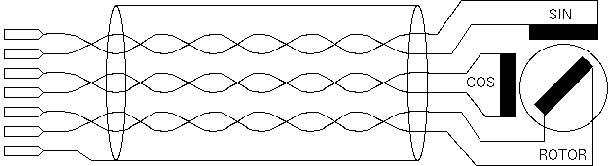
Resolver interface J7, J8 The ACU resolver interface is designed for resolvers with an impedance of 100 Ohms or more and transfer factor 0.5. The interface applies 4Veff / 2000Hz to the resolver drive coil. It expects 2Veff at the sine / cosine inputs at the maximum positions.
When connecting a resolver to the ACU, please consider the following:
| pin | signal | description | type |
|---|---|---|---|
| 1 | SHLD | Shield | |
| 2 | REF | drive signal to resolver | OUT |
| 3 | COS- | resolver COS | IN |
| 4 | SIN- | resolver SIN | IN |
| 5 | COS | resolver COS | IN |
| 6 | SHLD | Shield | |
| 7 | SHLD | Shield | |
| 8 | REF- | drive signal to resolver | OUT |
| 9 | SIN | resolver SIN | IN |
Resolver interface J6 The ACU resolver interface is designed for resolvers with an impedance of 100 Ohms or more and transfer factor 0.5. The interface applies 4Veff / 2000Hz to the resolver drive coil. It expects 2Veff at the sine / cosine inputs at the maximum positions.
When connecting a resolver to the ACU, please consider the following:
| pin | signal | description | type |
|---|---|---|---|
| 1 | SHLD | Shield | |
| 2 | REF | drive signal to resolver | OUT |
| 3 | COS- | resolver COS | IN |
| 4 | SIN- | resolver SIN | IN |
| 5 | COS | resolver COS | IN |
| 6 | SHLD | Shield | |
| 7 | SHLD | Shield | |
| 8 | REF- | drive signal to resolver | OUT |
| 9 | SIN | resolver SIN | IN |
TB1 Alarm
Connector Type: D-Sub9 female TB1 provides a dry contact Alarm Interface for ACU-Alarms and Tracking Alarms
| pin | signal | description | type |
|---|---|---|---|
| 1 | ACU_FLT_NC | acu alarm (connected to 2 if OK) | RELAY |
| 2 | ACU_FLT_C | RELAY | |
| 3 | ACU_FLT_NO | (connected to 2 if there is a FAULT) | RELAY |
| 6 | TRK_FLT_NC | tracking alarm (connected to 7 if OK) | RELAY |
| 7 | TRK_FLT_C | RELAY | |
| 8 | TRK_FLT_NO | (connected to 7 if there is a FAULT) | RELAY |
J16, J17 RS422
Connector Type: D-Sub9 female J16, J17 provides the interface to the external Handheld LCPD (or GD Satcom PMCU with Display)
| pin | signal | description | type |
|---|---|---|---|
| 1 | RS422 GND | RS422 GND | OUT |
| 6 | RS422 Tx- | RS422Tx- Angle Info | OUT |
| 19 | RS422 Tx+ | RS422Tx+ Angle Info | OUT |
| 20 | SHLD | Shield |
J11 Digital Inputs
Connector Type: D-Sub25 male This interface is not implemented yet and is reserved for further expansions
J14 RS232
Connector Type: D-Sub9 male This interface is not implemented yet and is reserved for further expansions
J11 LAN Connector
Connector Type: RJ45 male J11 is the Ethernet 10Base-T / RJ45 connector. Use a standard network cable to connect the sat-nms ACU-RMU to an Ethernet hub. If you want to connect your computer and the ACU directly without using a hub, you need a crossover cable for this with swapped RX/TX lines.
| pin | signal | description | type |
|---|---|---|---|
| 1 | TX+ | default Ethernet cabling (10Base-T) | OUT |
| 2 | TX- | OUT | |
| 3 | RX+ | IN | |
| 4 | |||
| 5 | |||
| 6 | RX- | IN | |
| 7 | |||
| 8 |
J12 Mains input connector
Connector type: IEC male The sat-nms ACU19V2 already contains all internal needed power supplies. Use any standard cable type with IEC connector. As they are wide-range types it is possible to connect nearly all worldwide available single phase mains. Please refer to chapter Specifications for more detailed informations.