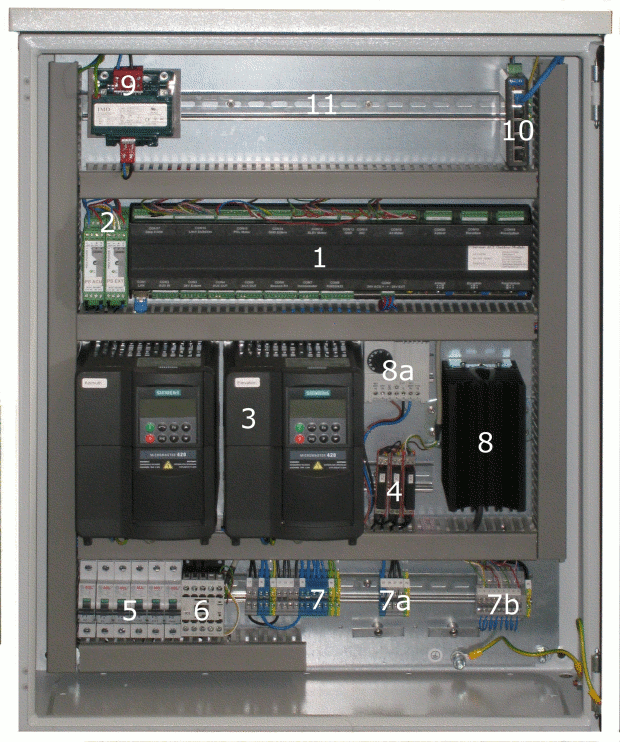
The sat-nms ACU-ODU is a full featured antenna positioner and as an option antenna tracking system. The electronics of the sat-nms ACU-ODU is build into an outdoor cabinet. The protection class of the cabinet is IP66 if no optional air ventilation is installed. So it is no problem to install it outside without any additional roof.
The unit consists from the components listed in the following table. All of these components are described in the next chapters. As the unit is available in different versions (manufacturer of frequency inverters, tracking / pointing, with or without Polarisation drive ect.) the following picture shows one standard cabinet. The look and the arrangement of the units may vary depending on your demand.
| No. | component | No. | component |
|---|---|---|---|
| (1) | sat-nms ACU-ODM | (7b) | terminals for limit switches and emergency stop |
| (2) | power supplies for sat-nms ACU-ODM | (8) | heater |
| (3) | frequency inverters | (8b) | thermostat for heater |
| (4) | solid state relays | (9) | optional 110V transformer for POL motor |
| (5) | circuit breakers | (10) | optional ethernet switch |
| (6) | contactor | (11) | optional beacon receiver (n.a. on this picture) |
| (7) | mains terminal | n.a. | optional air ventilation |
| (7a) | terminal for POL motor |
(1) sat-nms_ ACU-ODM The sat-nms ACU-ODM is the core module of the sat-nms ACU-ODU. For the detailed operation of the antenna controller please refer to chapter 5 Operation . Another interesting chapter is belonging the ACU-ODM is 4.3 Startup here you find also the description how to change the IP address of the unit in order to integrate the antenna controller in your sub-net. A short version of the documentation could also be found on the internal website of the sat-nms ACU-ODU. Just enter the IP-address of the unit (standard-IP is: 192.168.2.69) into the Web-browser of a connected computer and press the HELP button on the left side.
(2) Power supplies for sat-nms ACU-ODM In the ACU-ODU you find 2 power supplies: one is for the core processor of the ACU-ODM, it is labeled with PS ODM. The other one supplies the external contacts of the ACU e.g. the control signals for the POL drivers relais. This one is labeled with 'PS EXT'. By this, the core processor of the sat-nms ACU-ODM will not break down if something externally happens (e.g. overload/ short circuit)
(3) Frequency Inverters For bigger antennas most of the time three phase motors are used. These are connected to frequency inverters which are the high power interface between the sat-nms ACU-ODM module and the motors. Please take into account that some of the frequency inverter parameters are motor dependent and that these have to be changed to your specific antenna motors. The following chapter frequency inverter description gives a short overview of the frequency-inverters operation. If you need more detailed informations, please refer to the manual of the frequency inverters.
(4) Solid State Relais If your sat-nms ACU-RMU is equipped with the optional POL-drive, you find solid state relais in your sat-nms ACU-RMU. The POL Motor is normally a small single phase motor that does not need a frequency inverter for driving.
(5) Circuit breakers The circuit breakers disconnect the mains from the units build to the control cabinet. Every circuit breaker is labeled with the unit it is connected to. Warning: In case of switching off all the circuit breakers it is still voltage available at the mains terminals!
(6) Contactor The contactor disconnects the motor's mains when the emergency stop contact is open. Please refer to the schematics shipped together with the sat-nms ACU-ODU to see how to connect the emergency stop switch.
(7) Terminals Here the mains, limit- and emergency switches and (if available) POL motor is connected. Please refer to the schematics shipped together with the sat-nms ACU-ODU to see how to connect them.
(8) Heater The sat-nms ACU-ODU is equipped with a temperature controlled heater. In delivery state the thermostat is set to 10°C, what means as soon as the temperature in the cabinet falls below 10°C the heater switches to on state.
(9) Optional 110V transformer for Polarisation drive In several antennas 110V Motor are used. For these antennas a transformer can optional be ordered to make the sat-nms ACU-ODU work with these motors.
(10) Optional ethernet switch The sat-nms ACU-ODU can be equipped with an optional Ethernet switch. By this way it is easy to connect a notebook for troubleshooting or make some parameter changes. It is also possible to integrate an optional sat-nms L-Band beacon receiver. So you can upgrade the sat-nms ACU-ODU to a complete antenna tracking system. For this option the optional Ethernet switch is necessary as well.
(11) Optional sat-nms L-Band beacon receiver It is possible to realize a complete antenna tracking system with the sat-nms ACU-ODU. For this it is possible to integrate a sat-nms L-Band beacon receiver (LBRX) into the sat-nms ACU-ODU. In this case it is necessary to integrate the optional Ethernet switch into the sat-nms ACU-ODU. As the level information is in this case transferred via Ethernet (by UDP packets) between the beacon receiver and the antenna step track system the sat-nms LBRX beacon receiver not necessarily has to be at the same place as the antenna controller. It can be at a completely different location. The only requirement is that it is connected to the same Ethernet. Please refer to the documentation of the sat-nms LBRX how to setup the parameters of this unit and how to connect it. A short version of the documentation could be found on the internal website of the sat-nms ACU-ODM. Just enter the IP-address of the unit (standard-IP is: 192.168.2.65) into the Webbrowser of a connected computer and press the HELP button on the left side.
Optional air ventilation For using the sat-nms ACU-ODU in very hot regions, it is possible to equip the sat-nms ACU-ODU with an optional temperature controlled fan. By this way it is possible to ensure the availability of the sat-nms ACU-ODU in a hot ambient. ATTENTION: If the Unit is equipped with an optional air ventilation, avoid contact with jets of water, rain is no problem. Through the build-in ventilator the protection class is only IP54. The thermostat for the fan is normally set to 40°C, what means the fan switches on as soon as the temperature of the cabinet raises above 40°C. We strongly recommend not to set this threshold below 40°C. The reason for this is, that in the winter the heater and the fan work against each other. In worst case the fan and the heater run parallel over a longer time. This behavior is avoided through setting the fan threshold to 40°C.